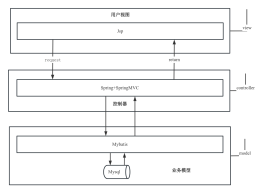
1、编写web.xml<br>
1、注册DispatcherServlet
<pre style="background-color: rgb(43, 43, 43); font-family: "JetBrains Mono", monospace; font-size: 9.8pt; color: rgb(169, 183, 198);"><pre style="font-family: "JetBrains Mono", monospace; font-size: 9.8pt;"><span style="color:#808080;"><!--</span><span style="color:#808080;font-family:'宋体',monospace;">配置</span><span style="color:#808080;">DispatcherServlet--><br></span><span style="color:#e8bf6a;"><servlet><br></span><span style="color:#e8bf6a;"> <servlet-name></span>springmvc<span style="color:#e8bf6a;"></servlet-name><br></span><span style="color:#e8bf6a;"> <servlet-class></span>org.springframework.web.servlet.DispatcherServlet<span style="color:#e8bf6a;"></servlet-class><br></span><span style="color:#e8bf6a;"> <init-param><br></span><span style="color:#e8bf6a;"> <param-name></span>contextConfigLocation<span style="color:#e8bf6a;"></param-name><br></span><span style="color:#e8bf6a;"> <param-value></span>classpath:applicationContext.xml<span style="color:#e8bf6a;"></param-value><br></span><span style="color:#e8bf6a;"> </init-param><br></span><span style="color:#e8bf6a;"> <load-on-startup></span>1<span style="color:#e8bf6a;"></load-on-startup><br></span><span style="color:#e8bf6a;"></servlet><br></span><span style="color:#e8bf6a;"><servlet-mapping><br></span><span style="color:#e8bf6a;"> <servlet-name></span>springmvc<span style="color:#e8bf6a;"></servlet-name><br></span><span style="color:#e8bf6a;"> <url-pattern></span>/<span style="color:#e8bf6a;"></url-pattern><br></span><span style="color:#e8bf6a;"></servlet-mapping></span></pre></pre>
2、配置过滤器
<pre style="background-color: rgb(43, 43, 43); font-family: "JetBrains Mono", monospace; font-size: 9.8pt; color: rgb(169, 183, 198);"><pre style="font-family: "JetBrains Mono", monospace; font-size: 9.8pt;"> <!--配置过滤器--><br> <filter><br> <filter-name>encoding</filter-name><br> <filter-class>org.springframework.web.filter.CharacterEncodingFilter</filter-class><br> <init-param><br> <param-name>encoding</param-name><br> <param-value>utf-8</param-value><br> </init-param><br> </filter><br> <filter-mapping><br> <filter-name>encoding</filter-name><br> <url-pattern>/*</url-pattern><br> </filter-mapping><br></pre></pre>
2、编写applicationContext.xml
1、添加注解支持
<pre style="background-color: rgb(43, 43, 43); font-family: "JetBrains Mono", monospace; font-size: 9.8pt; color: rgb(169, 183, 198);"><pre style="font-family: "JetBrains Mono", monospace; font-size: 9.8pt;"> <!--注解驱动--><br> <mvc:annotation-driven/><br></pre></pre>
2、自动扫描controller包
<pre style="background-color: rgb(43, 43, 43); font-family: "JetBrains Mono", monospace; font-size: 9.8pt; color: rgb(169, 183, 198);"><pre style="font-family: "JetBrains Mono", monospace; font-size: 9.8pt;"><!--配置自动扫描controller--><br><context:component-scan base-package="com.learning.controller"/><br></pre></pre>
3、配置静态资源过滤<br>
<pre style="background-color: rgb(43, 43, 43); font-family: "JetBrains Mono", monospace; font-size: 9.8pt; color: rgb(169, 183, 198);"><pre style="font-family: "JetBrains Mono", monospace; font-size: 9.8pt;"><!--配置静态资源过滤--><br><mvc:default-servlet-handler/><br></pre></pre>
4、配置视图解析器
<pre style="background-color: rgb(43, 43, 43); font-family: "JetBrains Mono", monospace; font-size: 9.8pt; color: rgb(169, 183, 198);"><pre style="font-family: "JetBrains Mono", monospace; font-size: 9.8pt;"> <!--视图解析器--><br> <bean id="internalResourceViewResolver" class="org.springframework.web.servlet.view.InternalResourceViewResolver"><br> <property name="prefix" value="/WEB-INF/jsp/"/><br> <property name="suffix" value=".jsp"/><br> </bean><br></pre></pre>
5、配置拦截器
<pre style="background-color: rgb(43, 43, 43); font-family: "JetBrains Mono", monospace; font-size: 9.8pt; color: rgb(169, 183, 198);"><pre style="font-family: "JetBrains Mono", monospace; font-size: 9.8pt;"> <mvc:interceptors><br> <mvc:interceptor><br> <mvc:mapping path="/**"/><br> <bean class="com.learning.config.MyInterceptor"/><br> </mvc:interceptor><br> <br> </mvc:interceptors><br></pre></pre>
3、编写controller类
1、新建config包
2、编写拦截器类
实现HandlerInterceptor接口,实现方法<br>
文件示例
<pre style="background-color: rgb(43, 43, 43); font-family: "JetBrains Mono", monospace; font-size: 9.8pt; color: rgb(169, 183, 198);"><pre style="font-family: "JetBrains Mono", monospace; font-size: 9.8pt;">package com.learning.config;<br><br>import org.springframework.web.servlet.HandlerInterceptor;<br>import org.springframework.web.servlet.ModelAndView;<br><br>import javax.servlet.http.HttpServletRequest;<br>import javax.servlet.http.HttpServletResponse;<br><br>/**<br> * @author 小也<br> * @create 2021/4/2 22:11<br> */<br>public class MyInterceptor implements HandlerInterceptor {<br> /**<br> * return true 放行,执行下一个拦截器<br> * return false 拦截,不执行下一个拦截器<br> */<br><br> public boolean preHandle(HttpServletRequest request, HttpServletResponse response, Object handler) throws Exception {<br> System.out.println("=========方法执行前=========");<br> return false;<br> }<br><br> public void postHandle(HttpServletRequest request, HttpServletResponse response, Object handler, ModelAndView modelAndView) throws Exception {<br> System.out.println("=========方法执行后=========");<br> }<br><br> public void afterCompletion(HttpServletRequest request, HttpServletResponse response, Object handler, Exception ex) throws Exception {<br> System.out.println("=========清理=========");<br> }<br>}<br></pre></pre>