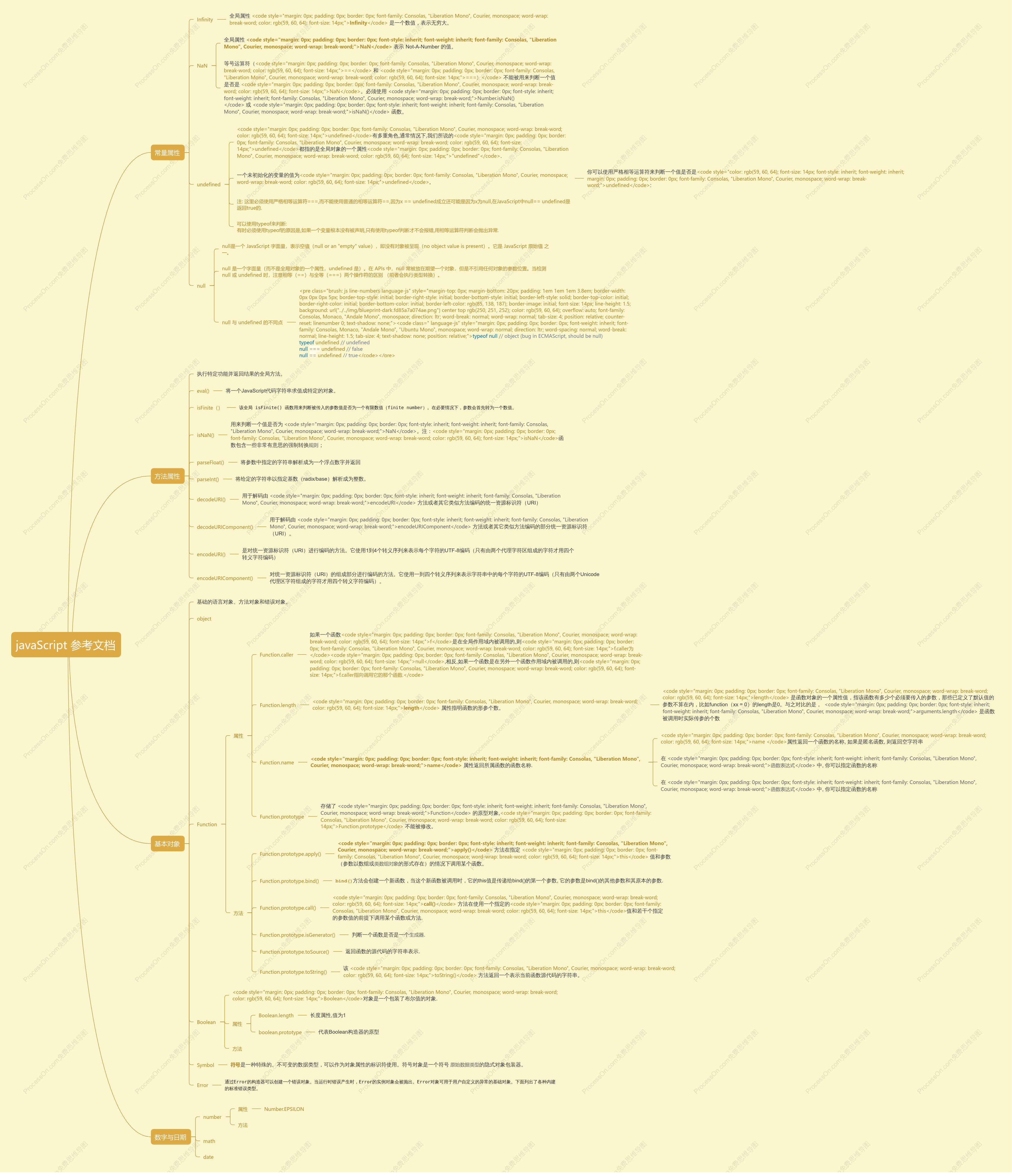
javaScript 参考文档
2016-11-23 11:32:16 33 举报javascript 学习导图
javascript 学习导图
模板推荐
作者其他创作
大纲/内容
常量属性
Infinity
<span style="color: rgb(59, 60, 64); font-family: "Open Sans", Arial, sans-serif; font-size: 14px;">全局属性 </span><code style="margin: 0px; padding: 0px; border: 0px; font-family: Consolas, "Liberation Mono", Courier, monospace; word-wrap: break-word; color: rgb(59, 60, 64); font-size: 14px;"><strong style="margin: 0px; padding: 0px; border: 0px;">Infinity</strong></code><span style="color: rgb(59, 60, 64); font-family: "Open Sans", Arial, sans-serif; font-size: 14px;"> 是一个数值,表示无穷大。</span>
NaN
<span style="color: rgb(59, 60, 64); font-family: "Open Sans", Arial, sans-serif; font-size: 14px;">全局属性 </span><strong style="margin: 0px; padding: 0px; border: 0px; color: rgb(59, 60, 64); font-family: "Open Sans", Arial, sans-serif; font-size: 14px;"><code style="margin: 0px; padding: 0px; border: 0px; font-style: inherit; font-weight: inherit; font-family: Consolas, "Liberation Mono", Courier, monospace; word-wrap: break-word;">NaN</code></strong><span style="color: rgb(59, 60, 64); font-family: "Open Sans", Arial, sans-serif; font-size: 14px;"> 表示 Not-A-Number 的值。</span>
<span style="color: rgb(59, 60, 64); font-family: "Open Sans", Arial, sans-serif; font-size: 14px;">等号运算符(</span><code style="margin: 0px; padding: 0px; border: 0px; font-family: Consolas, "Liberation Mono", Courier, monospace; word-wrap: break-word; color: rgb(59, 60, 64); font-size: 14px;">==</code><span style="color: rgb(59, 60, 64); font-family: "Open Sans", Arial, sans-serif; font-size: 14px;"> 和 </span><code style="margin: 0px; padding: 0px; border: 0px; font-family: Consolas, "Liberation Mono", Courier, monospace; word-wrap: break-word; color: rgb(59, 60, 64); font-size: 14px;">===)</code><span style="color: rgb(59, 60, 64); font-family: "Open Sans", Arial, sans-serif; font-size: 14px;"> 不能被用来判断一个值是否是 </span><code style="margin: 0px; padding: 0px; border: 0px; font-family: Consolas, "Liberation Mono", Courier, monospace; word-wrap: break-word; color: rgb(59, 60, 64); font-size: 14px;">NaN</code><span style="color: rgb(59, 60, 64); font-family: "Open Sans", Arial, sans-serif; font-size: 14px;">。必须使用 </span><a href="https://developer.mozilla.org/zh-CN/docs/Web/JavaScript/Reference/Global_Objects/Number/isNaN" title="Number.isNaN() 方法用来检测传入的值是否是 NaN。该方法比传统的全局函数 isNaN() 更可靠。" style="margin: 0px; padding: 0px; border: 0px; color: rgb(33, 122, 192); text-decoration: none; font-family: "Open Sans", Arial, sans-serif; font-size: 14px;"><code style="margin: 0px; padding: 0px; border: 0px; font-style: inherit; font-weight: inherit; font-family: Consolas, "Liberation Mono", Courier, monospace; word-wrap: break-word;">Number.isNaN()</code></a><span style="color: rgb(59, 60, 64); font-family: "Open Sans", Arial, sans-serif; font-size: 14px;"> 或 </span><a href="https://developer.mozilla.org/zh-CN/docs/Web/JavaScript/Reference/Global_Objects/isNaN" title="isNaN() 函数用来判断一个值是否为 NaN。注:isNaN函数包含一些非常有意思的强制转换规则;你也可以通过 ECMAScript 6 中定义的 Number.isNaN() 或者 typeof 来判断一个值是否为非数值。" style="margin: 0px; padding: 0px; border: 0px; color: rgb(33, 122, 192); text-decoration: none; font-family: "Open Sans", Arial, sans-serif; font-size: 14px;"><code style="margin: 0px; padding: 0px; border: 0px; font-style: inherit; font-weight: inherit; font-family: Consolas, "Liberation Mono", Courier, monospace; word-wrap: break-word;">isNaN()</code></a><span style="color: rgb(59, 60, 64); font-family: "Open Sans", Arial, sans-serif; font-size: 14px;"> 函数。</span>
undefined
<code style="margin: 0px; padding: 0px; border: 0px; font-family: Consolas, "Liberation Mono", Courier, monospace; word-wrap: break-word; color: rgb(59, 60, 64); font-size: 14px;">undefined</code><span style="color: rgb(59, 60, 64); font-family: "Open Sans", Arial, sans-serif; font-size: 14px;">有多重角色,通常情况下,我们所说的</span><code style="margin: 0px; padding: 0px; border: 0px; font-family: Consolas, "Liberation Mono", Courier, monospace; word-wrap: break-word; color: rgb(59, 60, 64); font-size: 14px;">undefined</code><span style="color: rgb(59, 60, 64); font-family: "Open Sans", Arial, sans-serif; font-size: 14px;">都指的是全局对象的一个属性</span><code style="margin: 0px; padding: 0px; border: 0px; font-family: Consolas, "Liberation Mono", Courier, monospace; word-wrap: break-word; color: rgb(59, 60, 64); font-size: 14px;">"undefined"</code><span style="color: rgb(59, 60, 64); font-family: "Open Sans", Arial, sans-serif; font-size: 14px;">.</span>
<span style="color: rgb(59, 60, 64); font-family: "Open Sans", Arial, sans-serif; font-size: 14px;">一个未初始化的变量的值为</span><code style="margin: 0px; padding: 0px; border: 0px; font-family: Consolas, "Liberation Mono", Courier, monospace; word-wrap: break-word; color: rgb(59, 60, 64); font-size: 14px;">undefined</code><span style="color: rgb(59, 60, 64); font-family: "Open Sans", Arial, sans-serif; font-size: 14px;">,</span>
<span style="color: rgb(59, 60, 64); font-family: "Open Sans", Arial, sans-serif; font-size: 14px;">你可以使用严格相等运算符来判断一个值是否是</span><code style="color: rgb(59, 60, 64); font-size: 14px; font-style: inherit; font-weight: inherit; margin: 0px; padding: 0px; border: 0px; font-family: Consolas, "Liberation Mono", Courier, monospace; word-wrap: break-word;">undefined</code><span style="color: rgb(59, 60, 64); font-family: "Open Sans", Arial, sans-serif; font-size: 14px;">:</span>
注: 这里必须使用严格相等运算符===,而不能使用普通的相等运算符==,因为x == undefined成立还可能是因为x为null,在JavaScript中null== undefined是返回true的.
<div>可以使用typeof来判断:</div><div>有时必须使用typeof的原因是,如果一个变量根本没有被声明,只有使用typeof判断才不会报错,用相等运算符判断会抛出异常.</div>
null
null是一个 JavaScript 字面量,表示空值(null or an "empty" value),即没有对象被呈现(no object value is present)。它是 JavaScript 原始值 之一。
null 是一个字面量(而不是全局对象的一个属性,undefined 是)。在 APIs 中,null 常被放在期望一个对象,但是不引用任何对象的参数位置。当检测 null 或 undefined 时,注意相等(==)与全等(===)两个操作符的区别 (前者会执行类型转换)。
null 与 undefined 的不同点
<pre class="brush: js line-numbers language-js" style="margin-top: 0px; margin-bottom: 20px; padding: 1em 1em 1em 3.8em; border-width: 0px 0px 0px 5px; border-top-style: initial; border-right-style: initial; border-bottom-style: initial; border-left-style: solid; border-top-color: initial; border-right-color: initial; border-bottom-color: initial; border-left-color: rgb(85, 138, 187); border-image: initial; font-size: 14px; line-height: 1.5; background: url("../../img/blueprint-dark.fd85a7a074ae.png") center top rgb(250, 251, 252); color: rgb(59, 60, 64); overflow: auto; font-family: Consolas, Monaco, "Andale Mono", monospace; direction: ltr; word-break: normal; word-wrap: normal; tab-size: 4; position: relative; counter-reset: linenumber 0; text-shadow: none;"><code class=" language-js" style="margin: 0px; padding: 0px; border: 0px; font-weight: inherit; font-family: Consolas, Monaco, "Andale Mono", "Ubuntu Mono", monospace; word-wrap: normal; direction: ltr; word-spacing: normal; word-break: normal; line-height: 1.5; tab-size: 4; text-shadow: none; position: relative;"><span class="token keyword" style="margin: 0px; padding: 0px; border: 0px; color: rgb(0, 119, 170);">typeof</span> <span class="token keyword" style="margin: 0px; padding: 0px; border: 0px; color: rgb(0, 119, 170);">null</span> <span class="token comment" spellcheck="true" style="margin: 0px; padding: 0px; border: 0px; display: inherit; color: rgb(112, 128, 144);">// object (bug in ECMAScript, should be null)</span>
<span class="token keyword" style="margin: 0px; padding: 0px; border: 0px; color: rgb(0, 119, 170);">typeof</span> undefined <span class="token comment" spellcheck="true" style="margin: 0px; padding: 0px; border: 0px; display: inherit; color: rgb(112, 128, 144);">// undefined</span>
<span class="token keyword" style="margin: 0px; padding: 0px; border: 0px; color: rgb(0, 119, 170);">null</span> <span class="token operator" style="margin: 0px; padding: 0px; border: 0px; color: rgb(166, 127, 89); background: rgba(255, 255, 255, 0.498039);">===</span> undefined <span class="token comment" spellcheck="true" style="margin: 0px; padding: 0px; border: 0px; display: inherit; color: rgb(112, 128, 144);">// false</span>
<span class="token keyword" style="margin: 0px; padding: 0px; border: 0px; color: rgb(0, 119, 170);">null</span> <span class="token operator" style="margin: 0px; padding: 0px; border: 0px; color: rgb(166, 127, 89); background: rgba(255, 255, 255, 0.498039);">==</span> undefined <span class="token comment" spellcheck="true" style="margin: 0px; padding: 0px; border: 0px; display: inherit; color: rgb(112, 128, 144);">// true</span></code></pre>
方法属性
<span style="color: rgb(59, 60, 64); font-family: "Open Sans", Arial, sans-serif; font-size: 14px;">执行特定功能并返回结果的全局方法。</span>
eval()
<span style="color: rgb(59, 60, 64); font-family: "Open Sans", Arial, sans-serif; font-size: 14px;">将一个JavaScript代码字符串求值成特定的对象。</span><br>
isFinite()
<span style="color: rgb(34, 34, 34); font-family: Menlo, monospace; font-size: 12px; white-space: pre-wrap;">该全局 isFinite() 函数用来判断被传入的参数值是否为一个有限数值(finite number)。在必要情况下,参数会首先转为一个数值。</span>
isNaN()
<span style="color: rgb(59, 60, 64); font-family: "Open Sans", Arial, sans-serif; font-size: 14px;">用来判断一个值是否为 </span><a title="全局属性 NaN 表示 Not-A-Number 的值。" href="https://developer.mozilla.org/zh-CN/docs/Web/JavaScript/Reference/Global_Objects/NaN" style="margin: 0px; padding: 0px; border: 0px; color: rgb(33, 122, 192); text-decoration: none; font-family: "Open Sans", Arial, sans-serif; font-size: 14px;"><code style="margin: 0px; padding: 0px; border: 0px; font-style: inherit; font-weight: inherit; font-family: Consolas, "Liberation Mono", Courier, monospace; word-wrap: break-word;">NaN</code></a><span style="color: rgb(59, 60, 64); font-family: "Open Sans", Arial, sans-serif; font-size: 14px;">。注:</span><code style="margin: 0px; padding: 0px; border: 0px; font-family: Consolas, "Liberation Mono", Courier, monospace; word-wrap: break-word; color: rgb(59, 60, 64); font-size: 14px;">isNaN</code><span style="color: rgb(59, 60, 64); font-family: "Open Sans", Arial, sans-serif; font-size: 14px;">函数包含一些非常有意思的强制转换</span><a href="https://developer.mozilla.org/zh-CN/docs/Web/JavaScript/Reference/Global_Objects/isNaN#Description" style="margin: 0px; padding: 0px; border: 0px; color: rgb(33, 122, 192); text-decoration: none; font-family: "Open Sans", Arial, sans-serif; font-size: 14px;">规则</a><span style="color: rgb(59, 60, 64); font-family: "Open Sans", Arial, sans-serif; font-size: 14px;">;</span>
parseFloat()
<span style="color: rgb(59, 60, 64); font-family: "Open Sans", Arial, sans-serif; font-size: 14px;">将参数中指定的字符串解析成为一个浮点数字并返回</span>
parseInt()
<span style="color: rgb(59, 60, 64); font-family: "Open Sans", Arial, sans-serif; font-size: 14px;">将给定的字符串以指定基数(radix/base)解析成为整数。</span>
decodeURI()
<span style="color: rgb(59, 60, 64); font-family: "Open Sans", Arial, sans-serif; font-size: 14px;">用于解码由 </span><a title="encodeURI() 是对统一资源标识符(URI)进行编码的方法。它使用1到4个转义序列来表示每个字符的UTF-8编码(只有由两个代理字符区组成的字符才用四个转义字符编码)。" href="https://developer.mozilla.org/zh-CN/docs/Web/JavaScript/Reference/Global_Objects/encodeURI" style="margin: 0px; padding: 0px; border: 0px; color: rgb(33, 122, 192); text-decoration: none; font-family: "Open Sans", Arial, sans-serif; font-size: 14px;"><code style="margin: 0px; padding: 0px; border: 0px; font-style: inherit; font-weight: inherit; font-family: Consolas, "Liberation Mono", Courier, monospace; word-wrap: break-word;">encodeURI</code></a><span style="color: rgb(59, 60, 64); font-family: "Open Sans", Arial, sans-serif; font-size: 14px;"> 方法或者其它类似方法编码的统一资源标识符(URI)</span>
decodeURIComponent()
<span style="color: rgb(59, 60, 64); font-family: "Open Sans", Arial, sans-serif; font-size: 14px;">用于解码由 </span><a href="https://developer.mozilla.org/zh-CN/docs/Web/JavaScript/Reference/Global_Objects/encodeURIComponent" title="encodeURIComponent()是对统一资源标识符(URI)的组成部分进行编码的方法。它使用一到四个转义序列来表示字符串中的每个字符的UTF-8编码(只有由两个Unicode代理区字符组成的字符才用四个转义字符编码)。" style="margin: 0px; padding: 0px; border: 0px; color: rgb(33, 122, 192); text-decoration: none; font-family: "Open Sans", Arial, sans-serif; font-size: 14px;"><code style="margin: 0px; padding: 0px; border: 0px; font-style: inherit; font-weight: inherit; font-family: Consolas, "Liberation Mono", Courier, monospace; word-wrap: break-word;">encodeURIComponent</code></a><span style="color: rgb(59, 60, 64); font-family: "Open Sans", Arial, sans-serif; font-size: 14px;"> 方法或者其它类似方法编码的部分统一资源标识符(URI)。</span>
encodeURI()
<span style="color: rgb(59, 60, 64); font-family: "Open Sans", Arial, sans-serif; font-size: 14px;">是对统一资源标识符(URI)进行编码的方法。它使用1到4个转义序列来表示每个字符的UTF-8编码(只有由两个代理字符区组成的字符才用四个转义字符编码)</span>
encodeURIComponent()
<span style="color: rgb(59, 60, 64); font-family: "Open Sans", Arial, sans-serif; font-size: 14px;">对统一资源标识符(URI)的组成部分进行编码的方法。它使用一到四个转义序列来表示字符串中的每个字符的UTF-8编码(只有由两个Unicode代理区字符组成的字符才用四个转义字符编码)。</span>
基本对象
<span style="color: rgb(59, 60, 64); font-family: "Open Sans", Arial, sans-serif; font-size: 14px;">基础的语言对象、方法对象和错误对象。</span>
object
Function
属性
Function.caller
<span style="color: rgb(59, 60, 64); font-family: "Open Sans", Arial, sans-serif; font-size: 14px;">如果一个函数</span><code style="margin: 0px; padding: 0px; border: 0px; font-family: Consolas, "Liberation Mono", Courier, monospace; word-wrap: break-word; color: rgb(59, 60, 64); font-size: 14px;">f</code><span style="color: rgb(59, 60, 64); font-family: "Open Sans", Arial, sans-serif; font-size: 14px;">是在全局作用域内被调用的,则</span><code style="margin: 0px; padding: 0px; border: 0px; font-family: Consolas, "Liberation Mono", Courier, monospace; word-wrap: break-word; color: rgb(59, 60, 64); font-size: 14px;">f.caller为</code><code style="margin: 0px; padding: 0px; border: 0px; font-family: Consolas, "Liberation Mono", Courier, monospace; word-wrap: break-word; color: rgb(59, 60, 64); font-size: 14px;">null</code><span style="color: rgb(59, 60, 64); font-family: "Open Sans", Arial, sans-serif; font-size: 14px;">,相反,如果一个函数是在另外一个函数作用域内被调用的,则</span><code style="margin: 0px; padding: 0px; border: 0px; font-family: Consolas, "Liberation Mono", Courier, monospace; word-wrap: break-word; color: rgb(59, 60, 64); font-size: 14px;">f.caller指向调用它的那个函数.</code>
Function.length
<code style="margin: 0px; padding: 0px; border: 0px; font-family: Consolas, "Liberation Mono", Courier, monospace; word-wrap: break-word; color: rgb(59, 60, 64); font-size: 14px;"><strong style="margin: 0px; padding: 0px; border: 0px;">length</strong></code><span style="color: rgb(59, 60, 64); font-family: "Open Sans", Arial, sans-serif; font-size: 14px;"> 属性指明函数的形参个数。</span>
<code style="margin: 0px; padding: 0px; border: 0px; font-family: Consolas, "Liberation Mono", Courier, monospace; word-wrap: break-word; color: rgb(59, 60, 64); font-size: 14px;">length</code><span style="color: rgb(59, 60, 64); font-family: "Open Sans", Arial, sans-serif; font-size: 14px;"> 是函数对象的一个属性值,指该函数有多少个必须要传入的参数,那些已定义了默认值的参数不算在内,比如function(xx = 0)的length是0。与之对比的是, </span><a href="https://developer.mozilla.org/zh-CN/docs/Web/JavaScript/Reference/Functions_and_function_scope/arguments/length" style="margin: 0px; padding: 0px; border: 0px; color: rgb(33, 122, 192); text-decoration: none; font-family: "Open Sans", Arial, sans-serif; font-size: 14px;" original-title="此页面仍未被本地化, 期待您的翻译!"><code style="margin: 0px; padding: 0px; border: 0px; font-style: inherit; font-weight: inherit; font-family: Consolas, "Liberation Mono", Courier, monospace; word-wrap: break-word;">arguments.length</code></a><span style="color: rgb(59, 60, 64); font-family: "Open Sans", Arial, sans-serif; font-size: 14px;"> 是函数被调用时实际传参的个数</span>
Function.name
<strong style="margin: 0px; padding: 0px; border: 0px; color: rgb(59, 60, 64); font-family: "Open Sans", Arial, sans-serif; font-size: 14px;"><code style="margin: 0px; padding: 0px; border: 0px; font-style: inherit; font-weight: inherit; font-family: Consolas, "Liberation Mono", Courier, monospace; word-wrap: break-word;">name</code></strong><span style="color: rgb(59, 60, 64); font-family: "Open Sans", Arial, sans-serif; font-size: 14px;"> 属性返回所属函数的函数名称.</span>
<code style="margin: 0px; padding: 0px; border: 0px; font-family: Consolas, "Liberation Mono", Courier, monospace; word-wrap: break-word; color: rgb(59, 60, 64); font-size: 14px;">name </code><span style="color: rgb(59, 60, 64); font-family: "Open Sans", Arial, sans-serif; font-size: 14px;">属性返回一个函数的名称, 如果是匿名函数, 则返回空字符串</span>
<span style="color: rgb(59, 60, 64); font-family: "Open Sans", Arial, sans-serif; font-size: 14px;">在 </span><a title="此页面仍未被本地化, 期待您的翻译!" href="https://developer.mozilla.org/zh-CN/docs/Web/JavaScript/Reference/Functions_and_function_scope" style="margin: 0px; padding: 0px; border: 0px; color: rgb(33, 122, 192); text-decoration: none; font-family: "Open Sans", Arial, sans-serif; font-size: 14px;"><code style="margin: 0px; padding: 0px; border: 0px; font-style: inherit; font-weight: inherit; font-family: Consolas, "Liberation Mono", Courier, monospace; word-wrap: break-word;">函数表达式</code></a><span style="color: rgb(59, 60, 64); font-family: "Open Sans", Arial, sans-serif; font-size: 14px;"> 中, 你可以指定函数的名称</span>
<span style="color: rgb(59, 60, 64); font-family: "Open Sans", Arial, sans-serif; font-size: 14px;">在 </span><a title="此页面仍未被本地化, 期待您的翻译!" href="https://developer.mozilla.org/zh-CN/docs/Web/JavaScript/Reference/Functions_and_function_scope" style="margin: 0px; padding: 0px; border: 0px; color: rgb(33, 122, 192); text-decoration: none; font-family: "Open Sans", Arial, sans-serif; font-size: 14px;"><code style="margin: 0px; padding: 0px; border: 0px; font-style: inherit; font-weight: inherit; font-family: Consolas, "Liberation Mono", Courier, monospace; word-wrap: break-word;">函数表达式</code></a><span style="color: rgb(59, 60, 64); font-family: "Open Sans", Arial, sans-serif; font-size: 14px;"> 中, 你可以指定函数的名称</span>
Function.prototype
<span style="color: rgb(59, 60, 64); font-family: "Open Sans", Arial, sans-serif; font-size: 14px;">存储了 </span><a href="https://developer.mozilla.org/zh-CN/docs/Web/JavaScript/Reference/Function" title="此页面仍未被本地化, 期待您的翻译!" style="margin: 0px; padding: 0px; border: 0px; color: rgb(33, 122, 192); text-decoration: none; font-family: "Open Sans", Arial, sans-serif; font-size: 14px;"><code style="margin: 0px; padding: 0px; border: 0px; font-style: inherit; font-weight: inherit; font-family: Consolas, "Liberation Mono", Courier, monospace; word-wrap: break-word;">Function</code></a><span style="color: rgb(59, 60, 64); font-family: "Open Sans", Arial, sans-serif; font-size: 14px;"> 的原型对象,</span><code style="margin: 0px; padding: 0px; border: 0px; font-family: Consolas, "Liberation Mono", Courier, monospace; word-wrap: break-word; color: rgb(59, 60, 64); font-size: 14px;">Function.prototype</code><span style="color: rgb(59, 60, 64); font-family: "Open Sans", Arial, sans-serif; font-size: 14px;"> 不能被修改。</span>
方法
Function.prototype.apply()
<strong style="margin: 0px; padding: 0px; border: 0px; color: rgb(59, 60, 64); font-family: "Open Sans", Arial, sans-serif; font-size: 14px;"><code style="margin: 0px; padding: 0px; border: 0px; font-style: inherit; font-weight: inherit; font-family: Consolas, "Liberation Mono", Courier, monospace; word-wrap: break-word;">apply()</code></strong><span style="color: rgb(59, 60, 64); font-family: "Open Sans", Arial, sans-serif; font-size: 14px;"> 方法在指定 </span><code style="margin: 0px; padding: 0px; border: 0px; font-family: Consolas, "Liberation Mono", Courier, monospace; word-wrap: break-word; color: rgb(59, 60, 64); font-size: 14px;">this</code><span style="color: rgb(59, 60, 64); font-family: "Open Sans", Arial, sans-serif; font-size: 14px;"> 值和参数(参数以数组或</span><a href="https://developer.mozilla.org/en-US/docs/Web/JavaScript/Guide/Predefined_Core_Objects#Working_with_Array-like_objects" style="margin: 0px; padding: 0px; border: 0px; color: rgb(33, 122, 192); text-decoration: none; font-family: "Open Sans", Arial, sans-serif; font-size: 14px;">类数组对象</a><span style="color: rgb(59, 60, 64); font-family: "Open Sans", Arial, sans-serif; font-size: 14px;">的形式存在)的情况下调用某个函数。</span>
Function.prototype.bind()
<strong style="margin: 0px; padding: 0px; border: 0px; color: rgb(59, 60, 64); font-family: "Open Sans", Arial, sans-serif; font-size: 14px;"><span style="margin: 0px; padding: 0px; border: 0px; font-family: "courier new", "andale mono", monospace; line-height: 1.5;">bind()</span></strong><span style="color: rgb(59, 60, 64); font-family: "Open Sans", Arial, sans-serif; font-size: 14px;">方法会创建一个新函数,当这个新函数被调用时,它的this值是传递给bind()的第一个参数, 它的参数是bind()的其他参数和其原本的参数.</span>
Function.prototype.call()
<code style="margin: 0px; padding: 0px; border: 0px; font-family: Consolas, "Liberation Mono", Courier, monospace; word-wrap: break-word; color: rgb(59, 60, 64); font-size: 14px;"><strong style="margin: 0px; padding: 0px; border: 0px;">call()</strong></code><span style="color: rgb(59, 60, 64); font-family: "Open Sans", Arial, sans-serif; font-size: 14px;"> 方法在使用一个指定的</span><code style="margin: 0px; padding: 0px; border: 0px; font-family: Consolas, "Liberation Mono", Courier, monospace; word-wrap: break-word; color: rgb(59, 60, 64); font-size: 14px;">this</code><span style="color: rgb(59, 60, 64); font-family: "Open Sans", Arial, sans-serif; font-size: 14px;">值和若干个指定的参数值的前提下调用某个函数或方法.</span>
Function.prototype.isGenerator()
<span style="color: rgb(59, 60, 64); font-family: "Open Sans", Arial, sans-serif; font-size: 14px;">判断一个函数是否是一个</span><a title="zh-cn/Core JavaScript 1.5 Guide/Iterators and Generators#Generators.3a a better way to build Iterators" href="https://developer.mozilla.org/zh-cn/JavaScript/Guide/Iterators_and_Generators#Generators.3a_a_better_way_to_build_Iterators" style="margin: 0px; padding: 0px; border: 0px; color: rgb(33, 122, 192); text-decoration: none; font-family: "Open Sans", Arial, sans-serif; font-size: 14px;">生成器</a><span style="color: rgb(59, 60, 64); font-family: "Open Sans", Arial, sans-serif; font-size: 14px;">.</span>
Function.prototype.toSource()
<span style="color: rgb(59, 60, 64); font-family: "Open Sans", Arial, sans-serif; font-size: 14px;">返回函数的源代码的字符串表示.</span>
Function.prototype.toString()
<span style="color: rgb(59, 60, 64); font-family: "Open Sans", Arial, sans-serif; font-size: 14px;">该 </span><code style="margin: 0px; padding: 0px; border: 0px; font-family: Consolas, "Liberation Mono", Courier, monospace; word-wrap: break-word; color: rgb(59, 60, 64); font-size: 14px;">toString()</code><span style="color: rgb(59, 60, 64); font-family: "Open Sans", Arial, sans-serif; font-size: 14px;"> 方法返回一个表示当前函数源代码的字符串。</span>
Boolean
<code style="margin: 0px; padding: 0px; border: 0px; font-family: Consolas, "Liberation Mono", Courier, monospace; word-wrap: break-word; color: rgb(59, 60, 64); font-size: 14px;">Boolean</code><span style="color: rgb(59, 60, 64); font-family: "Open Sans", Arial, sans-serif; font-size: 14px;">对象是一个包装了布尔值的对象.</span>
属性
Boolean.length
<span style="color: rgb(59, 60, 64); font-family: "Open Sans", Arial, sans-serif; font-size: 14px;">长度属性,值为1</span>
boolean.prototype
<span style="color: rgb(59, 60, 64); font-family: "Open Sans", Arial, sans-serif; font-size: 14px;">代表Boolean构造器的原型</span>
方法
Symbol
<strong style="margin: 0px; padding: 0px; border: 0px; color: rgb(59, 60, 64); font-family: "Open Sans", Arial, sans-serif; font-size: 14px;">符号</strong><span style="color: rgb(59, 60, 64); font-family: "Open Sans", Arial, sans-serif; font-size: 14px;">是一种特殊的、不可变的数据类型,可以作为对象属性的标识符使用。符号对象是一个符号 </span><a href="https://developer.mozilla.org/en-US/docs/Glossary/Primitive" class="glossaryLink" title="原始数据类型: A primitive (primitive value, primitive data type) is data that is not an object and has no methods. In JavaScript, there are 6 primitive data types: string, number, boolean, null, undefined, symbol (new in ECMAScript 2015)." style="margin: 0px; padding: 0px; border-width: 0px 0px 1px; border-top-style: initial; border-right-style: initial; border-bottom-style: dashed; border-left-style: initial; border-top-color: initial; border-right-color: initial; border-bottom-color: rgb(170, 170, 170); border-left-color: initial; border-image: initial; text-decoration: none; cursor: help; font-family: "Open Sans", Arial, sans-serif; font-size: 14px;">原始数据类型</a><span style="color: rgb(59, 60, 64); font-family: "Open Sans", Arial, sans-serif; font-size: 14px;">的隐式对象包装器。</span>
Error
<span style="color: rgb(34, 34, 34); font-family: Menlo, monospace; font-size: 12px; white-space: pre-wrap;">通过Error</span><span style="color: rgb(34, 34, 34); font-family: Menlo, monospace; font-size: 12px; white-space: pre-wrap;">的构造器可以创建一个错误对象。当运行时错误产生时,Error的实例对象会被抛出。Error对象可用于用户自定义的异常的基础对象。下面列出了各种内建的标准错误类型。</span>
数字与日期
number
属性
Number.EPSILON
方法
math
date


Collect
Get Started

Collect
Get Started

Collect
Get Started

Collect
Get Started
评论
0 条评论
下一页

