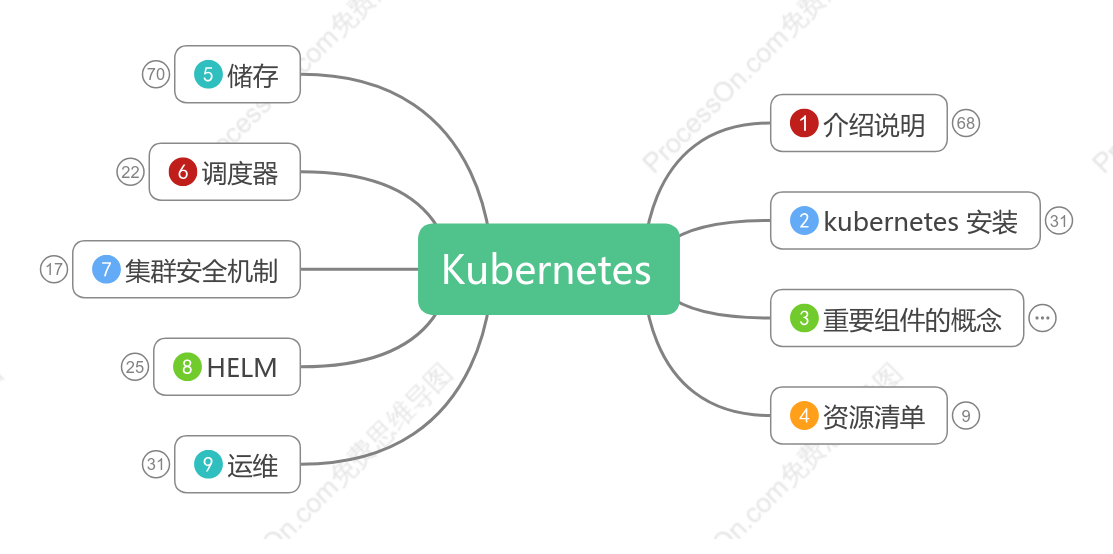
Kubernetes
2020-10-05 10:50:38 0 举报仅支持查看
Kubernetes理解
Kubernetes
模板推荐
作者其他创作
大纲/内容
储存
volume
定义概念
卷的类型
官网解释<br>On-disk files in a Container are ephemeral, which presents some problems for <br>nontrivial applications when running in Containers. <br>First, when a Container crashes, kubelet will restart it, but the files will be lost - <br>the Container starts with a clean state. <br>Second, when running Containers together in a Pod it is often necessary to <br>share files between those Containers. <br>The Kubernetes Volume abstraction solves both of these problems. <br>
分类
Host Volume
实例
PV
Persistent Volume
实例
PV是K8s中的资源,volume的plugin实现,生命周期独立于Pod,封装了底层存储卷实现的细节。<br><br>注意:PV的维护通常是由运维人员、集群管理员进行维护的。<br>
后端类型
PV访问策略说明
回收策略说明
Retain:表示删除PVC的时候,PV不会一起删除,而是变成Released状态等待管理员手动清理<br><br>Recycle:在Kubernetes新版本就不用了,采用动态PV供给来替代<br><br>Delete:表示删除PVC的时候,PV也会一起删除,同时也删除PV所指向的实际存储空间<br><br>注意:目前只有NFS和HostPath支持Recycle策略。AWS EBS、GCE PD、Azure Disk和Cinder支持Delete策略<br>
状态
Available:表示当前的pv没有被绑定<br><br>Bound:表示已经被pvc挂载<br><br>Released:pvc没有在使用pv, 需要管理员手工释放pv<br><br>Failed:资源回收失败<br>
实例演示
PVC
PersistentVolumeClaim
官网:https://kubernetes.io/docs/concepts/storage/persistent-volumes/#persistentvolumeclaims
有了PV,那Pod如何使用呢?为了方便使用,我们可以设计出一个PVC来绑定PV,然后把PVC交给Pod来使用即可。
用例
ngnix使用pvc实战
StorageClass
官网:https://kubernetes.io/docs/concepts/storage/storage-classes/<br><br>nfs github:github:https://github.com/kubernetes-incubator/external-storage/tree/master/nfs<br>
A StorageClass provides a way for administrators to describe the “classes” of storage they offer. Different classes might map to quality-of-service levels, or to backup policies, or to arbitrary policies determined by the cluster administrators. Kubernetes itself is unopinionated about what classes represent. This concept is sometimes called “profiles” in other storage systems.
Each StorageClass contains the fields provisioner, parameters, and reclaimPolicy, which are used when a PersistentVolume belonging to the class needs to be dynamically provisioned.<br><br>The name of a StorageClass object is significant, and is how users can request a particular class. Administrators set the name and other parameters of a class when first creating StorageClass objects, and the objects cannot be updated once they are created.
StorageClass声明存储插件,用于自动创建PV。<br><br>说白了就是创建PV的模板,其中有两个重要部分:PV属性和创建此PV所需要的插件。<br><br>这样PVC就可以按“Class”来匹配PV。<br><br>可以为PV指定storageClassName属性,标识PV归属于哪一个Class。<br>
实战
Secret
定义概念
Kubernetes secret objects let you store and manage sensitive information, such as passwords, OAuth tokens, and ssh keys.
Service Accout
kubernetes.io/service-account-token:用于被 serviceaccount 引用。serviceaccout 创建时 Kubernetes 会默认创建对应的 secret。Pod 如果使用了 serviceaccount,对应的 secret 会自动挂载到 Pod 的 /run/secrets/kubernetes.io/serviceaccount 目录中。
Opaque Secret
Opaque:使用base64编码存储信息,可以通过`base64 --decode`解码获得原始数据,因此安全性弱。
特殊说明
Opaque类型的Secret的value为base64位编码后的值
创建
从文件中创建
使用yaml文件创建
使用
Secret挂载到Volume
Secret导出到环境变量之中
kubernetes.io/dockerconfigjson
kubernetes.io/dockerconfigjson:用于存储docker registry的认证信息。
可以直接使用`kubectl create secret`命令创建
无论是ConfigMap,Secret,还是DownwardAPI,都是通过ProjectedVolume实现的,可以通过APIServer将信息放到Pod中进行使用。
ConfigMap
定义概念
ConfigMaps allow you to decouple configuration artifacts from image content to keep containerized applications portable.
用来保存配置数据的键值对,也可以保存单个属性,也可以保存配置文件。<br><br>所有的配置内容都存储在etcd中,创建的数据可以供Pod使用。<br>
创建configMap
使用目录创建
使用命令创建
使用文件创建
从配置文件中创建
通过yaml文件创建
Pod中使用configMap
ConfigMap代替环境变量
通过环境变量的方式,直接传递给pod
ConfigMap设置命令行参数
通过在pod的命令行下运行的方式(启动命令中)
通过数据卷插件使用ConfigMap
作为volume的方式挂载到pod内
注意:Pod只能使用同一个命名空间的ConfigMap
configMap热更新
实现演示
更新触发说明
调度器
调度器概念
概念
调度过程
自定义调度器
调度亲和性
nodeAffinity
preferredDuringSchedulingIgnoredDuringExecution
requiredDuringSchedulingIgnoredDuringExecution
podAntiAffinity
preferredDuringSchedulingIgnoredDuringExecution
requiredDuringSchedulingIgnoredDuringExecution
亲和性运算符
污点
污点概念
Taint
组成
污点的设置、查看和去除
Tolerations
tolerations 设置演示
固定节点调度
PodName 指定调度
标签选择器调度
集群安全机制
机制说明
准入控制
鉴权控制
AlwaysDeny
AlwaysAllow
ABAC
Webbook
RBAC
Role and ClusterRole
RoleBinding and ClusterRoleBinding
Resources
to Subjects
创建一个系统用户管理 k8s dev 名称空间:重要实验
认证
HTTP Token
HTTP Base
HTTPS
HELM
HELM 概念
HELM 概念说明
Helm是Kubernetes的软件包管理工具,类似于Ubuntu中的apt、CentOS中的yum等。 <br>可以快速查找、下载和安装软件包,Helm由客户端组件helm和服务端组件tiller组成。
组将构成
chart <br>
helm的打包格式叫chart,chart即一系列文件,描述了一组相关的k8s集群资源
helm <br>
客户端命令行工具,用于本地开发及管理chart、chart仓库等
tiller <br>
helm的服务端,tiller接收helm的请求,与k8s的apiserver打交道,根据chart生成一个release并且管 理release
release
helm install命令在k8s集群中部署的chart称为release <br>
repository helm chart
helm客户端通过http协议来访问存储库中chart的索引文件和压缩包
HELM 部署
HELM 自定义
HELM 部署实例
HELM 部署 dashboard
metrics-server
HPA 演示
资源限制
Pod
名称空间
Prometheus
ELK
运维
高可用集群
修改源码
指定Pod所运行的Node
kebectl命令总结
显示Pod的更多信息<br><br>kubectl get pod <pod-name> -o wide<br><br>以yaml格式显示Pod的详细信息<br><br>kubectl get pod <pod-name> -o yaml<br><br>查看pod的label标签:<br><br>kubectl get pods --show-labels<br><br>查看namespaces<br>kubectl get pods -n <namespaces><br>查看一下当前的命名空间:kubectl get namespaces<br><br><br>
1. 创建资源对象<br><br>根据yaml配置文件一次性创建service和rc<br><br>kubectl create -f my-service.yaml -f my-rc.yaml<br><br>根据<directory>目录下所有.yaml、.yml、.json文件的定义进行创建操作<br><br>kubectl create -f <directory>
2. 查看资源对象<br><br>查看所有Pod列表<br><br>kubectl get pods<br><br>查看rc和service列表<br><br>kubectl get rc,service(svc)
3. 描述资源对象<br><br>显示Node的详细信息<br><br>kubectl describe nodes <node-name><br><br>显示Pod的详细信息<br><br>kubectl describe pods/<pod-name><br><br>显示由RC管理的Pod的信息<br><br>kubectl describe pods <rc-name>
4. 删除资源对象<br><br>基于Pod.yaml定义的名称删除Pod<br><br>kubectl delete -f pod.yaml<br><br>删除所有包含某个label的Pod和service<br><br>kubectl delete pods,services -l name=<label-name><br><br>删除所有Pod<br><br>kubectl delete pods --all
5. 执行容器的命令<br><br>执行Pod的data命令,默认是用Pod中的第一个容器执行<br><br>kubectl exec <pod-name> data<br><br>指定Pod中某个容器执行data命令<br><br>kubectl exec <pod-name> -c <container-name> data<br><br>通过bash获得Pod中某个容器的TTY,相当于登录容器<br><br>kubectl exec -it <pod-name> -c <container-name> bash
6.Pod的扩容与缩容<br><br>执行扩容缩容Pod的操作<br><br>kubectl scale rc redis --replicas=3
7.Pod的滚动升级<br><br>执行滚动升级操作<br><br>kubectl rolling-update redis -f redis-rc.update.yaml
yaml文件配置的
pod
container
label
service
namespace
selector
replicaset
replicaController
deployment
statefulSet
configMap/secret
job
network
daemonSet
storage
lifeCycle
resource
部署 spring boot项目
介绍说明
发展历史
公有云类型说明
资源管理器对比
K8S 其优势
K8S 组件说明
etcd
一个可信赖的分布式键值储存服务
pod
Pod就是一个或多个Container的组合 <br>
官网解释:A Pod (as in a pod of whales or pea pod) is a group of one or more containers (such as Docker containers),<br> with shared storage/network, and a specification for how to run the containers.
Pod的维护谁来做?——ReplicaSet
ReplicaSet通过selector来进行管理
官网解释:A ReplicaSet is defined with fields, including a selector that specifies how to identify Pods it can acquire, <br>a number of replicas indicating how many Pods it should be maintaining, and a pod template specifying the data <br>of new Pods it should create to meet the number of replicas criteria.
Pod和ReplicaSet的状态如何维护和监测呢?—— Deployment <br>
Deployment 监测 Pod和ReplicaSet的变动
官网解释:A Deployment controller provides declarative updates for Pods and ReplicaSets.<br><br>You describe a desired state in a Deployment, and the Deployment controller changes the <br>actual state to the desired state at a controlled rate. You can define Deployments to create<br> new ReplicaSets, or to remove existing Deployments and adopt all their resources with new <br>Deployments. <br>
Label
Labels是一个key-value键值对,可以给对象贴的标签,比如说给一组pod贴上这一类标签
官网解释:Labels are key/value pairs that are attached to objects, such as pods.
Service
Service 可以这类Lobel的对象起名字,比如给一组Pod起名字
官网解释: An abstract way to expose an application running on a set of Pods as a network service.<br><br>With Kubernetes you don’t need to modify your application to use an unfamiliar service discovery<br> mechanism. Kubernetes gives Pods their own IP addresses and a single DNS name for a set of Pods, <br>and can load-balance across them. <br>
Node
Pods运行在Node之上,Node表示的是一台机器,比如一台Centos虚拟机,一个Node可以包含多个services/pods
一个Node可以运行多个Pod
官网解释:A node is a worker machine in Kubernetes, previously known as a minion. <br>A node may be a VM or physical machine, depending on the cluster. <br>Each node contains the services necessary to run pods and is managed by the master components.
集群
多个Node共同组成集群
集群框架图
组件结构
kubectl
操作集群的客户端,也就是和集群打交道
api server
请求肯定是到达Master Node,然后再分配给Worker Node创建Pod之类的 关键是命令通过kubectl过来之后,要认证授权一下
请求过来之后,Master Node中谁来接收
Scheduler
API收到请求之后,接下来由Schedule协调调用哪个Worker Node创建Pod,Container之类的,有调度策略
https://kubernetes.io/docs/concepts/scheduling/kube-scheduler
Controller Manager
Scheduler通过不同的策略,真正要分发请求到不同的Worker Node上创建内容,具体由Controller Manager负责
Worker Node的kubelet
Worker Node接收到创建请求之后,具体Worker Node的Kubelet来负责
最终Kubelet会调用Docker Engine,创建对应的容器
在Node上需要有Docker Engine,不然怎么创建维护容器
会涉及到域名解析DNS的问题
Dashboard <br>
监控面板,能够监测整个集群的状态
ETCD
集群中这些数据如何保存?分布式储存在ETCD之中
简化的架构图
官网架构图
namespace
资源隔离
命名空间就是为了隔离不同的资源,比如:Pod、Service、Deployment等。<br>可以在输入命令的时候指定命名空间-n,如果不指定,则使用默认的命名空间:default。
默认namespace为default
通过kubectl get namespaces查看
selector
选择器,筛选对象
Label Selector
通过Label筛选/正则表达式的对象
一般Selector
通过selector的name匹配筛选对象
kubernetes 安装
单机版
windows和mac可以通过 docker desktop安装
在线玩
在线play-with-k8s: https://labs.play-with-k8s.com/<br>
Minikube
K8S单节点,适合在本地学习使用 <br>
https://kubernetes.io/docs/setup/learning-environment/minikube/ <br>
构建k8s集群
linux安装
系统初始化
Kubeadm部署安装
常见问题分析
Cloud 上搭建
https://github.com/kubernetes/kops
CoreOs
https://coreos.com/tectonic/
kubeadm
本地多节点(这是官网推荐的搭建方式) <br>
https://github.com/kubernetes/kubeadm
优化方式二
感受一下kubernetes
查看连接信息
kubectl config view <br>kubectl config get-contexts <br>kubectl cluster-info
体验Pod
(1)创建pod_nginx.yaml|<br>
(2)根据pod_nginx.yaml文件创建pod <br>kubectl apply -f pod_nginx.yaml <br>
(3)查看pod <br>
kubectl get pods <br>kubectl get pods -o wide <br>kubectl describe pod nginx
(4)进入nginx容器 <br>
(5)访问nginx,端口转发
(6)删除pod <br>kubectl delete -f pod_nginx.yaml <br>
重要组件的概念
Pod
分类
自主式Pod(静态Pod)
静态Pod是由kubelet进行管理的,并且存在于特定的Node上。<br><br>不能通过API Server进行管理,无法与ReplicationController,Ddeployment或者DaemonSet进行关联,也无法进行健康检查。<br>
控制器管理的Pod
控制器
ReplicationController
RC 一定要指出一次有多少个Pod副本在运行,RC可以控制一个或者一组Pods一直都是启动着并有效的。
官网解释:A ReplicationController ensures that a specified number of pod replicas are running at any one time. <br>In other words, a ReplicationController makes sure that a pod or a homogeneous set of pods <br>is always up and available.
使用yaml文件的template字样
案例
ReplicaSets
在Kubernetes v1.2时,RC就升级成了另外一个概念:Replica Set,官方解释为“下一代RC”<br><br>ReplicaSet和RC没有本质的区别,kubectl中绝大部分作用于RC的命令同样适用于RS<br><br>RS与RC唯一的区别是:RS支持基于集合的Label Selector(Set-based selector),<br>而RC只支持基于等式的Label Selector(equality-based selector),这使得Replica Set的功能更强<br>
官网解释<br>A ReplicaSet’s purpose is to maintain a stable set of replica Pods running at any given time. <br>As such, it is often used to guarantee the availability of a specified number of identical Pods.<br>
案例
Deployment
Deployment相对RC最大的一个升级就是我们可以随时知道当前Pod“部署”的进度。<br><br>创建一个Deployment对象来生成对应的Replica Set并完成Pod副本的创建过程<br><br>检查Deploymnet的状态来看部署动作是否完成(Pod副本的数量是否达到预期的值)<br>
官网解释:<br>A Deployment provides declarative (陈述的) updates for Pods and ReplicaSets.<br><br>You describe a desired state in a Deployment, and the Deployment Controller changes the actual state to the desired state at a controlled rate. You can define Deployments to create new ReplicaSets, or to remove existing Deployments and adopt all their resources with new Deployments.<br>
案例
StatefulSet
`官网`:<https://kubernetes.io/docs/concepts/workloads/controllers/statefulset/><br>StatefulSet is the workload API object used to manage stateful applications.<br>Manages the deployment and scaling of a set of Pods, and provides guarantees about the ordering and uniqueness of these Pods.<br>
之前接触的Pod的管理对象比如RC、Deployment、DaemonSet和Job都是面向无状态的服务,但是现实中有很多服务是有状态的,比如MySQL集群、MongoDB集群、ZK集群等,它们都有以下共同的特点:<br>> - 每个节点都有固定的ID,通过该ID,集群中的成员可以互相发现并且通信<br>> - 集群的规模是比较固定的,集群规模不能随意变动<br>> - 集群里的每个节点都是有状态的,通常会持久化数据到永久存储中<br>> - 如果磁盘损坏,则集群里的某个节点无法正常运行,集群功能受损<br>
- StatefulSet里的每个Pod都有稳定、唯一的网络标识,可以用来发现集群内其他的成员<br>> - Pod的启动顺序是受控的,操作第n个Pod时,前n-1个Pod已经是运行且准备好的状态<br>> - StatefulSet里的Pod采用稳定的持久化存储卷,通过PV/PVC来实现,删除Pod时默认不会删除与StatefulSet相关的存储卷<br>> - StatefulSet需要与Headless Service配合使用
实例
DaemonSet
`官网`:https://kubernetes.io/docs/concepts/workloads/controllers/daemonset/<br>A DaemonSet ensures that all (or some) Nodes run a copy of a Pod. As nodes are added to the cluster, Pods are added to them. As nodes are removed from the cluster, those Pods are garbage collected. Deleting a DaemonSet will clean up the Pods it created.<br>
DaemonSet应用场景<br>> - 运行集群存储 daemon,例如在每个节点上运行 `glusterd`、`ceph`。<br>> - 在每个节点上运行日志收集 daemon,例如`fluentd`、`logstash`。<br>> - 在每个节点上运行监控 daemon,例如 [Prometheus Node Exporter](https://github.com/prometheus/node_exporter)、`collectd`、Datadog 代理、New Relic 代理,或 Ganglia `gmond`。<br>
任务集
Job
官网:https://kubernetes.io/docs/concepts/workloads/controllers/jobs-run-to-completion/
A Job creates one or more Pods and ensures that a specified number of them successfully terminate. <br>As pods successfully complete, the Job tracks the successful completions. <br>When a specified number of successful completions is reached, the task (ie, Job) is complete. <br>Deleting a Job will clean up the Pods it created.
对于RS,RC之类的控制器,能够保持Pod按照预期数目持久地运行下去,它们针对的是持久性的任务,比如web服务。<br>而有些操作其实不需要持久,比如压缩文件,我们希望任务完成之后,Pod就结束运行,不需要保持在系统中,此时就需要用到Job。<br>所以可以这样理解,Job是对RS、RC等持久性控制器的补充。<br><br>负责批量处理短暂的一次性任务,仅执行一次,并保证处理的一个或者多个Pod成功结束。<br>
实例
- 非并行Job:<br> - 通常只运行一个Pod,Pod成功结束Job就退出。<br>- 固定完成次数的并行Job:<br> - 并发运行指定数量的Pod,直到指定数量的Pod成功,Job结束。<br>- 带有工作队列的并行Job:<br> - 用户可以指定并行的Pod数量,当任何Pod成功结束后,不会再创建新的Pod<br> - 一旦有一个Pod成功结束,并且所有的Pods都结束了,该Job就成功结束。<br> - 一旦有一个Pod成功结束,其他Pods都会准备退出。
CronJob
`官网`:https://kubernetes.io/docs/concepts/workloads/controllers/cron-jobs/<br><br>A Cron Job creates Jobs on a time-based schedule.<br>One CronJob object is like one line of a crontab (cron table) file. It runs a job periodically on a given schedule, written in Cron format.<br>
cronJob是基于时间进行任务的定时管理。
在特定的时间点运行任务<br>- 反复在指定的时间点运行任务:比如定时进行数据库备份,定时发送电子邮件等等。
Horizontal Pod Autoscaler
`官网`:https://kubernetes.io/docs/tasks/run-application/horizontal-pod-autoscale/<br>The Horizontal Pod Autoscaler automatically scales the number of pods in a replication controller, deployment or replica set based on observed CPU utilization (or, with custom metrics support, on some other application-provided metrics). Note that Horizontal Pod Autoscaling does not apply to objects that can’t be scaled, for example, DaemonSets.<br>
使用Horizontal Pod Autoscaling,Kubernetes会自动地根据观察到的CPU利用率(或者通过一些其他应用程序提供的自定义的指标)自动地缩放在replication controller、deployment或replica set上pod的数量。
实例
Resource
requests
limits
实例
Dashboard
Dashboard is a web-based Kubernetes user interface. You can use Dashboard to deploy containerized applications to a Kubernetes cluster, troubleshoot your containerized application, and manage the cluster resources. You can use Dashboard to get an overview of applications running on your cluster, as well as for creating or modifying individual Kubernetes resources (such as Deployments, Jobs, DaemonSets, etc). For example, you can scale a Deployment, initiate a rolling update, restart a pod or deploy new applications using a deploy wizard.
一个界面控制端
pod生命周期
init container
main contianer
post start hook :容器启动后做什么操作
readiness probe :容器正常工作阶段
pre stop hook :容器停止前做什么操作
探针 Container probes
livenessProbe
Handlers
ExecAction
TCPSocketAction
HTTPGetAction
readinessProbe
Handlers
ExecAction
TCPSocketAction
HTTPGetAction
重启策略 restartPolicy
1、Always:但凡pod对象终止就将其重启,此为默认设定
2、OnFailure:尽在pod对象出现错误时方才将其重启
3、Never:从不重启。
pod对象的状态
1.pending:Pod 已被 Kubernetes 系统接受,但有一个或者多个容器镜像尚未创建。等待时间包括调度 <br>Pod 的时间和通过网络下载镜像的时间,这可能需要花点时间。
2.running: pod 已经被调度到某节点,并且所有容器都已经被kubectl创建完成。
3.succeeded:pod中的所有容器都已经成功终止并且不会被重启;
4.failed:所有容器都已经终止,但至少有一个容器终止失败,即容器返回了非0值的推出状态或已经被系统终止。
5.unknown:apiserver无法正常获取到pod对象的状态信息,通常是由于其无法与所在工作节点的kubelet通信所致。
通信模式
网络通信模式
官网原话:<br>Each Pod is assigned a unique IP address. <br>Every container in a Pod shares the network namespace, <br>including the IP address and network ports.
同一个pod中的容器是共享网络ip地址和端口号的,可以直接进行通信<br>那如果是通过容器的名称进行通信呢?就需要将所有pod中的容器加入到同一个容器的网络中,<br>我们把该容器称作为pod中的pause container。<br>
集群内Pod之间的通信
Calico——K8s的网络model<br><br>- pods on a node can communicate with all pods on all nodes without NAT<br>- agents on a node (e.g. system daemons, kubelet) can communicate with all pods on that node<br>- pods in the host network of a node can communicate with all pods on all nodes without NAT<br>
结论:通过Calico等网络,K8s的Pods可以跨机器访问,但是IP会是变动的。
集群内的Service-Cluster IP
把相同或者具有关联的Pod,打上Label,组成Service。<br>而Service有固定的IP,不管Pod怎么创建和销毁,都可以通过Service的IP进行访问
Service官网解释:https://kubernetes.io/docs/concepts/services-networking/service/<br><br>An abstract way to expose an application running on a set of Pods as a network service.<br><br>With Kubernetes you don’t need to modify your application to use an unfamiliar service<br> discovery mechanism. Kubernetes gives Pods their own IP addresses and a single DNS <br>name for a set of Pods, and can load-balance across them.<br>
案例
实现方式
1. kubectl expose<br>kubectl describe svc whoami-deployment<br>
yaml文件定义Service类型
Service存在的意义就是为了Pod的不稳定性,<br>而上述探讨的就是关于Service的一种类型Cluster IP,只能供集群内访问
外部访问,直接通过expose的服务的ip地址访问即可。
外部服务访问集群之中的Pod
Service-NodePort
Service-LoadBalance<br>通常需要第三方云提供商支持,有约束性<br>
Ingress
官网解释: <br>An API object that manages external access to the services in a cluster, typically HTTP.<br><br>Ingress can provide load balancing, SSL termination and name-based virtual hosting.<br>
Service HostPort
通过yaml文件指定
Nginx
Http 代理访问
Https代理访问
使用cookie 实现会话关联
BasicAuth
Nginx进行重写
组件通信模式
namespaces
命名空间
命名空间就是为了隔离不同的资源,比如:Pod、Service、Deployment等。<br>可以在输入命令的时候指定命名空间-n,如果不指定,则使用默认的命名空间:default。
案例:创建命名空间
案例:指定命名空间下的资源
资源清单
资源的概念
什么是资源
名称空间级别的资源
集群级别的资源
资源清单
yaml 文件
yaml 语法格式
通过资源清单编写Pod
Pod的生命周期


Collect
Get Started

Collect
Get Started

Collect
Get Started
Collect
Get Started
评论
0 条评论
下一页

