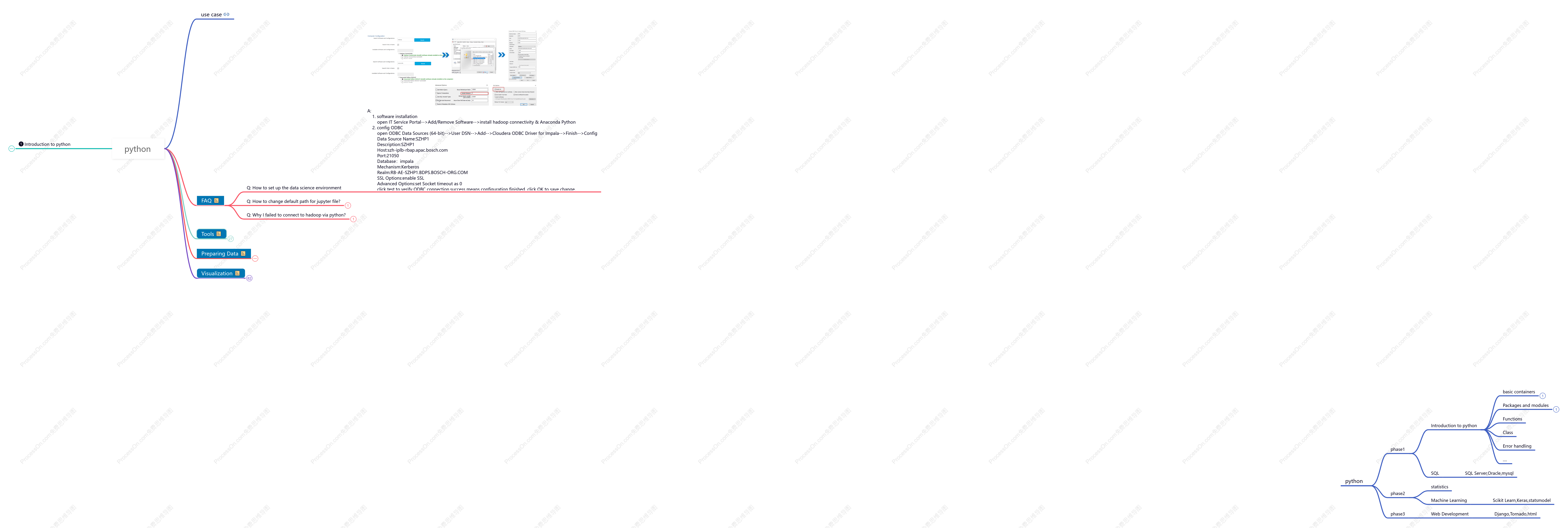
python
2021-01-16 22:10:01 1 举报python基础知识汇总
学习笔记
模板推荐
作者其他创作
大纲/内容
Introduction to python<br>
Python Basic
变量命名规则
第一个字符必须是字母或下划线
其他部分可以是字母、数字或下划线
对大小写敏感
不能使用关键字命名
['False', 'None', 'True', 'and', 'as', 'assert', 'break', 'class', 'continue', 'def', 'del', <br>'elif', 'else', 'except', 'finally', 'for', 'from', 'global', 'if', 'import', 'in', 'is', 'lambda',<br> 'nonlocal', 'not', 'or', 'pass', 'raise', 'return', 'try', 'while', 'with', 'yield']
注释
单行注释以#开头
# import pandas as pd<br>
多行注释''' '''
'''<br> line1<br>line2<br>line3<br>'''<br>
多行注释""" """<br>
"""<br>line1<br>line2<br>line3<br>"""
转义字符 \
\n 换行
\t 制表符
\a 提示音
\b 退格键(被覆盖)
\r 回车键
\f 换页
注: 在其前面加r可取消转义 例:r‘gui\nzi'
输出多个变量
from IPython.core.interactiveshell import InteractiveShell<br>InteractiveShell.ast_node_interactivity = "all"<br>#InteractiveShell.ast_node_interactivity = "last" #默认设置<br>
a, b = 1, 2<br> a<br> b
判断类型
isinstance
isinstance(要判断的值,要判断的类型);返回True或False
isinstance (a,int)
判断给定的值是否属于指定的一堆数据类型中,返回True或False
isinstance (a,(str,int,list))
type
判断给予属于属于哪个数据类型
type(a)
df.dtypes
1. float<br>2. int<br>3. bool<br>4. datetime64[ns]<br>5. datetime64[ns, tz]<br>6. timedelta[ns]<br>7. category<br>8. object
模块与包
第三方库
numpy<br>
pandas<br>
matplotlib<br>
sklearn
scipy
导入模块
import
import module as new_name
form module import objectname
from module import *
from module import objectname as newname
os模块
os 可以直接调用操作系统系统提供的接口函数
os.getcwd() 当前路径
os.chdir('需要切换到的路径') 切换路径
os.name 操作系统类型分posix和nt
os.uname() 获取详细的系统信息
os.environ 获取环境变量返回一个字典,要获取某个环境变量的值可以调用os.environ.get('key')
os.path.abspath('.') 查看当前目录的绝对目录
os.path.join('绝对路径',‘目录名’) 在某个目录下创建一个新目录,首先把新目录的完整路径表示出来
os.mkdir('路径') 创建一个目录
os.makedirs('目录') 创建多层目录
os.rmdir('路径') 删除一个目录
os.path.split() 拆分一个路径
os.path.splitext() 直接得到文件扩展名
os.rename('原文件名','新文件名') 对文件重命名
os.remove('文件名') 删除文件
列出所有.py扩展名文件
列出当前目录下所有目录
shutil 模块
shutil.rmtree() 删除目录 空目录有内容的都可以
shutil.copyfile('oldfile','newfile') 两个参数都必须是文件
shutil,copy('oldfile','newfile') 第二个参数可以是文件也可以是目标目录
shutil.move('file','package') 移动文件
sys模块
sys.argv 命令行参数的列表,列表的第一个元素就是正在运行的文件名
sys.exit() 退出当前程序
sys.path 返回Python目录下所有.pth路径文件下的内容及系统默认设置
time模块
time,localtime()
time.asctime(time.localtime()) 返回一个可读性时间
time.time() 可以用来计算程序的运行用时
time.clock()
re正则
正则是一门独立的语言,处理字符串的强大工具
属性和方法
re.search('目标匹配','匹配源') 默认返回一个目标匹配, 注意Py3和2的区别,3里返回更详细
re.findall('','') 以一个列表方式返回所有满足条件的元素,遍历
re.match() 判断一个正则表达式是
re.compile('筛选条件') 提前进行编译,确立筛选条件
元字符
. 匹配换行符之外的所有字符 如果需要匹配 . 本身可以用 \.
\d 匹配0-9的数字
\s 匹配任意的空白符,包括空格,制表符(tab),换行符等
\w 匹配字母或数字或下划线或汉字
\b 表示单词边界,出现第一个位置
^ 脱字符,匹配输入字符串的开始的位置,起始位置满足条件才返回,不然为None
$ 匹配输入字符串的结束位置,和^相反
与之对应的 \D \S \W \B 大写与他们的小写作用相反,用()来分组
{M,N} M和N为非负整数,其中M<=N 表示前面的匹配M~N 次,在这个范围呢往多匹配 {M,} 表示需要匹配M次 {,N} 等价于{0~N} {N} 表示需要匹配N次 * 匹配前面的子表达式0次或多次,等价于{0,} + 匹配前面的子表达式一次或多次,等价于{1,} ? 匹配前面的子表达式0次或1次,等价于{0,1} 注: *? +? {M,N}? 表示贪婪与懒惰,往少取
[] 字符类,将要匹配的一类字符集放在[]里面,表示或的意思。例如:[. ? * () {}] 匹配里面的这些字符;[0-9] 匹配0到9的数字相当于\d ; [^\d] 匹配除数字以外的字符,相当于\D ; [a-z] 匹配所有的小写字母[^a-z] 匹配非小写字母 | 相当于或分支条件 例:A|B 匹配字母A或B与[AB]是一样的
() 分组,将要匹配的一类字符用括号, 例 : (\d){3} 匹配一个三位数 ; a(bc)* 匹配一个a和0个或多个bc ; a(b|c)匹配ab或ac
re.I<br>使匹配对大小写不敏感<br>re.L<br>做本地化识别(locale-aware)匹配<br>re.M<br>多行匹配,影响 ^ 和 $<br>re.S<br>使 . 匹配包括换行在内的所有字符<br>re.U<br>根据Unicode字符集解析字符。这个标志影响 \w, \W, \b, \B.<br>re.X<br>该标志通过给予你更灵活的格式以便你将正则表达式写得更易于理解。
流程控制语句
if语句
单项分支
if 条件表达式:<br> code1<br> code2<br>
当条件表达式成立,返回True,执行对应的代码块,反之不执行。<br>
双项分支
if 条件表达式:<br> code1<br> code2<br>else:<br> code3<br> code4<br>
如果条件表达式成立,执行if对应代码块。<br>如果条件表达式不成立,执行else对应的代码块。<br>
多项分支
if 条件表达式1:<br> code1<br> code2<br>elif 条件表达式2:<br> code1<br> code2<br>elif 条件表达式3:<br> code1<br> code2<br>else:<br> code1<br> code2<br>
如果条件表达式1成立,返回True,执行对应代码块,反之则向下执行<br>直到最后,任何条件都不满足,执行else。<br>
循环结构 while|for
<b>while 循环</b>
while 条件表达式:<br> code1<br> code2<br>
while 循环中,满足条件便执行,不满足结束。
循环控制
break 结束循环,可以设置条件,当满足条件时结束循环
continue 跳出当前循环,开始下一轮循环,同样可以设置条件
pass 占位符,使程序完整。
else 在while循环中一样可以接else,在while执行完后执行else,但是while中是break结束的循环不会执行else
for循环
for循环的作用:遍历、循环、迭代
for 变量 in 可迭代的对象:<br> code1<br> code2<br>
range对象
range(开始值,结束值,步长)
结束值本身取不到,取到结束值之前的那个数
循环控制中与while中一样,使用break和continue
总结
1)while: 较为复杂的逻辑<br>2)for : 数据的遍历<br>3)while 和 for 部分代码可相互转换<br>
六大数据类型<br>
不可变类型
数值
数据类型
整数型
小数形式的字符串不能通过int()转化为int型
浮点型
小数形式和整数形式的字符串可以通过float()转化为float型
复数型
布尔
取值
false
true
逻辑运算
and &<br>
or |<br>
not ~<br>
运算
和数值类型计算
字符串类型计算
数值运算
算术运算
比较运算
复合赋值运算
计算函数
内置函数
abs(x)取绝对值
max()最大值
min()最小值
round()四舍五入
pow(x,y)求幂
math计算库
fabs()
ceil()
floor()
exp()
sqrt()
log10(x)
log(x,y)
modf()
字符串
字符串定义
“ ”
str()
可以使用str将其他类型对象转化为字符串
字符串方法
大小写字母变换
capitalize
首字母大写
title
每个单词首字母大写
upper
所有字母大写
lower
所有字母小写
swapcase
字母大小写互换
检索
len()
计算字符串长度
str.startswith("字符")/endswith()
检查字符串是否以某字符开始或者结尾
find()/rfind()
返回从左边开始第一次出现该字符的索引值,如果没有找到返回-1
index()/rindex()
返回从左边开始第一次出现该字符的索引值,如果没有找到则报错
count()
计算字符串中某个字符出现的次数
isupper
判断字符串是否都是大写
islower
判断字符串是否都是小写
isdecimal
判断字符串是否以数字组成
ljust
填充字符串,原字符串居左,默认填充空格
center
填充字符串,原字符串居中,默认填充空格
rjust
填充字符串,原字符串居右,默认填充空格
zfill
返回长度为 width 的字符串,原字符串右对齐,前面填充0
strip
默认去掉首尾两边空白符
rstrip
去掉右边某个字符,默认空白符
lstrip
去掉左边某个字符,默认空白符
replace
字符串替换
replace(“被替换字符或字符串”,“替换字符或字符串”)
str.replace(a,b,替换次数)
用b替换字符串中所有a
分割
str.split("分隔符",分割符号数量)
默认以特殊字符(空格,换行符等)分割
splitlines()
按行分割,参数keepend取false不显示换行符,取true显示换行符
partition()
以str为分隔符,分割成3部分,str前,str和str后
rsplit
从右向左按某字符切割字符串,可指定切割次数
字符串的拼接
直接用 +
格式化字符串 %s 例:'我是%s' % 桂子
%c 格式化ASCII字符
%d 格式化整数
%f 格式化小数
%o 格式化无符号八进制
%x 格式化无符号十六进制
%e 用科学记数法格式化定点数
格式化的辅助运算符
- 用作左对齐 例:'%-10.f' % 1.2223456
+ 用在正数前面显示加号 例:'%+d'% 255
0 显示的数字前面填充‘0’而不是默认的空格 例:‘%010.f’% 3.141596
m.n m是显示的最小长度,当m大于格式化位数时才起作用显示m位,n是显示的小数的位数 例'%10.3f'% 3.141596
注:%s 是通用的,能匹配所有类型
''.join() 括号里是元祖和列表
'{}{}'.format()
字符串格式化
进制转换等特殊符号的使用
:d
整型占位符(要求数据类型必须为整型)
:2d 占用两位,不够用空格来补,默认居右
可用> < ^来调整位置
print ("我叫 %s 今年 %d 岁!" % ('小明', 10))
:f
浮点型占位符(要求数据类型必须为浮点型)<br>
:.2f 可保留小数点后两位
:s
字符串占位符(要求数据类型必须为字符串)
:,
金钱占位符
将一堆纯数字字符串切割为三位一组
str.format格式化
'{}的年龄是{}岁{}'.format('小哥哥', 20 ,'!')
'{2}的年龄是{0}岁{1}'.format('小哥哥', 20, '!')
'{name}的年龄是{age}'.format(age=20,name='小哥哥')
元组
生成元组
tuple()
()生成
不依赖于"()",而是以","为重要标识
元组的切片和索引
tuple[:] # 显示元组中所有值<br>tuple[0]#输出第一个值<br>
元组对象的方法
max(tuple)#返回最大值
min(tuple)#返回最小值
len(tuple) #元组长度<br>
可变类型
列表
列表的定义
list()
list可以把字符串类型转化为列表
[]
遍历列表每一个元素
for var in list:<br>
for i in range(len(list)):<br>
随机取值<br>
choice(list)#随机选择一个元素
sample(list,n)#随机选择n个元素
索引
list[index]#根据索引找对应元素
list.index(a)#返回某个值的索引
list.index(max(list))#返回最大值的索引<br>list.index(min(list))#返回最小值的索引
列表的切片
[start:end:step]
步长为正数时,从左→右切片
步长为负数时,从右→左切片
排序
list.sort()
顺序,改变原列表
list.reverse()
倒序,改变原列表
sorted(list)
不改变原列表
增
list.append(元素)
每次只能添加一个元素
list_1.extend(list_2)
合并两个表,还可以通过"+"合并多个列表
list.insert(索引值,要插入的元素)
根据偏移量将元素插入到指定的位置
删
del命令
del list[start:end:step]
删除列表中指定位置的元素(一个或多个)
list.clear
list.pop([offset])
返回指定位置的元素,同时在列表中删除该元素
list.remove(元素)
改
list[2] = 'new value'<br>
字典
创建字典
dict2 = dict.fromkeys(dict1)<br>
dict2完全复制dict1
dict2 = dict.fromkeys(dict1,8)
dict2完全复制dict1的键,默认值为8
dict = {'a':[1,2,3],'b':['x','y','z']}<br>
遍历<br>
#循环所有key<br>1. for item in dict:<br>2. for item in dict.keys():<br>
for item in dict.values():#循环所有value<br>
for k,v in dict.items():#循环所有键和值<br>
增
dict[键名]=值
dict.setdefault('新键名',值)
dict1.update(dict2) ,把2中的键值对增加到字典1中,如果2中的键和1中的键重复,会覆盖1中的键值对,如果不重复,则会添加到1中
dict1.update({k1:v1,k2:v2}) <br>
删
del 字典名['键名']
删除指定键,一次只能删除一个键值对
del 字典名
删除字典
字典名.clear()
删除字典中所有键值对
字典名.pop('键名')
删除指定键,返回删除的键值
字典名.popitem()
随机删除一对键值对,并返回该键值对,一般是最后一对
改
dict[key]=new.value
提取字典中要修改的对应的键,赋予key一个新的值,如果字典中没有这个键,则会把这个键值对添加到字典中
查
字典名['键']
返回该键对应的值
字典名.get('键',alter_output)
返回该键对应的值,若键不存在,则返回第二个参数
字典名.keys()
返回包含所有键的列表
字典名.values()
返回包含所有值的列表
字典名.items()
以元组组成的列表返回包含所有键值对的列表
集合
集合是不重复的有序序列,会自动排序,筛除重复值
创建集合
set()
{}
花括号创建集合
set()
集合具有自动排序和去重的功能<br>stockSet = set()<br>stockSet.update(['a','hah','east'])<br>
增
set.add(新元素)
set.update(新元素)
删
#删除指定元素<br>set.remove('元素') <br>set.discard('元素')<br>
set.pop() 随机删除一个元素并返回这个元素
set.clear() 清空集合
集合相关操作
intersection
&
交集
difference
-
差集
union
|
并集
symmetric_difference
^
对称差集
issubset
<
子集
issuperset
>
父级
isdisjoint
不相交
冰冻集合
frozenset
集合冰冻后只能进行交差并补,不能增删
深浅拷贝
浅拷贝
浅拷贝生成的变量不受原变量更改的影响
浅拷贝的两种方法
import copy<br>a.copy()
b=a.copy() 浅复制,内容相同,id不同<br>
深拷贝
如果是容器类型的数据,深拷贝可以拷贝多级容器
深拷贝方法
c=deepcopy(a)
函数
基本概念
函数基本格式
定义函数
def func():<div> code1</div><div> code2</div>
调用函数
func()
函数命名规则
字母数字下划线,首字符不能为数字。<div>严格区分大小写,且不能使用关键字。</div><div>函数命名有意义,且不能使用中文。</div>
大驼峰命名法
每个单词首字母大写(定义类:面向对象)
小驼峰命名法
除了第一个单词首字符小写之外,剩下每个单词首字符大写
函数参数
形参
形式参数,在函数的定义处
普通形参
通过定义变量按顺序将实参传参
默认形参
形参上面有默认值,为默认形参
普通收集形参
专门用来收集多余没人要的普通实参
*args
命名关键字形参
专门用来收集多余的没人要的关键字实参
**kwargs
关键字收集形参
两种定义方式
def func(a,b,*,c) c是命名关键字
def func(*args,c,**kwargs) c是命名关键字参数
实参
普通实参
定义具体数据并传向形参
关键字实参
关键字实参是对具体的某个参数赋值,具体的顺序可以打乱。
区分默认形参和关键字实参
默认形参在函数的定义处<br>关键字实参在函数的调用处<br>
*和**的用法
*和** 在函数的定义处,用来做收集操作,打包<br>*和** 在函数的调用处,用来做打散操作,解包<br>
参数定义的顺序
普通参数 -> 默认参数 -> 普通收集参数 -> 命名关键字参数 -> 关键字收集参数
return返回值
return + 六大标准数据类型 还有类和对象,函数<br>如果不定义return,默认返回的是None<br>在执行完return之后,立刻终止函数,后面的代码不执行<br>
局部变量和全局变量
作用域
作用的范围
局部变量
函数内部定义的变量(在函数内部定义的变量)
局部变量作用域:在函数内部
全局变量
在函数外部定义的或者使用global在函数内部定义
全局变量作用域:横跨整个文件
可以使用global关键字在函数内部定义一个全局变量<br>也可以使用global关键字在函数内部修改全局变量<br>
函数名的使用
函数可销毁
del +函数名
函数名可作为容器变量元素
函数名可以作为函数的参数
函数名可作为函数的返回值
return +函数名
高阶函数
迭代器
什么是迭代器?
迭代器指的是迭代取值的工具,迭代是一个重复的过程,每次重复都是基于上一次的结果而继续的
迭代器的特征
不依赖于索引,而通过next指针迭代所有数据,一次只取一个值,大大节省空间
可迭代对象
容器类型数据、range对象、迭代器
如何定义一个迭代器
lst = [1,2,3,4,5]<br>it = iter(lst)<br>print(it,type(it))<br>
如何判断一个迭代器
如果it中含有iter和next两种魔术方法,那么其类型为迭代器
Iterator
如何调用一个迭代器
用next调用,next在调用迭代器中的数据时,是单向不可逆,一条路走到黑的过程
map
语法
map(func,Iterable)
功能
把Iterable中的数据一个一个拿出来,扔到func中做处理<br>把处理后的结果放到迭代器中,最后返回迭代器<br>
参数
func:自定义函数<br>Iterable:可迭代性数据(容器类型数据、range对象、迭代器)<br>
返回值
迭代器
filter
语法
filter(func,iterable)
功能
return True 当前这个数据保留<br>return False 当前这个数据舍弃<br>
参数
func : 自定义函数<br>iterable : 可迭代型数据(容器类型数据,range对象,迭代器)<br>
返回值
迭代器
reduce
语法
reduce(func,iterable)
功能
计算数据
参数
func : 自定义函数<br>iterable : 可迭代型数据(容器类型数据,range对象,迭代器)<br>
返回值
计算之后的结果
sorted
语法
sorted(iterable,key=函数,reverse=False)
功能
排序
参数
iterable(容器类型数据,range对象,迭代器)<br>key 指定 自定义函数或 内置函数<br>reverse : 代表升序或者降序 , 默认是升序(从小到大排序) reverse=False<br>
返回值
排序后的结果
与sort的区别
(1) sorted可以排序一切容器类型数据, sort只能排列表<br>(2) sorted返回的是新列表,sort是基于原有的列表进行修改<br>(3) 推荐使用sorted<br>
匿名函数 lambda
lambda 可以用于简单的函数简写
filter(判断条件,参数) 过滤器
map(函数,迭代器)
reduce ()
推导式
列表推导式<br>列表推导式在逻辑上等价于一个循环语句,只是形式上更加简洁
单循环推导式<br>语法:[val for val in Iterable]
带有判断条件的单循环推导式<br>语法:[val for val in Iterable if val>0 else 0]
双循环推导式<br>[num for elem in vec for num in elem]
带有判断条件的双循环推导式<br>[num for elem in vec for num in elem if cond1]
zip
语法
zip(iterable, … …)
>>>a = [1,2,3]<br>>>> b = [4,5,6]<br>>>> c = [4,5,6,7,8]<br>>>> zipped = zip(a,b) # 返回一个对象<br>>>> zipped<br><zip object at 0x103abc288><br>>>> list(zipped) # list() 转换为列表<br>[(1, 4), (2, 5), (3, 6)]
功能
将多个iterable中的值,一个一个拿出来配对组成元组放入迭代器中
enumerate
语法
enumerate(iterable,start=0)
>>> seasons = ['Spring', 'Summer', 'Fall', 'Winter']<br>>>> list(enumerate(seasons))<br>[(0, 'Spring'), (1, 'Summer'), (2, 'Fall'), (3, 'Winter')]
功能
枚举 ; 将索引号和iterable中的值,一个一个拿出来配对组成元组放入迭代器中
集合_字典推导式
集合推导式
语法:{val for val in Iterable}
字典推导式
语法:{k,v for k,v in Iterable}
生成器
什么是生成器
生成器本质是迭代器,允许自定义逻辑的迭代器
生成器和迭代器的区别
迭代器本身是系统内置的.重写不了.而生成器是用户自定义的,可以重写迭代逻辑
创建生成器的两种方式
生成器表达式 (里面是推导式,外面用圆括号)
生成器函数 (用def定义,里面含有yield)
yield与return的共同点及区别点
共同点
执行到这句话都会把值返回出去
区别点
yield每次返回时,会记住上次离开时执行的位置 , 下次在调用生成器 , 会从上次执行的位置往下走, 而return直接终止函数,每次重头调用.
send
next与send区别
next 只能取值<br>send 不但能取值,还能发送值<br>
注意点
第一个 send 不能给 yield 传值 默认只能写None<br>最后一个yield 接受不到send的发送值<br>send 是给上一个yield发送值<br>
yield from
可将一个可迭代对象变成一个迭代器返回
运算符
算术运算符
加
+
减
-
乘
*
除
/
整除
//
求余
%
求幂
**
比较运算符
等于
==
大于
><br>
小于
<
大于等于
>=
小于等于
<=
不等于
!=
赋值运算符
=
+=
c += a 等效于 c = c + a
-=
c -= a 等效于 c = c - a
*=
c *= a 等效于 c = c * a
/=
c /= a 等效于 c = c / a
//=
c //= a 等效于 c = c // a
%=
c %= a 等效于 c = c % a
**=
c **= a 等效于 c = c ** a
逻辑运算符
and &<br>
or |<br>
not ~
其他运算符<br>
成员运算符
in
a = 10<br>b = 20<br>list = [1, 2, 3, 4, 5 ]<br> <br>if ( a in list ):<br> print ("1 - 变量 a 在给定的列表中 list 中")<br>else:<br> print ("1 - 变量 a 不在给定的列表中 list 中")
not in
a = 10<br>b = 20<br>list = [1, 2, 3, 4, 5 ]<br>if ( b not in list ):<br> print ("2 - 变量 b 不在给定的列表中 list 中")<br>else:<br> print ("2 - 变量 b 在给定的列表中 list 中")
身份运算符
is
x is y, 类似 id(x) == id(y) , 如果引用的是同一个对象则返回 True,否则返回 False
is not<br>
x is not y , 类似 id(a) != id(b)。如果引用的不是同一个对象则返回结果 True,否则返回 False。
位运算符
&
按位与运算符:参与运算的两个值,如果两个相应位都为1,则该位的结果为1,否则为0
|
按位或运算符:只要对应的二个二进位有一个为1时,结果位就为1。
^
按位异或运算符:当两对应的二进位相异时,结果为1
~
按位取反运算符:对数据的每个二进制位取反,即把1变为0,把0变为1。~x 类似于 -x-1
<<
左移动运算符:运算数的各二进位全部左移若干位,由"<<"右边的数指定移动的位数,高位丢弃,低位补0。<br>a << 2 输出结果 240 ,二进制解释: 1111 0000
>>
右移动运算符:把">>"左边的运算数的各二进位全部右移若干位,">>"右边的数指定移动的位数<br>a >> 2 输出结果 15 ,二进制解释: 0000 1111
文件操作
文件操作
文件的写入
打开文件
fp = open("文件名",mode="w",encoding="utf-8")
写入文件
fp.write()
关闭文件
fp.close()
文件的读取
打开文件
fp = open("文件名",mode="r",encoding="utf-8")
读取文件
res=fp.read()<div>print(res)</div>
关闭文件
fp.close()
存储二进制字节流
wb
读取二进制字节流
rb
文件扩展模式
read
读取字符个数(里面参数代表字符个数)
seek
调整指针位置(里面参数代表字节个数)
seek(0):将光标移动到文件开头
seek(0,2):将光标移动到文件结尾
tell
当前光标左侧所有的字节数(返回字节数)
r+
先读后写
w+
可读可写
会清空文件,重新写入
a+
可读可写,追加
with语法
with open("文件名",mode="模式",encoding="字符编码") as fp:
r 只读 默认
w 以写入的方式打开文件,会覆盖已存在的文件
a 以写入的方式打开文件,如果文件存在会追加写入
b 以二进制模式打开文件,例wb rb
文件对象的方法属性
f.close() 关闭文件
f.read() 读取文件的所有字符,也设置读取字符的个数
f.readline() 从文件中读取并返回一行,也可设置读取字符个数
f.readlines() 返回的是一个列表
f.write('内容') 将字符串写入文件
f.flush() 写入后刷新
f.writeline(seq) 向文件写入字符串序列seq,seq是返回字符串的可迭代对象
f.writelines(x) x可以是一个列表
f.seek(offset,form) 在文件中移动文件指针,从from(默认起始位为0,1代表当前位置,为代表末尾)偏移offset个字节
f.fell() 返回当前指针在文件夹的位置
with open() as f 自动关闭
use case<br>
FAQ
Q: How to set up the data science environment
A: <br> 1. software installation<br> open IT Service Portal-->Add/Remove Software-->install hadoop connectivity & Anaconda Python<br> 2. config ODBC<br> open ODBC Data Sources (64-bit)-->User DSN-->Add-->Cloudera ODBC Driver for Impala-->Finish-->Config<br> Data Source Name:SZHP1<br> Description:SZHP1<br> Host:szh-iplb-rbap.apac.bosch.com<br> Port:21050<br> Database:impala<br> Mechanism:Kerberos<br> Realm:RB-AE-SZHP1.BDPS.BOSCH-ORG.COM<br> SSL Options:enable SSL<br> Advanced Options:set Socket timeout as 0<br> click test to verify ODBC connection,success means configuration finished, click OK to save change.<br>
Q: How to change default path for jupyter file?<br>
A: <br>1. open Anaconda Prompt (Anaconda3)-->input "jupyter notebook --generate-config"<br>2. create new folder in C: for jupyter(C:/jupyter_notebooks)<br>3. go to C:\Users\<your NT account>\.jupyter-->open jupyter_notebook_config.json<br> -->update c.NotebookApp.notebook_dir="C:/jupyter_notebooks"<br>4.open Anaconda Prompt (Anaconda3)-->input "jupyter notebook"
Q: Why I failed to connect to hadoop via python?<br>
A:<br>Go to Anaconda 3 on you Windows start menu and click on “Anaconda Prompt” <br>Once there, enter:<br>conda create --name py36 python=3.6 pyodbc jupyter pandas numpy (and all other packages you might need)<br><br> then activate the environment with:<br> conda activate py36<br><br> then start jupyter notebook with:<br> jupyter-notebook
Tools<br>
jupyter notebook<br>
theme/nbextensions<br>
theme/plugin installation<br>
#安装nbextensions<br>pip install jupyter_contrib_nbextensions<br>jupyter contrib nbextension install --user <br>pip install jupyter_nbextensions_configurator<br>#安装主题<br>pip install jupyterthemes<br>jt -t grade3 -f fira -fs 13 -cellw 90% -ofs 11 -dfs 11 -T -N
theme install parameters<br>
好用的插件
Table of Contents<br>目录,可以将所有的heade标题栏收集起来,只对于已经运行的markdown类型的标题有效.通过目录可以进入指定链接.
Variable Inspector<br>这是一个查看变量的插件,可以查看变量名、类型,大小,形状和值。
Hinterland<br>代码自动补全,选中
Codefolding<br>折叠代码(包括Python依据缩进折叠、其他代码依据方括号折叠、依据注释折叠)
ExcecuteTime<br>在代码模块最后计算该模块的计算时间和运行结束时间,美观实用
Spellchecker<br>对 markdown 单元中的内容进行拼写检查
code_prettify<br>代码美化,先配置环境: pip install yapf<br>
shortcut
shift +enter
运行当前代码
esc ; m
进入标记模式,生成标题
esc ; b/a
在当前模块下面或者上方增加一个模块
ctrl+shift+-
按鼠标位置拆分当前代码模块
shift+m
合并选中的代码模块
ctrl+/
将多行内容同时改为注释
Pycharm
Preparing Data
Pandas
输出设置
#显示所有列<br>pd.set_option('display.max_columns', None)<br>#显示所有行<br>pd.set_option('display.max_rows', None)<br>#设置value的显示长度为100,默认为50<br>pd.set_option('max_colwidth',100)<br>
数据存储与提取
导入<br>
pd.read_csv('文件全路径')<br>#路径存在中文时<br>file = open(r'文件全路径')<br>df = pd.read_csv(file)<br>
csv、tsv、txt
pd.read_sql()
sql
#获取所有表的字段
dic = {}<br>for i in process_tables: <br> content_table = pd.read_sql("DESCRIBE "+database+"."+i , conn) <br> columns = []<br> for j, k in content_table.iterrows(): <br> column_name= k["name"]<br> columns.append(column_name)<br> dic[i] = columns
获取指定数据库所有表名<br>
table = "SHOW tables IN "+database<br>tables = pd.read_sql(table,conn)
pd.read_excel('文件全路径')
xlsx、xls、xlsm
pd.read_json()
json
df = read_xlsb()
xlsb
import pyxlsb<br><br>def read_xlsb(file_path):<br>list_row = []<br>list_accumulate = []<br># xlsb<br>if file_path[-5:] == '.xlsb':<br>wb = pyxlsb.open_workbook(file_path)<br>print(wb.get_sheet(wb.sheets[0]).rows())<br>'''<br># 循环遍历所有sheet<br>for i in range(len(wb.sheets)):<br>sheet_row = wb.get_sheet(wb.sheets[i]).rows()<br>for sr in sheet_row:<br>for s in sr:<br>list_row.append(s.v)<br>list_accumulate.append(list_row)<br>list_row=[]<br>'''<br># 遍历选定sheet<br>sheet_row = wb.get_sheet(1).rows()<br>for sr in sheet_row:<br>for s in sr:<br>list_row.append(s.v)<br>list_accumulate.append(list_row)<br>list_row = []<br>return list_accumulate
导出
df.to_csv('C:/Users/xx/Result.csv',sep=',')
df.to_excel()
数据检查<br>
选择子集--df切片
testdf3.iloc[0] # pandas series<br>testdf3.iloc[[0]] # dataframe
取一行
testdf3[['A']] #单独一列<br>testdf3.loc[:,['A']] # 同上,但比较复杂,一般不用<br>testdf3.iloc[:,[0]] # 同上,可以在不知道列名的时候用
testdf3[2:3] # data frame<br>testdf3.iloc[2:3]
取连续的某几行
testdf3.iloc[[1,3]]
取不连续的多行
testdf3[['A','C']] # DF, 指定某几列,直接用列名<br>testdf3.loc[:,['A','C']] # 同上,但比较复杂,一般不用<br>testdf3.iloc[:,[0,2]] # 同上,可以在不知道列名的时候用
testdf3.loc[:,'A':'D'] #指定连续列,用列名 <br>testdf3.iloc[:,0:4] # 指定连续列,用数字
testdf3.iloc[[1,3],[0]] # 取行索引为1或3,列索引为0的结果<br>testdf3.iloc[[1,3],1:3] # 取行索引为1或3,列索引为1和2的结果<br>testdf3.iloc[[1,3],[1,3]]# 取行/列索引为1或3的结果
testdf3.loc[[1,3],["A","D"]]#取行索引为1或3,列名为A和D的值
df3.loc[:,(df3>1).any()]#Select cols with any vals >1
查看数据
初步查看:<br>df.head(n)#前n行<br>df.tail(n)#后n行<br>
统计信息,是否有异常值:df.describe()
查看一列:df['列名']<br>查看一列前几行:df['列名'][:n]<br>查看多列:df[['列1','列2']]<br>where过滤:df[df['列名']>condition]<br>
重命名列名<br>
导入文件时改
df=pd.read_csv('path',name=['name1','name2'])
导入文件后改
列:df.rename(columns={'原列1':'新列1'},inplace=True/False)<br>行:df.rename(index={'原行1':'新行1'},inplace=True/False)
df增删改查
df = pd.Dataframe(ndarray/list/dict,columns=('a','b')<br>
df['new'] = a#新增一列<br>
df.loc['row'] = a#新增一行<br>
df.append(df2,ignore_index=True)#纵向合并
df.drop(columns=['a','b'],axis=1)#删除a,b列
df.drop(0,axis=0)#删除索引为0的行
df.rename(columns={col1:col1_after,col2:col2_after})<br>df.columns=[v1,v2,v3,v4]<br>
修改DataFrame的列名
df['a'].isin([k1,k2,k3])
对DataFrame的数据进行条件筛选
df3.loc[:,(df3>1).any()] #选择存在值大于1的列<br>df3.loc[:,(df3>1).all()] #选择所有值都大于1的列
<br>
s.where((s > 0) & (s<4))<br>
.where()<br>将不符合条件的值替换掉成指定值,相当于执行了一个if-else
# 若salary<=40,则保持原来的值不变<br># 若salary大于40,则设置为40<br>data['salary'].where(data.salary<=40,40)
df6.query('second > first')
>>> df[(df.Country.isin(df2.Type))] #Find same elements<br>>>> df[~(df.Country.isin(df2.Type))] #Find different elements<br>>>> df3.filter(items=”a”,”b”]) #Filter on values<br>>>> df.select(lambda x: not x%5) #Select specific elements
统计方法
统计
df.describe()
生成描述性统计汇总,包括数据的计数和百分位数,有助于了解大致的数据分布
df.shape
(行,列)<br>
df.info()
打印所用数据的一些基本信息,包括索引和列的数据类型和占用的内存大小。
df.value_counts()<br>
统计分类变量中每个类的数量,比如company中各个公司都有多少人<br>df['company'].value_counts()<br>
df.count()
计数<br>
df['a'].nunique()
a列有多少不同值
df['a'].unique()
a列所有不同值
df.mean()
均值
df.sum()
求和<br>
df.size()
dh大小(行,列)
df.std()
标准差
df.median()
中位数
df.quantile(n)
求任一分位数,n取0.1,0.3
df.var()
方差
df.min()
最小值
df.max()
最大值
df.nth()
返回第n行
数据清洗
数据类型转化<br>
导入数据时改变
data = pd.read_csv('path',dtype={'列1':int})<br>
导入数据后改变
df['列1'].astype(数据类型)
字符串转为数值
df.loc['col'] = pd.to_numeric(df.loc['col'],errors='coerce')<br>只转换能转换的,不能转换的赋值为NaN<br>
数据规整化<br>
大小写转换
全转成大写<br>
df['col'].map(str.upper)
全转成小写
df['col'].map(str.lower)
首字母大写
df['col'].map(str.title)
空格
去除左边空值
df['col'].map(str.lstrip)
去除右边空值
df['col'].map(str.rstrip)
去除两边空值
df['col'].map(str.strip)
离群点和异常值
查找:df.describe()统计分析,最大值最小值中位数<br> plt.bar()箱线图<br>
处理:df.replace({'col':(异常值)},新值)
数据缺失
索引<br>
选择缺失值<br>
>>> df3.loc[:,df3.isnull().any()]#选择存在缺失值的列<br>>>> df3.loc[:,df3.notnull().all()]# 选择不存在缺失值的列<br>
计算数量
df.isnull().sum()
处理
删除数据dropna()
根据缺失比例删除行
有就删除:df.dropna() <br>
全部缺失才删除:df.dropna(how='all')
至少n个才删除:df.dropna(thresh=n)
某个/几个列值缺失删除:df.dropna(subset=['col1','col2'])<br>
根据缺失比例删除列<br>
有就删除:df.dropna(axis=1)<br>
全部缺失才删除:df.dropna(how='all',axis=1)<br>
直接删除列<br>
df.drop(['col'],axis=1)
替换数据replace()<br>
>>> df2.replace("a", "f") #值替换
填充数据fillna()
>>> df.fillna(0, inplace=True) #固定值填充<br>>>> df.fillna(method='ffill', inplace=True) #前面的值填充<br>>>> df.fillna(method='bfill', inplace=True) #后面的值填充<br>>>> df['col'].fillna(df.mean(), inplace=True)#均值填充
使用默认值<br>
空字符串<br>
df['col'].fillna('')
特殊值0/1
df['col'].fillna(0, inplace=True)
使用特征统计值<br>(缺失数据较少)<br>
mean()均值
df['col'].fillna(df.mean(), inplace=True)
from sklearn.preprocessing import Imputer<br>nan_model = Imputer(miss_values='nan', strategy='mean', axis=0)<br>nan_result = nan_model.fit_transform(df)
mode()众数
df['col'].fillna(df.mode(), inplace=True)
from sklearn.preprocessing import Imputer<br>nan_model = Imputer(miss_values='nan', strategy='most_frequent ', axis=0)<br>nan_result = nan_model.fit_transform(df)
median()中位数
df['col'].fillna(df.median(), inplace=True)
from sklearn.preprocessing import Imputer<br>nan_model = Imputer(miss_values='nan', strategy='median ', axis=0)<br>nan_result = nan_model.fit_transform(df)
舍弃或二元化处理<br>(缺失数据较多)<br>
非空:df.loc[df.['col'].notnull,'col']=newvalue1<br>空值:df.loc[df.['col'].isnull,'col']=newvalue2
插值法
拉格朗日(复用代码)<br>
# 拉格朗日插值法<br>import scipy.interpolate<br>from scipy.interpolate import lagrange<br><br><br>def lagrange_fill(dataframe, colname, k=5):<br> def ployinterp_column(s, n, k=5):<br> y = s[list(range(n - k, n)) + list(range(n + 1, n + 1 + k))] #取数<br> y = y[y.notnull()] #剔除空值<br> return lagrange(y.index, list(y))(n) #插值并返回插值结果<br><br> for i, index in enumerate(<br> dataframe[colname][dataframe[colname].isnull() == True].index):<br> dataframe[colname][index] = ployinterp_column(dataframe[colname],<br> i) # todo 返回当前数据的位置<br> return dataframe<br><br><br>lagrange_fill(df, 'a') #col为实际列名
利用缺失值上下填充
前面的值填充:df.fillna(method='ffill', inplace=True) <br>后面的值填充:df.fillna(method='bfill', inplace=True) <br>
随机森林算法预测
确实字符串:用常见频数类别代替:df['col].value_counts()
重复值
索引<br>
查找重复值:df.duplicated()<br> df.index.duplicated()
计算重复值数量:df.duplicated().value_counts()
某列中存在唯一值:df['col'].unique()<br>
处理 -- 删除<br>
df2.drop_duplicates('col', keep='last',inplace=True) <br>
排序
df.sort_values(by=['a','b'],ascending=False)
df.reset_index(drop=True)
索引
df.index = range(1,len(df)+1)<br>
s.reindex(['a','c','d','e','b'])
df = df.reset_index()#默认重置后的索引为0~len(df)-1<br>
df.set_index('col',inplace=True)
df = df.rename(index=str, columns={"Country":"cntry","Capital":"cptl","Population":"ppltn"})
字典字段选择(复用代码)
table2result_columns = {}<br>for table, column_list in dic.items(): <br> good_columns = []<br> for col in column_list:<br> #col.endswith("_result") or <br> if(col.endswith("_result") or col == 'uniquepart_id' or col == 'result_date' or col == 'location_id' \<br> or col == 'type_number'):#add only relevant columns<br> good_columns.append(col)<br> <br> table2result_columns[table] = good_columns
遍历<br>
>>> df.iteritems()# (Column-index, Series) pairs<br>>>> df.iterrows() # (Row-index, Series) pairs
日期
pd.to_datetime(data, format='%Y%m%d', errors='ignore')
data["trade_date"] = pd.to_datetime(data.trade_date)<br>从csv文件中导入数据,此时Dataframe中对应的时间列是字符串的形式
df2['Date']= pd.date_range('2000-1-1',periods=6,freq='M')
#yesterday<br>import datetime<br>def getYesterday(): <br> today=datetime.date.today() <br> oneday=datetime.timedelta(days=1) <br> yesterday=today-oneday <br> return yesterday
数据转换<br>
类型转换
ndarray = df.values<br>
list = df.values.tolist()<br>
dict = df.to_dict()<br>
df = pd.DataFrame(ndarray)<br>df = pd.DataFrame(list)<br>df = pd.DataFrame.from_dict(data, orient='index')
list-->str<br>
#字段拼接为字符串<br>ls = sql_columns[0]<br>for i in range(1,len(sql_columns)):<br> str_sql = ','.join(sql_columns[i])<br> ls.append(str_sql)<br>process_ls = ','.join(ls) <br>process_ls
行列变换<br>
df['a'].astype(int)
pd.cut()<br>将连续变量离散化,比如将人的年龄划分为各个区间
pd.cut(data.salary,bins = [0,10,20,30,40,50],labels = ['低','中下','中','中上','高'])
pd.cut(data.salary,bins = 5) #把薪水分成5个区间
pd.qcut()<br>使用分位数进行区间划分
pd.qcut(data.salary,q = 3)
.pivot_table()
pd.pivot_table(df2, values='Value',index='Date',columns='Type'])#Spread rows into columns
.pivot()
df2.pivot(index='Date', columns='Type',values='Value')#Spread rows into columns
<br>
Stack / Unstack
>>> stacked = df5.stack() #Pivot a level of column labels<br>>>> stacked.unstack() #Pivot a level of index labels
<br>
Melt
>>> pd.melt(df2, id_vars=["Date"],value_vars=["Type", "Value"],value_name="Observations")<br>#Gather columns into rows
<br>
map()<br>apply()<br>applymap()<br>
df['a'].map()
map可以作用于Series每一个元素的<br>对于Series而言,map可以解决绝大多数的数据处理需求,但如果需要使用较为复杂的函数,则需要用到apply方法。
data["gender"] = data["gender"].map({"男":1, "女":0})
def gender_map(x):<br> gender = 1 if x == "男" else 0<br> return gender<br>#注意这里传入的是函数名,不带括号<br>data["gender"] = data["gender"].map(gender_map)
df['a'].apply()<br>df.apply()<br>
apply()方法 可以作用于DataFrame 还有Series
def apply_age(x,bias):<br> return x+bias<br><br>#以元组的方式传入额外的参数<br>data["age"] = data["age"].apply(apply_age,args=(-3,))
def BMI(series):<br> weight = series["weight"]<br> height = series["height"]/100<br> BMI = weight/height**2<br> return BMI<br><br>data["BMI"] = data.apply(BMI,axis=1)
df.applymap()
对DataFrame中的每个单元格执行指定函数的操作
df.applymap(lambda x:"%.2f" % x)
分组与聚合
df.groupby('Gender')
无法调用,输出为<br><class 'pandas.core.groupby.groupby.DataFrameGroupBy'>
通过对DataFrame对象调用groupby()函数返回的结果是一个DataFrameGroupBy对象,而不是一个DataFrame或者Series对象,所以,它们中的一些方法或者函数是无法直接调用的,需要按照GroupBy对象中具有的函数和方法进行调用
df.groupby(['Gender', 'Age'])
无法调用,输出为<br><class 'pandas.core.groupby.groupby.DataFrameGroupBy'>
df.groupby('Gender').get_group('Female')
通过get_group筛选df中满足条件的值并输出<br>
df.groupby('petalwidth')['class'].nunique().to_frame('newcolname')
按照petalwidth分组并计算class列不同值的数量作为新列newcolname
df.groupby('Gender').max()[['Age', 'Score']]
根据性别分组并输出age,score最大值<br>
df.groupby('Gender').agg({'Age':np.median, 'Score':np.sum})
根据性别分组并输出age中位数,score求和
df.groupby('Gender').agg(['mean','sum'])
根据性别分组并输出其他列的均值和求和
data['avg_salary'] = data.groupby('company')['salary'].transform('mean')
对每一条数据求得相应的结果,同一组内的样本会有相同的值,组内求完均值后会按照原索引的顺序返回结果
df.groupby('Gender')['age'].plot(kind='kde', legend=True)
根据性别分组并绘制年龄概率密度分布图
数据合并
join
df1.join(df2, on=None, how=’left’)<br>
默认按索引合并<br>
merge
pd.merge(df1,df2,how='inner',on='key', left_on=None, right_on=None)
concat
pd.concat([data1,data2],ignore_index=True,axis=1,join='inner',keys=['a','b'])
append
s.append(s2)
SK-Learn
Standardization<br>标准化<br>
>>> from sklearn.preprocessing import StandardScaler<br>>>> scaler = StandardScaler().fit(X_train)<br>>>> standardized_X = scaler.transform(X_train)<br>>>> standardized_X_test = scaler.transform(X_test)
通过对原始数据进行变换把数据变换到均值为0,方差为1范围内
Normalization<br>正则化
>>> from sklearn.preprocessing import Normalizer<br>>>> scaler = Normalizer().fit(X_train)<br>>>> normalized_X = scaler.transform(X_train)<br>>>> normalized_X_test = scaler.transform(X_test)
L1正则化: 向量中各元素绝对值之和<br> L2正则化: 向量中各元素的平方之和
Binarization<br>二值化<br>
>>> from sklearn.preprocessing import Binarizer<br>>>> binarizer = Binarizer(threshold=0.0).fit(X)<br>>>> binary_X = binarizer.transform(X)
设定一个阈值,使得样本矩阵中大于阈值的元素置换为1;小于或等于阈值置换为0
Encoding Categorical Features<br>独热编码<br>
from sklearn.preprocessing import OneHotEncoder,LabelEncoder<br>One_encode = OneHotEncoder(sparse = False,drop='first')<br>label_encode = LabelEncoder()<br>dic1 = {}<br>for i in range(0,len(keepcol)):<br> label_classes = label_encode.fit_transform(df[keepcol[i]])<br> label_name = [keepcol[i]+'_'+str(Leg_class) for Leg_class in label_encode.classes_]<br> <br> res = One_encode.fit_transform(df[keepcol[i]].values.reshape(-1,1))<br> <br> dic = {label_name[j]:res[:, j] for j in range(len(label_name)-1)}<br> dic1.update(dic)<br> i += 1<br> dis_df = pd.DataFrame(dic1)
将有n种特征值的一个特征变成n个二元的特征,所有二元特征互斥,当某个二元特征为 1 时,表示取对应的这个类别
Imputing Missing Values<br>缺失值处理<br>
>>> from sklearn.preprocessing import Imputer<br>>>> imp = Imputer(missing_values=0, strategy='mean', axis=0)<br>>>> imp.fit_transform(X_train)
Modeling(Y2021 common module)
模型选择<br>
交叉验证法
分类
from sklearn.model_selection import KFold<br>from sklearn.model_selection import cross_val_score<br>#分类<br>from sklearn.linear_model import LogisticRegression<br>from sklearn.tree import DecisionTreeClassifier<br>from sklearn.discriminant_analysis import LinearDiscriminantAnalysis<br>from sklearn.neighbors import KNeighborsClassifier<br>from sklearn.naive_bayes import GaussianNB<br>from sklearn.svm import SVC<br>from sklearn.ensemble import RandomForestClassifier<br># 算法审查<br>models = {}<br># ****************************************classification****************************************<br>models['LR'] = LogisticRegression()#逻辑回归<br>models['LDA'] = LinearDiscriminantAnalysis()#线性判别分析<br>models['KNN'] = KNeighborsClassifier()#K近邻<br>models['CART'] = DecisionTreeClassifier()#决策树<br>models['NB'] = GaussianNB()#贝叶斯<br>models['SVM'] = SVC()#支持向量机<br>models['RFC'] = RandomForestClassifier()#随机森林 max_features = "sqrt"<br><br># 评估算法<br>results = []<br>for key in models:<br> kfold = KFold(n_splits=10, random_state=seed,shuffle=True)<br># scoring = ['accuracy','neg_log_loss','roc_auc','f1','f1_micro','f1_macro','f1_weighted'] #分类<br><br> cv_results = cross_val_score(models[key], X_train, Y_train, cv=kfold, scoring='accuracy')<br> results.append(cv_results)<br> print('%s: %.3f%% (%.3f%%)' %(key, cv_results.mean()*100, cv_results.std()))
回归<br>
from sklearn.model_selection import KFold<br>from sklearn.model_selection import cross_val_score<br><br>#线性回归<br>from sklearn.linear_model import LinearRegression<br>from sklearn.linear_model import Ridge<br>from sklearn.linear_model import Lasso<br>from sklearn.linear_model import ElasticNet<br>#非线性回归<br>from sklearn.svm import SVR<br>from sklearn.neighbors import KNeighborsRegressor<br>from sklearn.tree import DecisionTreeRegressor<br>from sklearn.ensemble import RandomForestRegressor<br># 算法审查<br>models = {}<br><br># ****************************************Regression****************************************<br>#线性<br>models['LinearR'] = LinearRegression()<br>models['ridge'] = Ridge()<br>models['lasso'] = Lasso()<br>models['EN'] = ElasticNet()<br>models['NB'] = GaussianNB()<br>#非线性<br>models['SVR'] = SVR()<br>models['KNN_R'] = KNeighborsRegressor()<br>models['CART_R'] = DecisionTreeRegressor()<br>models['RFR'] = RandomForestRegressor()#随机森林<br># 评估算法<br>results = []<br>for key in models:<br> kfold = KFold(n_splits=10, random_state=seed,shuffle=True)<br># scoring = ['r2','neg_mean_squared_error','neg_mean_absolute_error'] #回归<br> cv_results = cross_val_score(models[key], X_train, Y_train, cv=kfold, scoring='r2')<br> results.append(cv_results)<br> print('%s: %.3f%% (%.3f%%)' %(key, cv_results.mean()*100, cv_results.std()))
评价指标
分类
from sklearn.metrics import classification_report,confusion_matrix,accuracy_score,f1_score,roc_auc_score<br>#使用评估数据集评估算法<br>svm = SVC()<br>svm.fit(X=X_train, y=Y_train)<br>predictions = svm.predict(X_validation)<br>print(roc_auc_score(Y_validation, predictions))<br>print(f1_score(Y_validation, predictions,average='micro'))<br>print(accuracy_score(Y_validation, predictions))<br>print(confusion_matrix(Y_validation, predictions))# 混淆矩阵<br>print(classification_report(Y_validation, predictions))# 分类报告<br>"""<br># 二分类混淆矩阵<br>tn, fp, fn, tp = confusion_matrix(y_test, predictions).ravel()<br>print(pd.DataFrame(confusion_matrix(y_test, predictions),<br> columns=['Predicted False', "Predicted True"], index=['Actual False', 'Actual True']))<br>"""
回归
from sklearn.metrics import mean_absolute_error,mean_squared_error,r2_score<br>#使用评估数据集评估算法<br>svm = SVR()<br>svm.fit(X=X_train, y=Y_train)<br>predictions = svm.predict(X_validation)<br>print(mean_absolute_error(Y_validation, predictions))<br>print(mean_squared_error(Y_validation, predictions))<br>print(r2_score(Y_validation, predictions))
Visualization
中文支持
plt.rcParams['font.family'] = ['Arial Unicode MS'] # 用来正常显示中文标签<br>plt.rcParams['axes.unicode_minus'] = False # 用来正常显示负号<br>sns.set_style('ticks', {'font.sans-serif': ['Arial Unicode MS', 'Arial']}) #用来解决中文方块化的问题
Chart Decision Tree<br>
pd.plotting
pd.plotting.scatter_matrix(df, c=y_train, figsize=(15,15), marker=‘0’, hist_kwds={‘bins’:50},s=60,alpha=.8, cmap=mglearn.cm3)<br>对角线部分: 核密度估计图(Kernel Density Estimation),就是用来看某 一个 变量分布情况,横轴对应着该变量的值,纵轴对应着该变量的密度(可以理解为出现频次)。<br>非对角线部分:两个 变量之间分布的关联散点图。将任意两个变量进行配对,以其中一个为横坐标,另一个为纵坐标,将所有的数据点绘制在图上,用来衡量两个变量的关联度(Correlation)
<br>
matplotlib<br>>>> import matplotlib.pyplot as plt<br>
Create Plot
#Figure<br>>>> fig = plt.figure()<br>>>> fig2 = plt.figure(figsize=plt.figaspect(2.0))
#Axes<br>>>> fig.add_axes()<br>>>> ax1 = fig.add_subplot(221) # row-col-num<br>>>> ax3 = fig.add_subplot(212)<br>>>> fig3, axes = plt.subplots(nrows=2,ncols=2)<br>>>> fig4, axes2 = plt.subplots(ncols=3)
Plotting Routines
1D Data
>>> fig, ax = plt.subplots()<br>>>> lines = ax.plot(x,y) #Draw points with lines or markers connecting them<br>>>> ax.scatter(x,y) #Draw unconnected points, scaled or colored<br>>>> axes[0,0].bar([1,2,3],[3,4,5]) #Plot vertical rectangles (constant width)<br>>>> axes[1,0].barh([0.5,1,2.5],[0,1,2]) #Plot horiontal rectangles (constant height)<br>>>> axes[1,1].axhline(0.45) #Draw a horizontal line across axes<br>>>> axes[0,1].axvline(0.65) #Draw a vertical line across axes<br>>>> ax.fill(x,y,color='blue') #Draw filled polygons<br>>>> ax.fill_between(x,y,color='yellow') #Fill between y-values and 0
Vector Fields
>>> axes[0,1].arrow(0,0,0.5,0.5) #Add an arrow to the axes<br>>>> axes[1,1].quiver(y,z) #Plot a 2D field of arrows<br>>>> axes[0,1].streamplot(X,Y,U,V) #Plot a 2D field of arrows
Data Distributions
>>> axes[0,1].arrow(0,0,0.5,0.5) #Add an arrow to the axes<br>>>> axes[1,1].quiver(y,z) #Plot a 2D field of arrows<br>>>> axes[0,1].streamplot(X,Y,U,V) #Plot a 2D field of arrows
2D Data or Images
>>> fig, ax = plt.subplots()<br>>>> im = ax.imshow(img, <br>cmap='gist_earth',<br>interpolation='nearest',<br>vmin=-2,<br>vmax=2)<br>#Colormapped or RGB arrays
>>> axes2[0].pcolor(data2) #Pseudocolor plot of 2D array<br>>>> axes2[0].pcolormesh(data) #Pseudocolor plot of 2D array<br>>>> CS = plt.contour(Y,X,U) #Plot contours<br>>>> axes2[2].contourf(data1) #Plot filled contours<br>>>> axes2[2]= ax.clabel(CS) #Label a contour
Colors, Color Bars & Color Maps
>>> plt.plot(x, x, x, x**2, x, x**3)<br>>>> ax.plot(x, y, alpha = 0.4)<br>>>> ax.plot(x, y, c='k')<br>>>> fig.colorbar(im, orientation='horizontal')<br>>>> im = ax.imshow(img,cmap='seismic')
Markers
>>> fig, ax = plt.subplots()<br>>>> ax.scatter(x,y,marker=".")<br>>>> ax.plot(x,y,marker="o")
Linestyles
>>> plt.plot(x,y,linewidth=4.0)<br>>>> plt.plot(x,y,ls='solid')<br>>>> plt.plot(x,y,ls='--')<br>>>> plt.plot(x,y,'--',x**2,y**2,'-.')<br>>>> plt.setp(lines,color='r',linewidth=4.0)
Text & Annotations
>>> ax.text(1,-2.1,'Example Graph',style='italic')<br>>>> ax.annotate("Sine",xy=(8, 0),xycoords='data',xytext=(10.5, 0),textcoords='data',arrowprops=dict(arrowstyle="->",connectionstyle="arc3"),)
Limits, Legends & Layouts
Limits & Autoscaling<br>>>> ax.margins(x=0.0,y=0.1) #Add padding to a plot<br>>>> ax.axis('equal') #Set the aspect ratio of the plot to 1<br>>>> ax.set(xlim=[0,10.5],ylim=[-1.5,1.5]) #Set limits for x-and y-axis<br>>>> ax.set_xlim(0,10.5)# Set limits for x-axis<br>Legends<br>>>> ax.set(title='An Example Axes', ylabel='Y-Axis',xlabel='X-Axis')#Set a title and x-and y-axis labels<br>>>> ax.legend(loc='best') #No overlapping plot elements<br>Ticks<br>>>> ax.xaxis.set(ticks=range(1,5), ticklabels=[3,100,-12,"foo"])#Manually set x-ticks<br>>>> ax.tick_params(axis='y', direction='inout',length=10)#Make y-ticks longer and go in and out<br>Subplot Spacing<br>>>> fig3.subplots_adjust(wspace=0.5, hspace=0.3,left=0.125,right=0.9,top=0.9,bottom=0.1)#Adjust the spacing between subplots<br>>>> fig.tight_layout() #Fit subplot(s) in to the figure area<br>Axis Spines<br>>>> ax1.spines['top'].set_visible(False)# Make the top axis line for a plot invisible<br>>>> ax1.spines['bottom'].set_position(('outward',10))
Save Plot
Save figures<br>>>> plt.savefig('foo.png')<br>Save transparent figures<br>>>> plt.savefig('foo.png', transparent=True)
seaborn<br>>>> import seaborn as sns<br>>>> import matplotlib.pyplot as plt<br>
create a plot<br>
>>> f, ax = plt.subplots(figsize=(5,6)) #Create a figure and one subplot
Seaborn styles
>>> sns.set() #(Re)set the seaborn default<br>>>> sns.set_style("whitegrid") Set the matplotlib parameters<br>>>> sns.set_style("ticks", {"xtick.major.size":8,"ytick.major.size":8})<br>#Set the matplotlib parameters<br>>>> sns.axes_style("whitegrid") <br>#Return a dict of params or use with with to temporarily set the style
Context Functions
>>> sns.set_context("talk") #Set context to "talk"<br>>>> sns.set_context("notebook", font_scale=1.5, rc={"lines.linewidth":2.5}) <br>#Set context to "notebook",Scale font elements and override param mapping
Color Palette
>>> sns.set_palette("husl",3) #Define the color palette<br>>>> sns.color_palette("husl") #Use with with to temporarily set palette<br>>>> flatui = ["#9b59b6","#3498db","#95a5a6","#e74c3c","#34495e","#2ecc71"]<br>>>> sns.set_palette(flatui) #Set your own color palette
Axisgrid Objects
>>> g.despine(left=True) #Remove left spine<br>>>> g.set_ylabels("Survived") #Set the labels of the y-axis<br>>>> g.set_xticklabels(rotation=45) #Set the tick labels for x<br>>>> g.set_axis_labels("Survived", "Sex")#Set the axis labels<br>>>> h.set(xlim=(0,5), ylim=(0,5), xticks=[0,2.5,5],yticks=[0,2.5,5])<br>#Set the limit and ticks of the x-and y-axis
Plot
>>> plt.title("A Title") #Add plot title<br>>>> plt.ylabel("Survived") #Adjust the label of the y-axis<br>>>> plt.xlabel("Sex")# Adjust the label of the x-axis<br>>>> plt.ylim(0,100) #Adjust the limits of the y-axis<br>>>> plt.xlim(0,10) #Adjust the limits of the x-axis<br>>>> plt.setp(ax,yticks=[0,5]) #Adjust a plot property<br>>>> plt.tight_layout() #Adjust subplot params
Bokeh<br>>>> from bokeh.plotting import figure<br>>>> from bokeh.io import output_file, show
Plotting
>>> from bokeh.plotting import figure<br>>>> p1 = figure(plot_width=300, tools='pan,box_zoom')<br>>>> p2 = figure(plot_width=300, plot_height=300,x_range=(0, 8), y_range=(0, 8))<br>>>> p3 = figure()
Renderers & Visual Customizations
Glyphs
ChildTopic
Scatter Markers
>>> p1.circle(np.array([1,2,3]), np.array([3,2,1]),
fill_color='white')
>>> p2.square(np.array([1.5,3.5,5.5]), [1,4,3],
color='blue', size=1)
Line Glyphs
>>> p1.line([1,2,3,4], [3,4,5,6], line_width=2)
>>> p2.multi_line(pd.DataFrame([[1,2,3],[5,6,7]]),
pd.DataFrame([[3,4,5],[3,2,1]]),
color="blue")
Customized Glyphs
Selection and Non-Selection Glyphs<br>>>> p = figure(tools='box_select')<br>>>> p.circle('mpg', 'cyl', source=cds_df,<br>selection_color='red',<br>nonselection_alpha=0.1)<br>Hover Glyphs<br>>>> from bokeh.models import HoverTool<br>>>> hover = HoverTool(tooltips=None, mode='vline')<br>>>> p3.add_tools(hover)<br>Colormapping<br>>>> from bokeh.models import CategoricalColorMapper<br>>>> color_mapper = CategoricalColorMapper(<br>factors=['US', 'Asia', 'Europe'],<br>palette=['blue', 'red', 'green'])<br>>>> p3.circle('mpg', 'cyl', source=cds_df,<br>color=dict(field='origin',<br>transform=color_mapper),<br>legend='Origin')
Legend Location
Inside Plot Area<br>>>> p.legend.location = 'bottom_left'<br>Outside Plot Area<br>>>> from bokeh.models import Legend<br>>>> r1 = p2.asterisk(np.array([1,2,3]), np.array([3,2,1])<br>>>> r2 = p2.line([1,2,3,4], [3,4,5,6])<br>>>> legend = Legend(items=[("One" ,[p1, r1]),("Two",[r2])],<br>location=(0, -30))<br>>>> p.add_layout(legend, 'right')
Legend Orientation
>>> p.legend.orientation = "horizontal"<br>>>> p.legend.orientation = "vertical"
Legend Background & Border
>>> p.legend.border_line_color = "navy"<br>>>> p.legend.background_fill_color = "white"
Rows & Columns Layout
Rows<br>>>> from bokeh.layouts import row<br>>>> layout = row(p1,p2,p3)<br>Columns<br>>>> from bokeh.layouts import columns<br>>>> layout = column(p1,p2,p3)<br>Nesting Rows & Columns<br>>>>layout = row(column(p1,p2), p3)
Grid Layout
>>> from bokeh.layouts import gridplot<br>>>> row1 = [p1,p2]<br>>>> row2 = [p3]<br>>>> layout = gridplot([[p1,p2],[p3]])
Tabbed Layout
>>> from bokeh.models.widgets import Panel, Tabs<br>>>> tab1 = Panel(child=p1, title="tab1")<br>>>> tab2 = Panel(child=p2, title="tab2")<br>>>> layout = Tabs(tabs=[tab1, tab2])
Linked Plots
Linked Axes<br>>>> p2.x_range = p1.x_range<br>>>> p2.y_range = p1.y_range<br>Linked Brushing<br>>>> p4 = figure(plot_width = 100,<br>tools='box_select,lasso_select')<br>>>> p4.circle('mpg', 'cyl', source=cds_df)<br>>>> p5 = figure(plot_width = 200,<br>tools='box_select,lasso_select')<br>>>> p5.circle('mpg', 'hp', source=cds_df)<br>>>> layout = row(p4,p5)
Output & Export
Notebook
>>> from bokeh.io import output_notebook, show<br>>>> output_notebook()
HTML
Standalone HTML<br>>>> from bokeh.embed import file_html<br>>>> from bokeh.resources import CDN<br>>>> html = file_html(p, CDN, "my_plot")
>>> from bokeh.io import output_file, show<br>>>> output_file('my_bar_chart.html', mode='cdn')
Components<br>>>> from bokeh.embed import components<br>>>> script, div = components(p)
PNG
>>> from bokeh.io import export_png<br>>>> export_png(p, filename="plot.png")
SVG
>>> from bokeh.io import export_svgs<br>>>> p.output_backend = "svg"<br>>>> export_svgs(p, filename="plot.svg")
Show or Save Your Plots
>>> show(p1) <br>>>> show(layout)
pyecharts
python
phase1
Introduction to python<br>
basic containers<br>
list,dic,tuple,set,string,int
Packages and modules
numpy,pandas,matplotlib
Functions
Class
Error handling
....
SQL
SQL Server,Oracle,mysql<br>
phase2
statistics
Machine Learning<br>
Scikit Learn,Keras,statsmodel
phase3
Web Development<br>
Django,Tornado,html


Collect
Get Started

Collect
Get Started
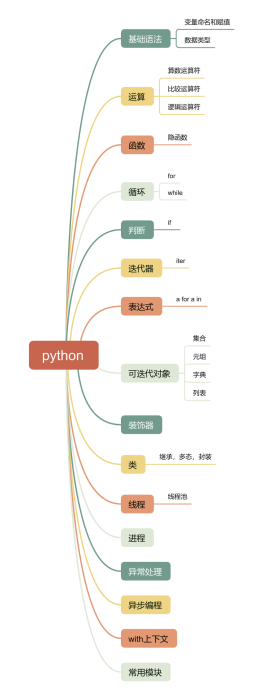
Collect
Get Started
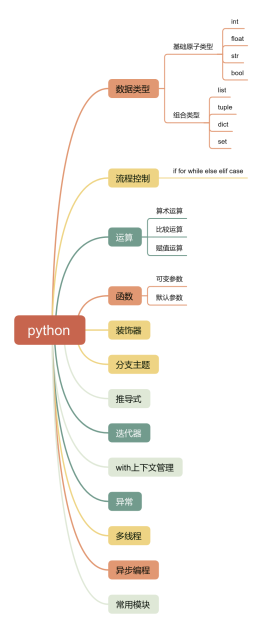
Collect
Get Started
评论
0 条评论
下一页

