SpringBoot
2021-03-31 16:21:31 381 举报SpringBoot是一个开源的Java框架,它可以帮助开发者快速构建和部署微服务应用。SpringBoot具有简化配置、快速开发和轻量级等特点,使得开发者可以专注于业务逻辑的实现,而无需关心底层的技术细节。通过自动配置和约定优于配置的原则,SpringBoot能够大大减少开发者的工作量,提高开发效率。同时,SpringBoot还具备良好的可扩展性和兼容性,可以与各种第三方库和技术无缝集成。总之,SpringBoot是一个非常实用的Java开发框架,适用于构建各种规模的企业级应用。
SpringBoot
Springboot源码分析
模板推荐
作者其他创作
大纲/内容
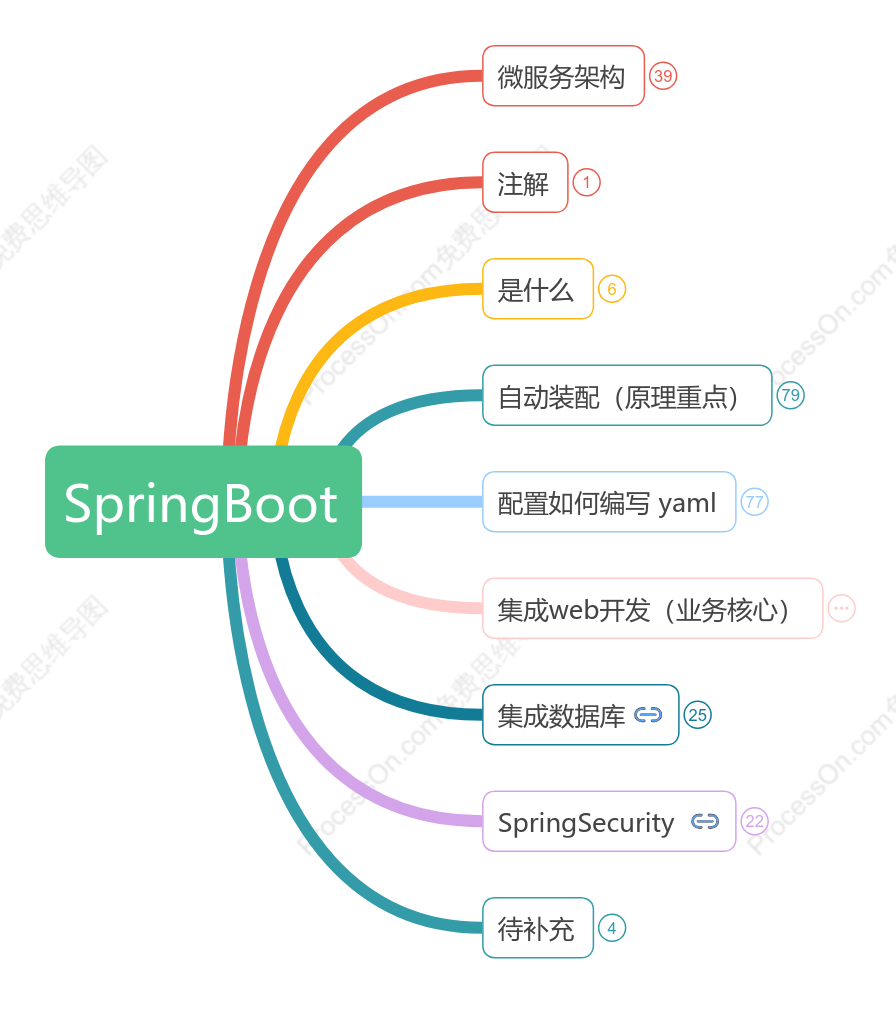
微服务架构
SpringCloud
接口:RESTful风格
注册中心:Eureka
服务调用(负载均衡)
Ribbon
Feign
熔断/降级
Hystrix
网关
Zuul
Gateway
配置
SpringCloud config
git
架构
MVC
三层架构
MVVM
微服务
一个一个业务
service
userService
模块
SpringMVC
controller
提供接口
案例
流程
仓库冻结
资金冻结
验证
购买成功
仓库数量减少
仓库解冻
资金解冻
放在一台服务器上大量工作all in one:10s
用户下单
controller
消息队列:异步处理只需1s
注解
@RestController=@Controller+@ResponseBody
是什么
Maven工具package打包项目,生成jar文件
springbootdemo-0.0.1-SNAPSHOT.jar
java -jar .\springbootdemo-0.0.1-SNAPSHOT.jar
控制台运行jar包同样可以访问 http://localhost:8080/test/
一个个jar
微服务
自动装配(原理重点)
pom.xml
spring-boot-dependencies
核心依赖在父工程中
在写入或引入一些SpringBoot依赖时,不需要指定版本,因为有版本仓库
启动器
<dependency><br> <groupId>org.springframework.boot</groupId><br> <artifactId>spring-boot-starter</artifactId><br> </dependency>
springboot的启动场景
spring-boot-starter-web
自动导入web环境所有依赖
spring-boot-starter-test
springboot会将所有功能场景,都变成一个个启动器
需要使用什么功能,只需在官网找到对应的启动器starter
主程序
@SpringBootApplication
标注此类为Springboot应用:启动类下所有资源被导入<br>
程序入口
点入查看@SpringBootConfiguration<br>点入查看@Configuration<br>
得到@Component,证明是Spring的一个组件
<pre style="background-color:#2b2b2b;color:#a9b7c6;font-family:'JetBrains Mono',monospace;font-size:10.5pt;">SpringApplication.<span style="font-style:italic;">run</span>(SpringbootdemoApplication.<span style="color:#cc7832;">class, </span>args)<span style="color:#cc7832;">;</span></pre>
双击放大查看
最初以为运行了一个main方法,没想到却<b>开启了一个服务</b>
关于SpringBoot谈谈你的理解
自动装配(见下)
SpringApplication.run
SpringApplication的实例化
推断应用的类型:普通项目还是<b>Web项目</b><br>
查找并加载所有可用<b>初始化器 </b>, 设置到initializers属性中
找出所有的应用程序<b>监听器</b>,设置到listeners属性中
推断并设置main方法的定义类,找到<b>运行主类</b>
run方法的执行
监听器
装配环境参数
上下文区域
@ComponentScan
扫描当前主启动类同级的包
<b><font color="#f384ae">@EnableAutoConfiguration</font></b> 自动导入包
@AutoConfigurationPackage 自动配置包
@Import({Registrar.class})
自动配置 包注册<br>
@Import({<b><font color="#662c90">AutoConfigurationImportSelector</font></b>.class}) 自动导入包的核心
自动配置导入选择
为什么自动配置没有生效,怎么解决?
因为存在核心<b>注解@ConditionalOnXXX</b>
双击放大查看
如果条件均满足才会生效
需要导入对应Start启动器才生效
结论
SpringBoot所有自动配置都是在启动的时候扫描并加载:spring.factories(所有自动配置类都在里面,但不一定生效)<br>
步骤/原理
<ul><li>SpringBoot启动会加载大量自动配置类<br></li></ul>
自动配置类在spring-boot-autoconfigure-2.2.2.RELEASE.jar包下<br>
从类路径下/META-INF/spring.factories获取指定值<br>
<ul><li>我们需要的功能有没有在SpringBoot默认的自动配置类中<br></li></ul>
如果没有需要在application.yaml中配置<br>
<ul><li>给容器中自动配置类添加组件时,会从properties类中获取属性<br></li></ul>
<ul><li>把所有需要导入的组件,以类名方式返回,这些组件被添加到容器<br></li></ul>
<ul><li>容器中(spring.factories)存在很多xxxAutoConfiguration的文件(@Bean)<br></li></ul>
自动配置类,给容器中添加组件
yaml可以注入到我们的配置类中
案例
spring.factories中的org.springframework.boot.autoconfigure.web.servlet.<i>HttpEncoding</i><b>AutoConfiguration</b>,\
有@Configuration表示一个配置类
@EnableConfigurationProperties({HttpProperties.class})
<b><font color="#381e11">HttpProperties.class</font></b>中
@ConfigurationProperties(prefix = "<b><font color="#662c90">spring.http</font></b>")<br>
在application.yaml中<br>
可以为<b>HttpProperties.class</b>中的属性赋值(自定义配置)
<span style="font-size: inherit;">其中encoding等属性为</span><b style="font-size: inherit;"><font color="#000000">HttpProperties.class</font></b><span style="font-size: inherit;">中拥有的属性</span><br>
public String[] selectImports(AnnotationMetadata annotationMetadata) {
导入元数据
protected <b><font color="#662c90">AutoConfigurationImportSelector</font></b>.AutoConfigurationEntry <i><u><b>getAutoConfigurationEntry(获得自动配置实体)</b></u></i><br>(AutoConfigurationMetadata autoConfigurationMetadata, AnnotationMetadata annotationMetadata) {
List<String> configurations = this.<b>getCandidateConfigurations</b>(annotationMetadata, attributes);<b><font color="#fdb813">//获取候选配置</font></b>
protected List<String> <b>getCandidateConfigurations</b>(AnnotationMetadata metadata, AnnotationAttributes attributes) {<br> List<String> configurations = SpringFactoriesLoader.<b><font color="#55beed">loadFactoryNames</font></b>(<b><font color="#f15a23">this.getSpringFactoriesLoaderFactoryClass()</font></b>, this.getBeanClassLoader());<br> Assert.notEmpty(configurations, "No auto configuration classes found in <b><font color="#c41230">META-INF/spring.factories</font></b>. If you are using a custom packaging, make sure that file is correct.");<br> return configurations;<br> }
获取候选配置
protected Class<?> <b><font color="#f15a23">getSpringFactoriesLoaderFactoryClass</font></b>() {<br><b><font color="#f384ae"> return EnableAutoConfiguration.class</font></b>;<br> }
public static List<String> <b><font color="#31a8e0">loadFactoryNames</font></b>(Class<?> <b><font color="#f15a23">factoryType</font></b>, @Nullable ClassLoader classLoader) {<br> String factoryTypeName = factoryType.getName();<br> return (List)<b><font color="#16884a">loadSpringFactories</font></b>(classLoader).getOrDefault(factoryTypeName, Collections.emptyList());<br> }
private static Map<String, List<String>> <b><font color="#16884a">loadSpringFactories</font></b>(@Nullable ClassLoader classLoader) {<br> MultiValueMap<String, String> result = (MultiValueMap)<b>cache</b>.<b>get</b>(classLoader);<br>……<br>Enumeration<URL> urls = classLoader != null ? <b>classLoader.getResources</b>("<b><font color="#c41230">META-INF/spring.factories</font></b>") : <b>ClassLoader.getSystemResources</b>("<b><font color="#c41230">META-INF/spring.factories</font></b>");<br> LinkedMultiValueMap result = new LinkedMultiValueMap();<br><b>while</b>(urls.hasMoreElements()) {<br> URL url = (URL)urls.nextElement();<br> UrlResource resource = new UrlResource(url);<br><b> Properties properties = PropertiesLoaderUtils.loadProperties(resource);//<font color="#c41230">所有资源加载到配置类中</font></b><br>……<br><b>cache.put</b>(classLoader, result);<br> return result;<br>……
配置如何编写 yaml
yaml语法
对空格要求较高
普通的key-value
name: xinzhang
对象
student:<br> name: xinzhang<br> age: 28
行内写法
students: {name: xinzhang,age: 24}
数组
pets:<br> - cat<br> - dog<br> - pig
pet: [cat,dog,pig]
yaml可以注入到我们的配置类中
原方式
POJO添加@Component注解
属性使用
@Value("3")<br> private Integer age;
测试用
@Autowired<br>private Dog dog;
yaml方式
POJO
@Component<br><b><font color="#f15a23">@ConfigurationProperties</font></b>(prefix = "person")<br>public class Person {<br> private String name;<br> private Integer age;<br> private Boolean happy;<br> private Date birth;<br> private Map<String,Object> maps;<br> private List<Object> lists;<br> private Dog dog;
yaml文件
person:<br> name: xinzhang${random.uuid}<br> age: ${random.int}<br> happy: true<br> birth: 2018/3/24<br> maps: {k1: v1,k2: v2}<br> lists:<br> -code<br> -music<br> -girl<br> dog:<br> name: ${person.hello:hello}_大聪明<br> age: 3
<b><font color="#f15a23">@ConfigurationProperties</font></b>(prefix = "person")
将配置文件中配置的每一个属性值映射到对应组件中
Springboot将本类中所有属性和配置文件中相关配置进行绑定
参数prefix = "person"
将配置文件中person下面所有属性一一对应
可以使用占位符,随机变量,选择表达式
${person.hello:hello}
person.hello存在,使用person.hello
person.hello不存在,使用hello
对比
松散绑定
yml中写的last-name,和lastName一样, - 后面跟着的字母默认是大写
如果我们在某个业务中,只需要获取配置文件中的某个值,可以使用一下 @value
如果说,我们专门编写了一个JavaBean来和配置文件进行一一映射,就直接@ConfigurationProperties,不要犹豫
JSR303数据校验,在字段增加一层过滤器验证,保证数据合法性
Java Specification Requests
Java 规范提案
@Validated
SpringBoot配置文件可以配置哪些东西?(见上同款绿框)
配置文件加载位置
优先级由高到底,高优先级的配置会覆盖低优先级的配置
优先级1:项目路径下的config文件夹配置文件
优先级2:项目路径下配置文件
优先级3:资源路径下的config文件夹配置文件
优先级4:资源路径下配置文件
SpringBoot会从这四个位置全部加载主配置文件;互补配置
多环境切换
主配置文件编写时,文件名可以是 application-{profile}.properties/yml , 用来指定多个环境版本
<strike>application-test.properties</strike>
测试环境配置
<strike>application-dev.properties</strike>
开发环境配置
使用yaml的多文档块
Springboot不会直接启动环境配置文件
默认使用application.properties主配置文件
通过配置来激活需要的环境
spring.profiles.active=dev
yaml的多文档块
server:<br> port: 8081<br>spring:<br> profiles:<br> active: test<br>---<br>server:<br> port: 8082<br>spring:<br> profiles: dev<br>---<br>server:<br> port: 8083<br>spring:<br> profiles: test
spring:<br> profiles:<br> active: test
选择要激活那个环境块
若没有激活其他环境
默认使用配置文件环境
spring:<br> profiles: dev
配置环境的名称
启用 debug=true属性
来让控制台打印自动配置报告,这样我们可以很方便的知道哪些自动配置类生效
Positive matches
自动配置类启用的:正匹配
Negative matches
没有启动,没有匹配成功的自动配置类:负匹配
Unconditional classes
没有条件的类
集成web开发(业务核心)<br>
导入静态资源
源码思想
查看spring-boot-autoconfigure-2.2.2.RELEASE.jar包下META-INF/spring.factories中的WebMvc<font color="#c41230"><b>AutoConfiguration</b></font>
<font color="#f15a23"><b>WebMvcAutoConfigurationAdapter</b></font>方法
<font color="#f15a23"><b>addResourceHandlers</b></font>
查看Resource<font style="--darkreader-inline-color:#ee4763;" data-darkreader-inline-color="" color="#c41230"><b>Properties</b></font>.class源码
private static final String[] <font style="--darkreader-inline-color:#9fcd70;" data-darkreader-inline-color="" color="#669635"><b>CLASSPATH_RESOURCE_LOCATIONS </b></font>= <br>new String[]{"classpath:/META-INF/resources/", "classpath:/resources/", "classpath:/static/", "classpath:/public/"};
可以查看到静态资源映射规则
classpath:/META-INF/resources/
<dependency><br> <groupId>org.<b>webjars</b></groupId><br> <artifactId>jquery</artifactId><br> <version>3.4.1</version><br></dependency>
http://localhost:8080/webjars/jquery/3.4.1/jquery.js
浏览器可访问<br>
位置在maven导入的jar包中
classpath:/resources/
resources下可以再新建resources文件夹,新建1.js
http://localhost:8080/1.js
优先访问
classpath:/static/
resources下新建static文件夹,新建1.js
http://localhost:8080/1.js
在resources中没有1.js会访问static
classpath:/public/
resources下新建public文件夹,新建1.js
http://localhost:8080/1.js
上述两个文件夹没有,才会访问
配置文件自定义静态文件路径<br>
application.yaml配置文件中
spring:<br> resources:<br> static-locations: classpath:/xinzhangconfig/
注意配置文件中<font style="--darkreader-inline-color:#fdc746;" data-darkreader-inline-color="" color="#c08802"><b>空格</b></font><br>
配置之后替代了Resource<font style="--darkreader-inline-color:#ee4763;" data-darkreader-inline-color="" color="#c41230"><b>Properties</b></font>.class中<font style="--darkreader-inline-color:#9fcd70;" data-darkreader-inline-color="" color="#669635"><b><font style="--darkreader-inline-color:#6fffb4;">CLASSPATH_RESOURCE_LOCATIONS</font></b></font>的属性
首页
WebMvcAutoConfiguration.class
welcomePageHandlerMapping
getWelcomePage
getIndexHtml
return this.resourceLoader.getResource(location + "<font style="--darkreader-inline-color:#9fcd70;" data-darkreader-inline-color="" color="#669635"><b>index.html</b></font>");
在静态资源路径下添加即可<br>
模板引擎Thymeleaf(JSP)
<br>
作用
后台封装动态数据,数据交给模板引擎,模板引擎进行表达式解析、填充指定位置
引入Thymeleaf
<!--thymeleaf--><br><dependency><br> <groupId>org.springframework.boot</groupId><br> <artifactId>spring-boot-starter-thymeleaf</artifactId><br></dependency>
<br>
ThymeleafAutoConfiguration
ThymeleafProperties.class
private String prefix = "<font color="#f384ae"><b>classpath:/templates/</b></font>";<br> private String suffix = "<font color="#f15a23"><b>.html</b></font>";
html页面放在类路径下的templates中,thymeleaf自动渲染
Thymeleaf使用
所有的html元素都可以被Thymeleaf替换接管
命名空间<br>
<html lang="en" xmlns:th="http://www.thymeleaf.org">
th:元素名
前端<div th:text="${msg}"></div>
后端model.addAttribute("msg","hello this is my thymeleaf");
Thymeleaf语法
首先添加命名空间<br>
<html lang="en" xmlns:th="http://www.thymeleaf.org">
<br>
片段包含
JSP:include
th:insert
遍历
c:forEach
th:each
前端<h2 th:each="<font color="#662c90"><b>user</b></font> :<font color="#f15a23"><b>${users}</b></font>" th:text="${<font color="#662c90"><b>user</b></font>}"></h2>
后端map.put("<font color="#f15a23"><b>users</b></font>", Arrays.asList("xinzhang","UCAS"));
条件判断<br>
c:if
th:if
声明变量<br>
c:set
th:object
任意属性修改
支持prepend/append<br>
th:attr
th:attrprepend
th:attrappend
修改指定属性默认值<br>
th:value
th:href
th:src
表达式
Selection Variable Expressions: *{...}:选择表达式:和${}在功能上是一样;
Message Expressions: #{...}:获取国际化内容
Link URL Expressions: @{...}:定义URL;
<link th:href="@{/css/bootstrap.min.css}" rel="stylesheet">
起始路径对应resources/static
Fragment Expressions: ~{...}:片段引用表达式
装配扩展SpringMVC
The auto-configuration adds the following features on top of Spring’s defaults
Inclusion of <font color="#0076b3"><b>ContentNegotiatingViewResolver </b></font>and BeanNameViewResolver beans
public class <b><font color="#0076b3">ContentNegotiatingViewResolver </font></b>extends WebApplicationObjectSupport<br> <font color="#662c90"><b>implements ViewResolver</b></font>, Ordered, InitializingBean <br>//实现了视图解析器接口的类,可以看做视图解析器
public <font color="#662c90"><b>interface ViewResolver</b></font> {<br> View <font color="#924517"><i>resolveViewName</i></font>(String viewName, Locale locale) throws Exception;
<b><font color="#0076b3">ContentNegotiatingViewResolver</font></b><font color="#000000">重写了<font color="#924517"><i>resolveViewName</i></font>方法</font>
List<View> candidateViews = <u><i>getCandidateViews</i></u>(viewName, locale, requestedMediaTypes);
for (ViewResolver viewResolver : this.viewResolvers) {
return candidateViews;
选择候选视图
View bestView = <u><i>getBestView</i></u>(candidateViews, requestedMediaTypes, attrs);
获取最好的视图
在src/main/java下创建config包,创建config类
you can add your own <font color="#f15a23"><b>@Configuration </b></font>class of type <b><font color="#f384ae">WebMvcConfigurer</font>(shift+shift查看为接口,实现接口) <font color="#924517"><i>but without @EnableWebMvc.</i></font></b><br>
分析@EnableWebMvc
@Import(<b><i><font color="#924517">DelegatingWebMvcConfiguration</font></i></b>.class)<br>public @interface EnableWebMvc {<br>}
public class <font color="#924517"><b>DelegatingWebMvcConfiguration </b></font>extends <font color="#924517"><b>WebMvcConfigurationSupport </b></font>{
<b><font color="#c41230">WebMvcAutoConfiguration</font></b>
<font color="#c41230"><b>@ConditionalOnMissingBean(WebMvcConfigurationSupport.class)</b></font>
配置了@EnableWebMvc会导入并继承WebMvcConfigurationSupport
如果存在WebMvcConfigurationSupport.class则以下自动配置均失效
@ConditionalOn的巧妙应用
自定义视图解析器,并注册到bean中会自动装配
//扩展 SpringMVC<br><font color="#f15a23">@Configuration</font><br>public class <font color="#c41230"><b>MyMvcConfig </b></font><font color="#f384ae">implements WebMvcConfigurer</font> {<br> <font color="#924517"><u>@Bean</u></font><br> public ViewResolver myViewResolver(){<br> return new MyViewResolver();<br> }<br> public static class MyViewResolver <font color="#f1753f"><u>implements ViewResolver </u></font>{<br> @Override<br> public View resolveViewName(String viewName, Locale locale) throws Exception {<br> return null;<br> }}}
类DispatcherServlet.java<br>
方法doDispatch(HttpServletRequest request, HttpServletResponse response)
处理请求响应
方法中设置断点<br>
debug启动调试访问http://localhost:8080/
可查看到自定义视图解析器已生效
<br>
<br>
用户配置和默认的组合
Automatic registration of Converter, GenericConverter, and <b><i>Formatter beans</i></b>.
查找WebMvcAutoConfiguration文件中的Formatter<br>
@Bean<br> public FormattingConversionService mvcConversionService() {<br> WebConversionService conversionService = new WebConversionService(<font color="#662c90"><b>this.mvcProperties.getDateFormat()</b></font>);<br> this.<font color="#662c90"><b>addFormatters</b></font>(conversionService);<br> return conversionService;}
WebMvcProperties
/**<br> * Date format to use. For instance, `dd/MM/yyyy`.<br> */<br> private String dateFormat;
<i><b>***Properties的属性可以在配置文件中更改配置</b></i>
扩展SpringMVC:视图跳转
//扩展 SpringMVC<br>@Configuration<br>public class MyMvcConfig implements WebMvcConfigurer {<br> @Override<br> public void addViewControllers(ViewControllerRegistry registry) {<br> registry.addViewController("/xinzhang").setViewName("test");<br> }
<b>大型公司如何写Starter</b>
写XXXConfiguration,使用ConditionalOn等注解
配置properties<br>
打jar包放入spring-boot-autoconfigure-2.2.5.RELEASE.jar!\org\springframework\boot\autoconfigure中
包含XXXConfiguration+properties
注:遇见XXX<strike>Auto</strike>Configuration,立即推,帮着我们扩展了什么功能<br>
实操员工管理系统
配置首页<br>
server:<br> servlet:<br> context-path: /xinzhang
所有页面的静态资源都需要使用Thymeleaf接管
th:href @{}
th:src="@{/img/bootstrap-solid.svg}"
首页访问使用自定义配置方式<br>
<font style="--darkreader-inline-color:#f47c51;" data-darkreader-inline-color="" color="#b4380b"><b>@Configuration</b></font><br>public class MyMvcConfig implements <font style="--darkreader-inline-color:#f47c51;" data-darkreader-inline-color="" color="#b4380b"><b>WebMvcConfigurer </b></font>{<br> @Override<br> public void <font style="--darkreader-inline-color:#f47c51;" data-darkreader-inline-color="" color="#b4380b"><b>addViewControllers</b></font>(ViewControllerRegistry registry) {<br><u> registry.addViewController("/").setViewName("index.html");</u><br> registry.addViewController("/index.html").setViewName("index.html");}}
可以设置多个
页面国际化
MessageSourceAutoConfiguration
MessageSourceProperties
private String basename = "messages";
新创建路径i18n
可视化进行三个文件同时操作
login.properties
login.btn=登录
login_en_US.properties
login.btn=login
login_zh_CN.properties
login.btn=登录
application.yaml
spring:<br> #配置文件放的真实位置<br> messages:<br> basename: i18n.login
HTML静态资源页面<br>
th可以加在任何位置
国际化使用
[[#{login.btn}]]
th:text="#{login.remember}
中英文切换对应链接<br>
<a class="btn btn-sm" th:href="@{/index.html(<font color="#662c90"><b>language</b></font>='zh_CN')}">中文</a>
<a class="btn btn-sm" th:href="@{/index.html(<font color="#662c90"><b>language</b></font>='en_US')}">English</a>
实现中英文切换<br>
WebMvcAutoConfiguration.java
WebMvcAutoConfigurationAdapter类
localeResolver方法
interface LocaleResolver
AcceptHeaderLocaleResolver
AcceptHeaderLocaleResolver implements LocaleResolver
重写了两个方法
resolveLocale
setLocale
自定义LocaleResolve类实现LocaleResolver接口<br>
重写了两个方法
public Locale resolveLocale(HttpServletRequest <font color="#f15a23"><b>request</b></font>)
String language = <font color="#f15a23"><b>request</b></font>.getParameter("<font color="#662c90"><b>language</b></font>");<br> Locale locale = Locale.getDefault();<br> if (!StringUtils.isEmpty(language)){<br> String[] strings = language.split("_");<br> locale = new Locale(strings[0], strings[1]);}<br> return locale;
setLocale
在自定义的配置类中
@Configuration<br>public class MyMvcConfig implements WebMvcConfigurer {
添加bean注入
@Bean<br> public <b>LocaleResolver </b><font color="#f384ae"><u><i>localeResolver</i></u></font>(){<br> return new MyLocaleResolverConfig();<br> }
类名要与返回类名对应,首字母小写
拦截器
自定义拦截器类
public class LoginHandlerInterceptor implements <font color="#7dcdc2"><b>HandlerInterceptor </b></font>{<br> @Override<br> public boolean <font color="#00a650"><b>preHandle</b></font>(HttpServletRequest request, HttpServletResponse response, Object handler) throws Exception {<br> <i><u>Object session = request.getSession().getAttribute("LoginUser");</u></i><br> if (session == null){<br> request.setAttribute("msg", "权限不足,请先登录");<br> <i><u>request.getRequestDispatcher("/index.html").forward(request, response);</u></i><br> return false;<br> }else {<br> return true;}}}
实现<font color="#7dcdc2"><b>HandlerInterceptor</b></font>接口
使用session令用户登录一次后免登陆
返回false进行拦截
返回true放行
getRequestDispatcher
转发跳转到起始登录页面
登录页面配置
@Controller<br>public class LoginController {<br> @RequestMapping("/user/login")<br> public String login(@RequestParam("username") String username,<br> @RequestParam("password") String password,<br> Model model,<br> HttpSession session){<br> if (!StringUtils.isEmpty(username) && "123".equals(password)){<br> <u><i>session.setAttribute("LoginUser", username);</i></u><br> return "<font color="#662c90"><b>redirect:/main.html</b></font>";<br> }else {<br> model.addAttribute("msg", "输入不合法");<br> return "index";}}}
登录成功添加session
redirect:/main.html
重定向
避免登录成功后url显示密码
需要自定义<font color="#f15a23"><b>配置</b></font>支持
<font color="#f15a23"><b>@Configuration</b></font><br>public class MyMvcConfig<font color="#f15a23"><b> implements WebMvcConfigurer</b></font> {<br> @Override<br> public void <font color="#f384ae"><b>addViewControllers</b></font>(ViewControllerRegistry registry) {<br> registry.addViewController("/").setViewName("index.html");<br> registry.addViewController("/index.html").setViewName("index.html");<br> registry.addViewController("<font color="#662c90"><b>/main.html</b></font>").setViewName("dashboard.html");<br> }
在自定义配置信息中配置拦截内容
@Override<br> public void <font color="#f384ae"><b>addInterceptors</b></font>(InterceptorRegistry registry) {<br> registry.<font color="#31a8e0"><b>addInterceptor</b></font>(new LoginHandlerInterceptor())<br> .<font color="#16884a"><b>addPathPatterns("/**")</b></font><br> .<font color="#fdb813"><b>excludePathPatterns</b></font>("/index.html","/","/user/login",<br> "/css/**","/img/**","/js/**");<br> }
addInterceptor
添加拦截器
addPathPatterns
要使当前拦截器生效的路径
excludePathPatterns
不被拦截的路径
增删改查
前端:展示员工列表
提取公共页面
集成数据库<br>
整合JDBC
JDBCTemplate/RedisTemplate
JdbcTemplateConfiguration使用@Bean进行注入
可以拿来即用
URL
jdbc:mysql://localhost:3306/mybatis_test?useUnicode=true&characterEncoding=utf8&useSSL=false&serverTimezone=UTC&rewriteBatchedStatements=true&allowMultiQueries=true
整合Druid数据源
配置文章
整合MyBatis框架
Maven
<!--MyBatis--><br> <dependency><br> <groupId>org.mybatis.spring.boot</groupId><br> <artifactId>mybatis-spring-boot-starter</artifactId><br> <version>2.1.1</version><br> </dependency>
注意:java实体类字段要与数据库字段对应
可使用Lombok
@Data<br>@NoArgsConstructor<br>@AllArgsConstructor
application.yaml
mybatis:<br> type-aliases-package: org.xinzhang.springbootdemo.entity<br> mapper-locations: classpath:mapper/*.xml
同mybatis-config.xml
<!--<br> 为类型设置类型别名<br> type:Java 类型,若只设置type,默认的别名就是类名,且不区分大小写<br> --><br> <!-- <typeAlias type="com.atguigu.bean.User" alias="u"/> --><br> <typeAliases><br> <package name="org.xinzhang.mybatistest.bean"/><br> </typeAliases>
mapper-locations
直接映射resources文件下文件目录,无需class文件中xml与class在一起的方式
mybatis:<br> configuration:<br> map-underscore-to-camel-case: true<br> lazy-loading-enabled: true<br> aggressive-lazy-loading: false<br> cache-enabled: true
同mybatis-config.xml
<settings><br> <setting name="mapUnderscoreToCamelCase" value="true"/><br> <setting name="lazyLoadingEnabled" value="true"/><br> <setting name="aggressiveLazyLoading" value="false"/><br> <setting name="cacheEnabled" value="true"/><br> </settings>
@Mapper注解修饰java接口<br>
表示本类是一个 MyBatis 的 Mapper
SpringSecurity <br>
基本介绍<br>
在web开发中,安全第一位
过滤器/拦截器
非功能性需求<br>
没有安全框架功能也能实现
设计之初考虑安全问题
漏洞
隐私泄露
架构一旦确定很难更改<br>
功能
认证/授权
vip1-6
功能权限
访问权限<br>
菜单权限
拦截器/过滤器
大量原生代码,易造成冗余
实现
AOP
横切
配置类来实现
文章
待补充
Shiro
分布式开发 Dubbo(RPC风格)+zookeepe
swagger 接口文档
任务调度

收藏
立即使用

收藏
立即使用

收藏
立即使用

收藏
立即使用

Collect
Get Started

Collect
Get Started

Collect
Get Started

Collect
Get Started
评论
0 条评论
下一页

