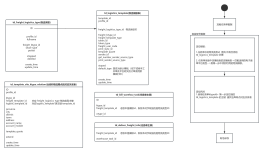
ID profile_idfullnamefreight_btype_idshare_typepersetstoppeddeletedcreate_timeupdate_time
定位模板:1.任务单中的物流类型id 查找 所有支持的 td_logistics_template 列表2. 任务单信息中店铺信息的店铺类型->匹配适用的电子面单平台类型-->到第一步中找到可用的物流模板。
取号保存
td_template_site_ktype_relation(仓库和物流网点的对应关系表)
IDprofile_idktype_idfreight_template_id 对应 freight_logistics_type 物流类型主键logistic_template_id 对应logistic_template 表主键 template_idprovincecitydistricttownaddressaccount_nameaccount_mobiletemplate_quoteextendcreate_timeupdate_time
加载任务单数据
定位网点1.使用任务单ktypeId+ 第一步定位到的td_logistics_template 的主键 查找仓库网点对应关系表
td_logistics_template(物流模板表)
组装取号数据
td_deliver_freight_Info(任务单主表)
freight_template_id 老版本是模板id,新版本此字段放的是物流类型IDwarehouse_task_id
td_bill_warehou_task(任务单主表)
IDktype_idfreight_template_id 老版本是模板id,新版本此字段放的是物流类型IDotype_id
td_freight_logistics_type(物流类型)