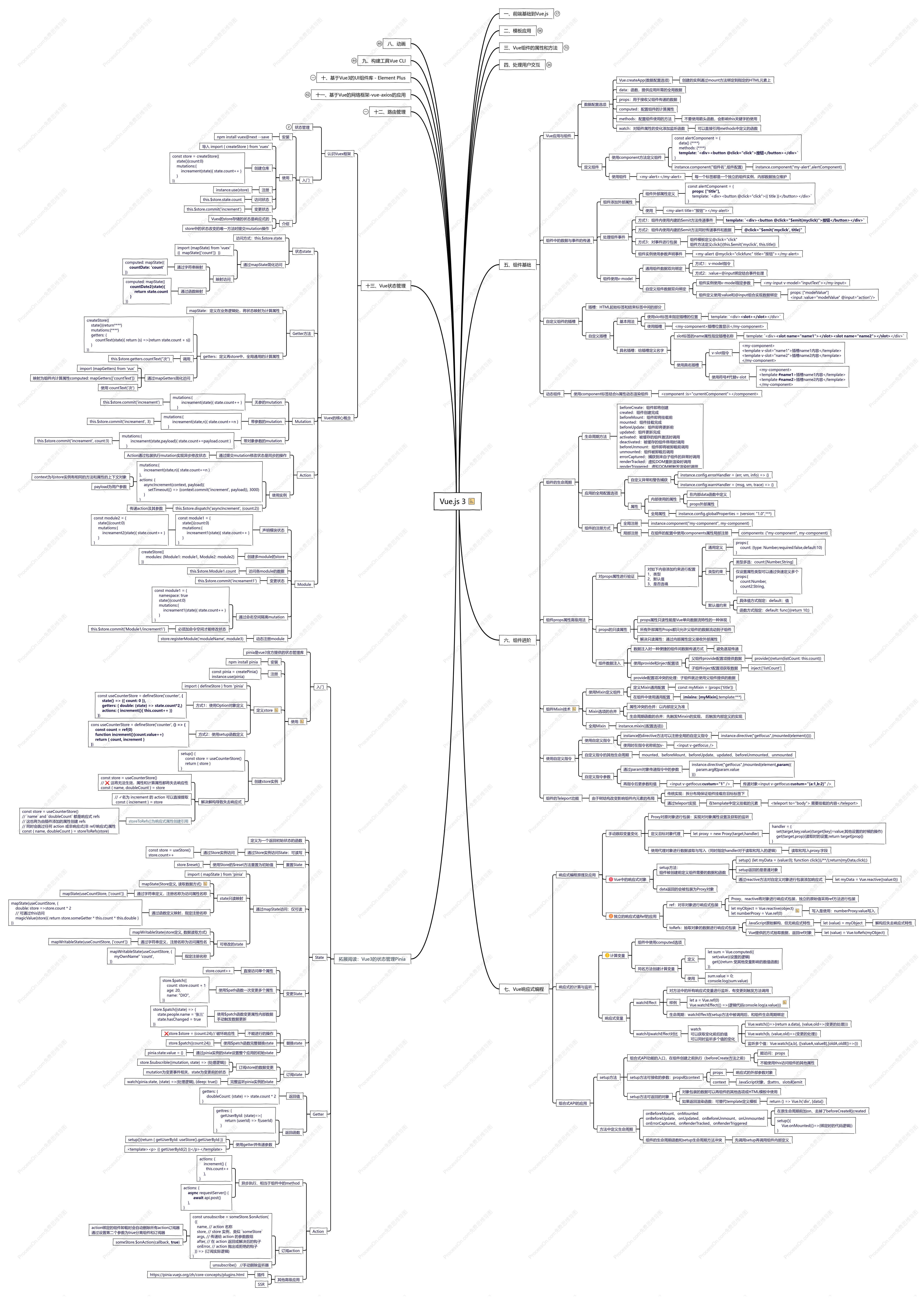
循序渐进Vue.js 3前端开发实战
2022-12-06 12:13:45 3 举报《循序渐进Vue.js 3前端开发实战》笔记
javascript
前端书籍
项目实战
模板推荐
作者其他创作
大纲/内容
八、动画
CSS3原生动画
transition简单过渡动画
方式1:使用transition属性指定过渡动画
transition: width 2s, height 2s, background-color 2s;
方式2:使用逐条属性对动画效果进行设置
transition-property: width, height, background-color;
transition-duration: 1s;
transition-timing-function: linear;
transition-delay: 2s;
keyframes关键帧动画
定义关键帧
@keyframes animation1 {<br> 0% {样式详情}<br> 50% {样式详情}<br> 100% {样式详情}<br>}<br>
或则只定义起始状态<br><font color="#0b033f">@keyframes animation1 {</font><font color="#0b033f"></font><br><font color="#0b033f"> from {样式详情}</font><font color="#0b033f"></font><br><font color="#0b033f"> to {样式详情}</font><br><font color="#0b033f">}</font><br>
使用
通过animation属性使用关键帧
.clazzName {<br> 其他样式<br> animation: animation1 4s linear;<br>}<br>
使用逐条属性对动画效果进行设置
animation-name、duration、timing-function、direction、iteraction-count、play-state、delay、fill-mode
使用JS方式实现动画
定时器更新组件状态
setInterval(()=>{更新组件状态}, 10)<br>
Vue过渡动画
定义过渡动画
Vue使用transition内置组件,包装展示过渡动画的组件
动画的定义
定义6组CSS属性样式,其中x为组件transition的name值<br>x-enter-from:即将插入页面<br>x-enter-active:插入过程整个过渡动画都会添加<br>x-enter-to:<font color="#0b033f">组件被插入页面后</font><br>x-leave-from:移除前的初始状态<br>x-leave-active:移除过程整个过渡动画都会添加<br>x-leave-to:移除后的结束状态<br>
active中的动画行为可使用transition或animation方式
组件的包装
<transition name="ani">需要做动画的组件</transtion>
包装的组件在插入或移除的时,自动寻找动画名称开头的CSS类
动画过程中的监听回调
transition组件的监听回调函数
before-enter、enter、after-enter、enter-cancelled<br>before-leave、leave、after-leave、leave-cancelled
使用实例
<transtion name="ani" @enter="funcEnter">包装的组件</transition>
在组件的methods方法中定义回调方法的实现
多个组件的过渡动画
默认transition内部组件的插入和移除同步进行
先执行移除再插入:transition组件的mode属性设置为out-in
<transition name="ani" <b>mode="in-out"</b>>包装的组件</transition>
列表的过渡动画
使用transition-group内置组件包装v-for组件实现对列表元素变动的动画
<<b>transition-group</b> name="ani"><br> <div v-for="item in list">元素组件</div><br></<b>transition-group</b>>
区别组件过渡动画
要求:列表中每一个元素有唯一的key值
ani-move特殊动画类:实现对排序过程动画进行定义
九、构建工具Vue CLI
Vue CLI入门
安装
安装nodejs
安装Vue CLI:npm install -g @vue/cli
升级Vue CLI:npm update -g @vue/cli
快速创建项目
使用命令创建
vue create hello-world
使用图形界面交互创建
vue ui
Vue CLI项目模板工程
模板工程结构
文件
.gitignore:git版本忽略文件<br>babel.config.js:Babel工具的配置文件,Babel一个JavaScript编译器<br>package.json:存储JSON对象,配置当前项目名称、版本号、脚本命令以及模块依赖等<br>yarn.lock:记录YARN报管理器安装的依赖版本信息,无需关心<br>
文件夹
node_modules:存放npm安装的依赖模块<br>public:共有的资源文件,图标、HTML文件等<br>src:核心功能代码,asserts存放资源文件,components存放组件文件
vue文件结构
template模板部分、script脚本代码、style样式代码
允许Vue项目工程
命令方式
npm run dev
指定运行端口:npm run serve -- --port 9000
交互界面方式
vue ui
在项目中使用依赖
命令方式
npm install --save axios vue-axios
会自动更新package.json并保存依赖到node_modules文件夹下
交互界面方式
vue ui
依赖-安装依赖
工程构建
命令方式
npm run build
交互界面方式
vue ui
任务-build
构建结果:dist文件夹,包含压缩后的入口文件index.html、静态资源、CSS、JavaScript等文件
新一代构建工具Vite
对比Vue CLI
<font color="#0b033f">不基于webpack,轻量,功能仅构建和开发服务器</font>
体验Vite
使用Vite创建Vue项目
npm init @vitejs/app
十、基于Vue3的UI组件库 - Element Plus
入门
安装
引入样式
element-plus/lib/theme-chalk/index.css
引入组件库
element-plus/lib/index.full.js
Vue挂载Element
Vue.createApp({})<b>.use(ElementPlus)</b>
按钮组件
el-button
属性:type、disable等
标签组件
el-tag
属性:type<font color="#0b033f">、closeable</font>、click、close
el-check-tag
属性:checked
空态图与加载占位图
el-empty
属性:image等<br>插槽:image、description
el-skeleton
属性:animated、count、rows、throttle等
el-skeleton-item
图片与头像
el-image
属性:fit、src、load、error、lazy
el-avatar
属性:src<br>
表单类
单选框
el-radio-group
属性:v-model、disable、change
el-radio
属性:label
el-radio-button
属性:label
复选框
el-checkbox-group
属性:min、max、v-model
el-checkbox
属性:label
标准输入框
el-input
属性:type、change等<br>插槽:prefix、suffix、prepend、append
带推荐列表的输入框
el-autocomplete
属性:disabled、placement、fetech-suggestions、select、change<br>插槽:prefix、suffix、prepend、append
数字输入框
el-input-number
属性:min、max、precision、change、blur、focus
选择列表
el-select
属性:multiple、disabled、clearable、remote-method、change、remote-tag、clear、focus
el-option-group
el-option
多级列表组件
el-cascader
属性:options、props
开关与滑块
开关组件
el-switch
属性:loading、before-change、change
滑块组件
el-slider
属性:min、max、step、change、input
选择器
时间选择器
el-time-picker
属性:is-ranage、default-value、format、change、blur、focus
日期选择器
el-date-picker
属性:type、format、validate-event、change、blur、focus
type为datetime时同时选择日期和时间
颜色选择器
el-color-picker
属性:show-alpha、color-format、predefine
提示类
警告
el-alert
属性:type、description、effect、close
消息提示
el-button
属性:message、type、duration、showClose、center、onClose
Element-Plus注册的全局方法
<span><font color="#0b033f">$message方法:直接使用this调用发起消息提示</font></span>
$msgbox方法:用户进行交互
通知
全局方法$notify
参数:title、type、duration、position、showClose、onClose、onClick、offset
数据承载相关组件
表格
el-table
属性:data
el-table-column
属性:prop、label、sortable
导航菜单
el-menu
属性:mode、select、open
el-submenu
属性:index、show-timeout
el-menu-item
属性:index、route
标签页
el-tabs
属性:editable、closeable、addable、before-leave、tab-click
el-tab-pane
属性:label、name、lazy<br>插槽:label<br>
抽屉
el-drawer
属性:direction
布局容器
el-container
属性:direction
内部组件:el-header、el-aside、el-main、el-footer
十一、基于Vue的网络框架-vue-axios的应用
入门
安装
npm install --save axios vue-axios
导入
import VueAxios from 'vue-axios'
Vue.createApp({})<b>.use(VueAxios, axios)</b>
使用
this.axios.get(api).then((response)=>{请求结果处理})
其中api需要进行encodeURI编码
vue.config.js配置解决跨域问题
proxy: {<br> 'myApi': {<br> target: '目标网站'<br><font color="#0b033f"> changeOrigin: true<br></font> pathRewrite: {'^/myApi':''}<br> } <br>}<br>
this.axios.get("/myApi"+"目标网站的路径").then((response)=>{})
使用功能
通过配置方式请求数据
快捷方法
axios.get(url[, config])<br>axios.post(url[, data[, config]])<br>axios.delete(url[, config])<br>axios.head(url[, config])<br>axios.options(url[, config])<br>axios.put(url[, config])<br>axios.patch(url[, data[, config]])
通用方法
this.axios({<br>method:"get",<br>url: "/myApi"+api,<br>}).then((response)=>{请求结果处理})<br>
复用axios请求实例
const instance = this.axios.create({<br> baseURL: "/myApi",<br> timeout: 1000,<br> headers: {通用请求头}<br>});<br>
instance.get(api).then((response)=>{请求结果处理})
请求配置冲突合并
axios默认配置 < defaults属性配置 < 请求时的config参数配置
请求的配置和响应数据结构
配置数据结构
url、method、baseURL、data、headers等
响应数据结构
data、status、headers、config、request
拦截器
拦截请求发起前和完成后
全局拦截
拦截请求开始
this.axios.interceptors.request.use(<br> (config)=>{<font color="#0b033f">拦截</font>请求开始return config},<br> (error)=>{出现错误的拦截处理return Promise.reject(error)}<br>)<br>
拦截请求完成
this.axios.interceptors.response.use(<br> (response)=>{<font color="#0b033f">拦截</font>请求完成return <font color="#0b033f">response</font>},<br> (error)=>{出现错误的拦截处理return Promise.reject(error)}<br>)<br>
全局移除拦截器
this.axios.interceptors.request.eject(requestInterceptor)<br>
特定请求拦截
拦截请求开始
this.axios({<br> method:"get",<br> url: "/myApi"+api,<br><b> interceptors: {request: myInterceptor}</b><br>}).then((response)=>{请求结果处理})<br>
拦截请求完成
略<br>
十二、路由管理
入门
安装
npm install vue-router@4 -s
使用
路由跳转链接
<router-link to="/demo1">页面1</router-lijnk>
路由页面出口
<router-view></router-view>
创建路由
const router = createRouter({<br> hisotry: createWebHashHistory(),<br> router:[{path:"/demo1",component: Demo1}]<br>})<br>
注册路由
Vue.createApp({})<b>.use(router)</b>
带参数的动态路由
路由参数匹配
参数获取
组件内部使用$route属性获取全局的路由对象<br>路由对象的params属性可以获取定义的参数
{{ $route.params.username }}
参数定义
在路由定义时通过路径变量定义参数<br>使用冒号标记参数
[{path:"/user/<b>:username/:id</b>", component: User}]
参数传递
路由跳转时的路由链接指定参数
/user/小王/8888
注:相同组件只会执行一次生命周期<br>提升组件重用性
通过使用导航守卫处理相同组件路由的切换
export default { beforeRouteUpdate(to, from){路由切换处理}}
路由匹配语法规则
参数指定正则
/user/:username<br>/user/:id(\\d+)
其中id参数的路由只匹配数字,其他参数则匹配username
参数匹配数组
/category/:cat*
/category/一级/二级/三级
cat为数组["一级", "二级", "三级"]
参数可选
/user/:username?
其中可不传递username参数
嵌套路由
父组件预留路由出口
<router-view></router-view>
定义嵌套路由
[{<br> path: "/user/:username?",<br> component: User,<br> <b>children: [<br> path: "/friends/:count",<br> component: Friends<br> ]</b><br>}]<br>
children的实际路径由父组件和自身path拼接<br>/user/小王/friends/6
不限嵌套层数
Friends组件显示在父组件的router-view组件内
页面导航
使用路由方法
使用$router对象的push方法向history栈添加一个新记录
几种push方法的参数传递方式
this.$router.push({path:"/user/小王"})
<font color="#0b033f">this.$router.</font>push("/user/小王")
<font color="#0b033f">this.$router.push({name:"user",params:{username:"小王"}})</font>
需要定义路由的时间对路由进行命名
this.$router.push({path:"/user", query:{name: 'xixi'}})
传递路由查询参数
设置了path,params属性会被自动忽略
push方法返回Promise对象
this.$router.push(****).then(()=>{跳转结果处理})
导航历史控制
路由替换
this.$router.push({path:"/user/小王", <b>repleace: true</b>})
this.$router.<b>replace</b>({path:"/user/小王"})
路由跳转
跳转到后一个记录:this.$router.go(1)
跳转到后三个记录:this.$router.go(3)
跳转到前一个记录:this.$router.go(-1)
路由的命名
使用名称进行跳转
push方法方式
<font color="#0b033f">this.$router.push({name:"user",params:{username:"小王"}})</font>
router-link方式
<route-link :to="{ name: 'user', params:{username: '小王' }}">小王</router-link>
路由视图命名
在一个组件中包含多个router-view,用name区分
<router-view name="topBar"></router-view>
定义路由时指定每个路由的填充组件
const routes = [{<br> path: "/home/:username/:id"<br> components: {<br> topBar: User,<br> default: UserSetting<br> }<br>}]<br>
特殊的对于未命名的路由视图,使用default的组件填充
使用别名
const routes = [{<br> path: "/home/:username/:id"<br> components: UserSetting,<br> <b>alias: '/setting/:id'</b><br>}]<br>
必须包含原path中的参数
<b><font color="#0b033f">alias: ['/setting/:id', '/s/:id']</font></b>
路由重定向
静态路由重定向
const routes = [{<br> path: "/home/:username/:id"<br> components: UserSetting,<br> <b>redirect: '/otherPage'</b><br>}]<br>
<b><font color="#0b033f">redirect: { name: "OtherPage"}</font></b>
动态路由重定向
const routes = [{<br> path: "/home/:username/:id"<br> components: UserSetting,<br> <b>redirect: to => {return { path: "/otherPage"}}</b><br>}]<br>
通过函数计算得到不同的路由
路由传参
通过$router.params组件与路由强绑定<br>通用方式:使用外部属性接收路由的参数传递
组件的外部属性定义
选项的props属性
外部属性id<br>路由参数id<br>
路由的props属性
props是布尔类型
路由参数会自动映射到外部属性
props: true
props是对象
props的数据原样传递给组件的外部属性
props: {id: "000"}
props是函数
函数返回传递给外部属性的对象
props: route => {return {id: router.params.id, name: "小王"}}
路由导航守卫
全局导航守卫
router的beforeEach方法注册全局的前置导航守卫
router.beforeEach((to, from)=>{return true})
参数函数返回值为布尔值时决定是否能跳转
router.beforeEach((to, from)=>{return { name: "setting", params: {id: "0000"}}})
参数函数返回值为路由对象时跳转到指定路由
router的afterEach方法注册全局的后置导航守卫
router.afterEach((to, from, failure) => {后置事件统一处理})
特定路由导航守卫
路由定义时指定
const routes = [{<br> path: "/home/:username/:id"<br> components: UserSetting,<br><b> beforeEnter: router => {return true}</b><br>}]<br>
组件内部定义
export default {<br> beforeRouteEnter(to, from){通过路由切换到当前组件时调用}<br> <font color="#0b033f">beforeRouteUpdate(to, from){当前路由发生变化时调用}<br></font> beforeRouteLeave(to, from){离开当前页面时调用}<br>}<br>
<font color="#0b033f">beforeRouteEnter不能直接通过this获取当前组件<br></font>当前组件未被创建<br>beforeRouteUpdate、beforeRouteLeave能通过this获取当前组件实例<br>
<span><font color="#0b033f">beforeRouteEnter(to, from, next){<br> next((w)=>{w为当前组件实例,在确认此次跳转后调用次方法})<br> return true<br>}</font></span><br>
通过next参数注册确认此次跳转的回调方法
动态路由
动态添加与删除路由
动态添加路由
let call = this.$router.addRoute({path:"/demo",name:"demo",component:Demo})
添加重复名称的路由会覆盖原路由
addRoute返回删除回调,可通过执行删除回调删除路由
call()
动态删除路由
this.$router.removeRoute("demo")
通过路由名称删除
其他路由的函数
检查是否包含某路由
this.$router.hasRoute("demo")
获取所有路由
this.$router.getRoutes()
十三、Vue状态管理
认识Vuex框架
状态管理
视图触发动作,动作改变状态,状态驱动视图
Vuex:多组件依赖同一状态;多组件变更一个状态
入门
安装
npm install vuex@next --save
使用
导入 import { createStore } from 'vuex'
创建仓库
<span><font color="#0b033f">const store = createStore({<br> state(){count:0}<br> mutations:{<br> increament(state){ state.count++ }<br> }<br>})</font></span><br>
注册
instance.use(store)
访问状态
this.$store.state.count
变更状态
this.$store.commit('increment')
介绍
Vuex的store存储的状态是响应式的
store中的状态改变的唯一方法时提交mutation操作
Vuex的核心概念
状态state
访问方式:this.$store.state<br>
<font color="#0b033f">通过mapState简化访问</font>
import {mapState} from 'vuex'<br>{{ mapState(['count']) }}
映射访问
通过字符串映射
computed: mapState({<br> <b>countDate: 'count'</b><br>})<br>
通过函数映射
computed: mapState({<br> <b>countDate2(state){<br> return state.count<br> }</b><br>})<br>
Getter方法
mapState:定义在业务逻辑处,将状态映射为计算属性
getters:定义再store中,全局通用的计算属性
createStore({<br> state(){return****}<br> mutations:{****}<br> getters: {<br> countText(state){ return (s) =>{return state.count + s}}<br> }<br>})<br>
调用
this.$store.getters.countText("次")
通过mapGetters简化访问
import {mapGetters} from 'vux'
映射为组件内计算属性computed: mapGetters(['countText'])
使用 countText('次')
Mutation
无参的mutation
<font color="#0b033f">mutations:{</font><font color="#0b033f"></font><br><font color="#0b033f"> increament(state){ state.count++ }</font><font color="#0b033f"></font><br><font color="#0b033f"> }</font>
this.$store.commit('increament')
带参数的mutation
<font color="#0b033f">mutations:{</font><font color="#0b033f"></font><br><font color="#0b033f"> increament(state,n){ state.count+=n }</font><font color="#0b033f"></font><br><font color="#0b033f"> }</font>
this.$store.commit('increament', 3)
带对象参数的mutation
<font color="#0b033f">mutations:{</font><font color="#0b033f"></font><br><font color="#0b033f"> increament(state,payload){ state.count+=payload.count }</font><font color="#0b033f"></font><br><font color="#0b033f"> }</font>
this.$store.commit('increament', count:3)
Action
通过提交mutation修改状态是同步的操作
Action通过包装执行mutation实现异步修改状态
使用实例
<font color="#0b033f">mutations:{</font><font color="#0b033f"></font><br><font color="#0b033f"> increament(state,n){ state.count+=n }</font><font color="#0b033f"></font><br><font color="#0b033f">},<br></font>actions: {<br> asyncIncrement(context, payload){<br> setTimeout(() => {context.commit('increment', payload)}, 3000)<br> }<br>}<br>
context为与store实例有相同的方法和属性的上下文对象
payload为用户参数
this.$store.dispatch('asyncIncrement', {count:2})
传递action及其参数
Module
声明模块状态
<font color="#0b033f">const module1 = {</font><font color="#0b033f"></font><br><font color="#0b033f"> state(){count:0}</font><font color="#0b033f"></font><br><font color="#0b033f"> mutations:{</font><font color="#0b033f"></font><br><font color="#0b033f"> increament1(state){ state.count++ }</font><font color="#0b033f"></font><br><font color="#0b033f"> }</font><font color="#0b033f"></font><br><font color="#0b033f">}</font>
<font color="#0b033f">const module2 = {</font><font color="#0b033f"></font><br><font color="#0b033f"> state(){count:0}</font><font color="#0b033f"></font><br><font color="#0b033f"> mutations:{</font><font color="#0b033f"></font><br><font color="#0b033f"> increament2(state){ state.count++ }</font><font color="#0b033f"></font><br><font color="#0b033f"> }</font><font color="#0b033f"></font><br><font color="#0b033f">}</font>
创建多module的store
createStore({<br> modules: {Module1: module1, Module2: module2}<br>})<br>
访问各module的数据
this.$store.Module1.count
变更状态
this.$store.commit('increament1')
通过命名空间隔离mutation
<font color="#0b033f">const module1 = {<br></font><font color="#0b033f"></font> namespace: true<br><font color="#0b033f"> state(){count:0}</font><font color="#0b033f"></font><br><font color="#0b033f"> mutations:{</font><font color="#0b033f"></font><br><font color="#0b033f"> increament1(state){ state.count++ }</font><font color="#0b033f"></font><br><font color="#0b033f"> }</font><font color="#0b033f"></font><br><font color="#0b033f">}</font><br>
必须加命令空间才能修改状态
this.$store.commit{'Module1/increment1'}
动态注册module
store.registerModule('moduleName', module3)
<font color="#2c3e50">拓展阅读:Vue3的状态管理Pinia</font>
入门
pinia是vue3官方提供的状态管理库
使用
安装
npm install pinia
注册
const pinia = createPinia()<br>instance.use(<font color="#0b033f">pinia</font>)<br>
定义store
import { defineStore } from 'pinia'<br>
方式1:使用Option对象定义
const useCounterStore = defineStore('counter', <b>{<br> state() => ({ count: 0 }),<br> getters: { double: (state) => state.count*2,}<br> actions: { increment(){ this.count++ }}<br>}</b>)<br>
方式2:使用setup函数定义
cons useCounterStore = defineStore('counter', <b>() => {<br> const count = ref(0)<br> function increment(){count.value++}<br> return { count, increment }<br>}</b>)<br>
创建store实例
setup() {<br> const store = useCounterStore()<br> return { store }<br>}<br>
<font color="#0b033f">解决</font>解构导致失去响应式
const store = useCounterStore()<br>// ❌ 这将无法生效,属性和计算属性都将失去响应性<br>const { name, doubleCount } = store
<font color="#0b033f">// ✓名为 increment 的 action 可以直接提取</font><font color="#0b033f"></font><br><font color="#0b033f"> const { increment } = store</font>
<font color="#476582">storeToRefs()为响应式属性创建引用</font>
const store = useCounterStore()<br>// `name` and `doubleCount` 都是响应式 refs<br>// 这也将为由插件添加的属性创建 refs<br>// 同时会跳过任何 action 或非响应式(非 ref/响应式)属性<br>const { name, doubleCount } = storeToRefs(store)<br>
State
定义为一个返回初始状态的函数
通过Store实例访问State:可读写
通过Store实例访问
const store = useStore()<br>store.count++
重置State
使用Store的$reset方法重置为初始值
store.$reset()
通过mapState访问:仅可读
import { mapState } from 'pinia'<br>
state只读映射
mapState(Store定义, 读取数据方式)
通过字符串定义,注册名称为访问属性名称
mapState(useCountStore, ['count'])
通过函数定义映射,指定注册名称
mapState(useCountStore, {<br> double: store =>store.count * 2<br> // 可通过this访问<br> magicValue(store){ return store.someGetter * this.count * this.double }<br>})<br>
可修改的state
mapWritableState(store定义, 数据读取方式)
通过字符串定义,注册名称为访问属性名
mapWritableState(useCountStore, ['count'])
指定注册名称
mapWritableState(useCountStore, {<br> myOwnName" 'count',<br>})<br>
变更State
直接访问单个属性
store.count++
使用$path函数一次变更多个属性
store.$patch({<br> count: store.count + 1<br> age: 20,<br> name: "DIO",<br>})<br>
使用$patch函数变更属性内部数据<br>手动触发数据更新
store.$patch{(state) => {<br> state.people.name = '张三'<br> state.hasChanged = true<br>}}<br>
替换state
不能进行的操作
<font color="#0b033f">❌</font>store.$store = {count:24}// 破坏响应性
使用$patch函数完整替换state
store.$patch({count:24})
通过pinia实例的state设置整个应用的初始state
pinia.state.value = {}
订阅state
订阅store的数据变更
store.$subscrible((mutation, state) => {处理逻辑})
mutation为变更事件相关,state为变更前的状态
完整监听pinia实例的state
watch(pinia.state, (state) =>{处理逻辑}, {deep: true})
Getter
返回值
getters: {<br> doubleCount: (state) => state.count * 2<br>}<br>
返回函数
gettres: {<br> getUserById: (state)=>{<br> return (userId) => f(userId)<br> }<br>}<br>
使用getter并传递参数
setup(){return { getUserById: useStore().getUserById }}<br>
<template><p> {{ getUserById(2) }}</p></template>
Action
异步执行、相当于组件中的method
actions: {<br> increment() {<br> this.count++<br> },<br>}
actions: {<br> <b>async</b> requestServer() {<br> <b>await</b> api.post()<br> },<br>}
订阅action
const unsubscribe = someStore.$onAction(<br> ({<br> name, // action 名称<br> store, // store 实例,类似 `someStore`<br> args, // 传递给 action 的参数数组<br> after, // 在 action 返回或解决后的钩子<br> onError, // action 抛出或拒绝的钩子<br> }) => {订阅实际逻辑}<br>)
action绑定的组件卸载时会自动删除所有action订阅器<br>通过设置第二个参数为true分离组件和订阅器
someStore.$onAction(callback, <b>true</b>)
<font color="#0b033f">unsubscribe() //手动删除监听器</font>
其他高级应用
插件
https://pinia.vuejs.org/zh/core-concepts/plugins.html
SSR
一、前端基础到Vue.js
HTML基础
CSS基础
选择器
通用选择器*、标签选择器、类选择器、id选择器
CSS样式入门
背景、样式、边框与边距
JS基础
语法
变量:var、let;常量:const
表达式:数据类型、运算符
函数定义
条件分支:if-else、switch、while
Vue基础
data()、methods()
Vue.createApp().mount("#id")
新特性:性能、typescript支持
对比AngularJs:入门简单、灵活性强、轻量、API简单
二、模板应用
模板基础
模板插值
{{ 值表达式 }}
{{ count }}、{{ count + 10 }}
仅插值一次:v-once
<h1 v-once>{{ count }}</h1>
HTML插值:v-html
<span v-html="htmlVar"></span>
属性插值:v-bind
<h1 v-bind:id="id1">内容</h1>
模板指令
模板指令也是HTML标签属性:通常以前缀v-开头
指令及指令参数
v-指令[.修饰符][:参数]
v-bind:style、v-on:click
参数动态化
v-bind:[prop]="classVar"
参数修饰符
v-model.trim="content"
常用指令的简化
v-bind:id=id简化:id="id"
v-on:click="btnClick"简化@click="btnClick"
条件渲染
v-if
v-if指令条件渲染
v-if="条件表达式"
<h1 v-if="show">标题</h1>
v-else指令
必须紧跟v-if指令
<h1 v-if="show">标题</h1><br><h1 v-else>标题2</h1>
v-else-if指令
v-else-if="条件表达式"
<h1 v-if="score ==100">满分</h1><br><h1 v-else-if="score > 60">优秀</h1><br><h1 v-else>不及格</h1><br>
div包装的v-if、template一组的v-if
v-show
v-show指令条件渲染
v-show="条件表达式"
<h1 v-show="show">标题</h1>
v-if对比v-show
v-if
懒加载、条件加载重组和销毁:切换性能消耗大
v-show
display:none:初始渲染性能消耗<br>
循环渲染
v-for
v-for循环渲染指令
v-for="变量名 in 集合名"
v-for="item in list"
v-for="(变量名,索引) in 集合名"
<ul><br> <li v-for="(item,index) in list"><br> <div>{{ item.name }} - {{ item.id }}</div><br> </li><br></ul><br>
v-for="(变量名,key,索引) in 集合名" :key="index"
指定主键
v-for高级用法
v-for对列表进行循环渲染-》对数据对象的绑定
通过列表数据进行处理后循环渲染
v-for="item in handle(list)"
三、Vue组件的属性和方法
属性和方法
属性:data函数
通过组件实例获取:instance.count
通过$data获取:instance.$data.count
方法:methods选项
自动绑定方法到组件实例本身,可使用this关键字访问属性
计算属性和侦听器
计算属性:computed选项
computed: {<br> type() { return this.count > 80 ? "合格" : "不合格" }<br>}<br>
访问
读取:指定get方法
computed: {<br> type{<br> get(){ return **** }<br> }<br>}<br>
console.log(instance.type)
写入:指定set方法
computed: {<br> type{<br> set(newValue){ this.****= }<br> }<br>}<br>
instance.type=****
计算属性还是函数
计算属性:缓存计算结果,依赖属性没变化不会重新执行
函数:每次访问都会重新执行函数的逻辑
属性侦听器
监听属性的变化:通过watch选项
watch: {<br> count(oldValue, newValue){<br> ****<br> }<br>}<br>
函数限流
限流:限制操作,常见的方案时根据事件间隔进行限流,即在指定事件间隔内不允许重复执行同一函数
手动实现限流函数
通过setTimeout函数延迟设置信号量
使用Lodash库进行限流
引用
lodash.min.js
使用
click: _.debounce(func(){ **** }, 2000)
表单数据双向绑定
文本框
<input v-modle="变量名"/>
多行文本框
<textarea v-model="变量名"></textarea>
不能直接插入文本
<textarea v-model="变量名">{{ text}}</textarea>
复选框与单选框
复选框
<input type="checkbox" v -model="checkbox"/>
单选框
<input type="radio" value="男" v -model="sex"/>
选择列表
单选选择列表
<select v-model="select"><br> <option>选项1</option><br> ****<br></select>
多选选择列表
<select v-model="select" <b>multiple</b>><br> <option>选项1</option><br> ****<br></select>
绑定指令修饰符
lazy
不实时同步属性的值
v-model.lazy="text"
trim
将绑定的文本数据的首尾空格去掉
v-model.trim="text"
样式绑定
可行方案:通过class属性、id属性或直接使用标签名进行CSS样式绑定
class属性绑定
内联方式绑定
:class="{类名:条件表达式,...}"
<div :class="{blue:isblue,red:isRed}">
组件数据对象方式绑定
:class="变量名"
<div :class="style"></div><br>style:{blue:true,red:flase}<br>
数组对象绑定
:class="[变量名1,变量名2]"
<div :class="[blueClass, redClass]"></div><br>blueClass:"blue"<br>redClass:"red"<br>
绑定内联样式
通过style属性设置,样式采用驼峰
<div :style="{color: 变量名,fontSize:变量名}"></div>
四、处理用户交互
事件的监听与处理
事件监听示例
v-on:click="方法或函数体"
通常使用@click代替
click(用户自定义参数, [event]){}
自动获取Event对象
多事件处理
@click="func1(), func2()"
事件捕获与事件冒泡
事件捕获:从父组件向子组件传播
事件冒泡:从子组件向父组件传播
@click默认监听事件冒泡
事件修饰符
<font color="#0b033f">@click.capture</font>
监听事件捕获阶段
@click.stop
阻止事件传递
@click.once
只触发一次事件
@click.self
当事件对象的target属性是当前组件时才触发事件
@click.Prevent
禁止默认的事件
@click.passive
不禁止默认的事件
事件类型
常用事件类型
click、dblclick<br>focus、blur、change、select<br>mousedown、mouseup、mousemove、mouseout、mouseover<br>keydown、keyup
按键修饰符
组合事件和修饰符实现特定功能
@keyup.enter="keyup"
@mousedown.alt.ctrl="mousedown"
键盘按键修饰符:enter、page-down、ctrl、alt、shift、meta等
鼠标按键修饰符:left、right、middle
五、组件基础
Vue应用与组件
数据配置选项
Vue.createApp(数据配置选项)
创建的实例通过mount方法绑定到指定的HTML元素上
data:函数,提供应用所需的全局数据
props:用于接收父组件传递的数据
computed:配置组件的计算属性
methods:配置组件使用的方法
不要使用箭头函数,会影响this关键字的使用
watch:对组件属性的变化添加监听函数
可以直接引用methods中定义的函数
定义组件
使用component方法定义组件
const alertComponent = {<br> data() {****}<br> methods: {****}<br> <b>template: `<div><button @click="click">按钮</button></div>`</b><br>}<br>
instance.component("组件名",组件配置)
instance.component("my-alert",alertComponent)
使用组件
<my-alert></my-alert>
每一个标签都是一个独立的组件实例,内部数据独立维护
组件中的数据与事件的传递
组件添加外部属性
组件外部属性定义
const alertComponent = {<br> <b>props: ["title"],</b><br> template: `<font color="#0b033f" style=""><div><button @click="click">{{ title }}</button></div>`</font><br>}<br>
使用
<my-alert title="按钮"></my-alert>
处理组件事件
方式1:组件内使用内建的$emit方法传递事件
<b><font color="#0b033f">template: `<div><button @click="$emit(myclick)">按钮</button></div>`</font></b>
方式2:组件内使用内建的$emit方法同时传递事件和数据
<b><font color="#0b033f">@click="$emit('myclick', title)"</font></b>
方式3:对事件进行包装
组件模板定义@click="click"<br>组件方法定义click(){this.$emit('myclick', this.title)}
组件实例使用参数声明事件
<my-aliert @myclick="clickfunc" title="按钮"></my-alert>
组件使用v-model
通用组件数据双向绑定
方式1:v-model指令
方式2::value+@input绑定结合事件处理
自定义组件数据双向绑定
组件实例使用v-model指定参数
<my-input v-model="inputText"></my-input>
组件定义使用:value和@input组合实现数据绑定
props: ["modelValue"]<br><input :value="modelValue" @input="action"/><br>
自定义组件的插槽
插槽:HTML起始标签和结束标签中间的部分
自定义插槽
基本用法
使用slot标签来指定插槽的位置
<font color="#0b033f">template: `</font><font color="#0b033f"><div><b><slot></slot></b></div>`</font>
使用插槽
<my-component>插槽位置显示</my-component>
具名插槽:给插槽定义名字
slot标签的name属性指定插槽名称
<font color="#0b033f">template: `</font><font color="#0b033f"><div><b><slot name="name1"></slot></b></font><b><font color="#0b033f"><slot name="name2"></slot></font></b><font color="#0b033f"></div>`</font>
使用具名插槽
v-slot指令
<font color="#0b033f"><my-component><br><template v-slot="name1">插槽</font><font color="#0b033f">name1</font><font color="#0b033f">内容</template><br></font><font color="#0b033f"><template v-slot="name2">插槽</font><font color="#0b033f">name2</font><font color="#0b033f">内容</template></font><font color="#0b033f"><br></my-component></font><br>
使用符号#代替v-slot
<font color="#0b033f"><my-component><br><template <b>#name1</b>>插槽</font><font color="#0b033f">name1</font><font color="#0b033f">内容</template><br></font><font color="#0b033f"><template <b>#name2</b>>插槽</font><font color="#0b033f">name2</font><font color="#0b033f">内容</template></font><font color="#0b033f"><br></my-component></font>
动态组件
使用component标签结合is属性动态渲染组件
<component :is="currentComponent"></component>
六、组件进阶
组件的生命周期
生命周期方法
beforeCreate:组件即将创建<br>created:组件创建完成<br>beforeMount:组件即将挂载前<br>mounted:组件挂载完成<br>beforeUpdate:组件即将更新前<br>updated:组件更新完成<br>activated:被缓存的组件激活时调用<br>deactivated:被缓存的组件停用时调用<br>beforeUnmount:组件即将被卸载前调用<br>unmounted:组件被卸载后调用<br>errorCaptured:捕获到来自子组件的异常时调用<br>renderTracked:虚拟DOM重新渲染时调用<br>renderTriggered:虚拟DOM被触发渲染时调用
应用的全局配置选项
自定义异常和警告捕获
instance.config.errorHandler = (err, vm, info) => {}
instance.config.warnHandler = (msg, vm, trace) => {}
属性
内部使用的属性
在<font color="#0b033f">内部</font>data函数中定义
props外部属性
全局属性
instance.config.globalProperties = {version: "1.0",***}
组件的注册方式
全局注册
instance.component("my-component", my-component)
局部注册
在组件的配置中使用components属性局部注册
components: {"my-component", my-component}
组件props属性高级用法
对props属性进行验证
对如下内容添加约束进行配置<br>1、类型<br>2、默认值<br>3、是否选填<br>
通用定义
props:{<br> count: {type: Number,required:false,default:10}<br>}<br>
类型约束
类型多选:count:[Number,String]
仅设置属性类型可以通过快速定义多个<br>props:{<br> count:Number,<br> count2:String,<br>}<br>
默认值约束
具体值方式指定:default:值
函数方式指定:default: func(){return 10;}
props的只读属性
props属性只读性能是Vue单向数据流特性的一种体现
所有外部属性Props都只允许父组件的数据流动到子组件
解决只读属性:通过内部属性定义接收外部属性
组件数据注入
数据注入时一种便捷的组件间数据传递方式
避免逐层传递
使用provide和inject配置项
父组件provide配置项提供数据
provide(){return{listCount: this.count}}
子组件inject配置项获取数据
inject:['listCount']
provide配置项冲突的处理:子组件就近使用父组件提供的数据
组件Mixin技术
使用Mixin定义组件
定义Mixin通用配置
const myMixin = {props:['title']}
在组件中使用通用配置
{<b>mixins: [myMixin]</b>,template:***}
Mixin选项的合并
属性冲突的合并:以内部定义为准
生命周期函数的合并:先触发Minxin的实现, 后触发内部定义的实现
全局Mixin
instance.mixin({配置选项})
使用自定义指令
使用自定义指令
instance的directive方法可以注册全局的自定义指令
instance.directive("getfocus",{mounted(element){}})
使用时在指令名称前加v-
<input v-getfocus />
自定义指令的其他生命周期
mounted、beforeMount、beforeUpdate、updated、beforeUnmounted、unmounted
自定义指令参数
通过param对象传递指令中的参数
instance.directive("getfocus",{mounted(element<b>,param</b>){<br> param.arg和param.value<br>}})<br>
再指令后更参数和值
<input v-getfocus:<b>custum="1"</b> />
<font color="#0b033f">传递对象<input v-getfocus:</font><b><font color="#0b033f">custum="{a:1,b:2}"</font></b><font color="#0b033f"> /></font>
组件的Teleport功能
由于树结构改变影响组件内元素的布局
传统实现:拆分布局保证组件挂载在目标标签下
通过teleport实现
在template中定义挂载的元素
<teleport to="body"> 需要挂载的内容</teleport>
七、Vue响应式编程
响应式编程原理及应用
手动跟踪变量变化
Proxy对原对象进行包装:实现对对象属性设置及获取的监听
定义目标对象代理
let proxy = new Proxy(target,handler)
handler = {<br> set(target,key,value){target[key]=value;其他设置的时候的操作}<br> get(target,prop){读取时的设置;return target[prop]}<br>}<br>
使用代理对象进行数据读取与写入(同时指定handler对于读取和写入的逻辑)
读取和写入proxy.字段
Vue中的响应式对象
setup方法:<br>组件被创建前定义组件需要的数据和函数<br>
setup() {let myData = {value:0}; function click(){/**/};return{myData,click};}
setup返回的是普通对象
通过reactive方法对自定义对象进行包装添加响应式
let myData = Vue.reactive({value:0})
<font color="#0b033f">data返回的会被包装为Proxy对象</font>
独立的响应式值Ref的应用
ref:对非对象进行响应式包装
Proxy、reactive将对象进行响应式包装,独立的原始值采用ref方法进行包装
let myObject = Vue.reactive(object)<br>let numberProxy = Vue.ref(0)<br>
写入是使用:numberProxy.value写入
toRefs:抽取对象的数据进行响应式包装
JavaScript原始解构,但无响应式特性
<span><font color="#0b033f">let {value} = myObject</font></span>
解构后失去响应式特性
Vue提供的方式抽取数据,返回ref对象
<span><font color="#0b033f">let {value} = Vue.toRefs(myObject)</font></span>
响应式的计算与监听
计算变量
组件中使用computed选项
同名方法创建计算变量
定义
let sum = Vue.computed({<br> set(value){设置的逻辑}<br> get(){return 受其他变量影响的数值函数}<br>})<br>
使用
sum.value = 0;<br>console.log(sum.value)
响应式变量
watchEffect
<span><font color="#0b033f">对方法中的所有响应式变量进行监听,有变更则触发方法调用</font></span>
样例
let a = Vue.ref(0)<br>Vue.watchEffect(() =>{逻辑代码console.log(a.value)})
生命周期:watchEffect在setup方法中被调用后,和组件生命周期绑定
watch与watchEffect对比
watch<br>可以获取变化前后的值<br>可以同时监听多个值的变化
Vue.watch(()=>{return a.data}, (value,old=>{变更的处理}))
Vue.watch(b, (value,old)=>{变更的处理})
监听多个值:Vue.watch([a,b], ([valueA,valueB],[oldA,oldB])=>{})
组合式API的应用
setup方法
组合式API功能的入口,在组件创建之前执行(beforeCreate方法之前)
能访问:props
不能使用this访问组件的其他属性
setup方法可接收的参数:props和context
props
响应式的外部参数对象
context
JavaScript对象,含attrs、slots和emit
setup方法可返回的对象
对象包装的数据可以再组件的其他选项或HTML模板中使用
如果返回渲染函数:可替代template定义模板
return () => Vue.h('div', [data])
方法中定义生命周期
onBeforeMount、onMounted<br>onBeforeUpdate、onUpdated、onBeforeUnmount、onUnmounted<br>onErrorCaptured、onRenderTracked、onRenderTriggered
在原生命周期前加on、去掉了beforeCreate和created<br>
setup(){<br> Vue.onMounted(()=>{绑定时的代码逻辑})<br>}<br>
组件的生命周期函数和setup生命周期方法冲突
先调用setup再调用组件内部定义

收藏
立即使用

收藏
立即使用

收藏
立即使用

收藏
立即使用

Collect
Get Started

Collect
Get Started

Collect
Get Started

Collect
Get Started
评论
0 条评论
下一页

