AI
推荐
模板社区
专题
登录
免费注册
首页
思维导图
详情
git
2021-09-30 14:50:48
8
举报
分享方式
免费使用
git基本操作
git
Git
版本控制
Git分支管理
模板推荐
作者其他创作
大纲/内容
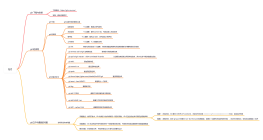
基础命令
文件相关
git add file
git rm file
同步相关
git clone url
git pull
git commit -m "comment"
git push
分支相关
创建分支
git branch test
切换分支
子主题
git checkout test
合并
1. 切换到被合并的分支 git checkout master<br>2. 将test分支合并到master:git merge test
删除分支
git branch -d test
预览差异
git diff <source_branch> <target_branch>
查看命令
查看远仓库地址
git remote -v
查看日志
git log<br>
仓库相关
仓库初始化
git init
仓库迁移
git clone --mirror <URL to my OLD repo location><br>cd <New directory where your OLD repo was cloned><br>git remote set-url origin <URL to my NEW repo location><br>git push -f origin<br>
仓库更新
git remote update
基础配置
创建ssh-key
ssh-keygen -t rsa -C "test@email.com"<br>
查看ssh-key
一般在在创建key的用户目录:~/.ssh目录下<br>公钥放在id_rsa.pub<br>
配置用户名和邮箱
全局生效
git config --global user.name "username" <br>git config --global user.email "email"
当前仓库生效
git config user.name "username" <br>git config user.email "email"
查看配置列表
git config --list<br>
收藏
立即使用
美学
收藏
立即使用
git
TURNING
职业:大学本科
去主页
Collect
Get Started
Git
Collect
Get Started
Pro Git
Collect
Get Started
Git
Collect
Get Started
git2
评论
0
条评论
下一页
图形选择
思维导图
主题
补充说明
AI生成
修改AI描述
去编辑
重新生成
提示
关闭后当前内容将不会保存,是否继续?
取消
确定
Document