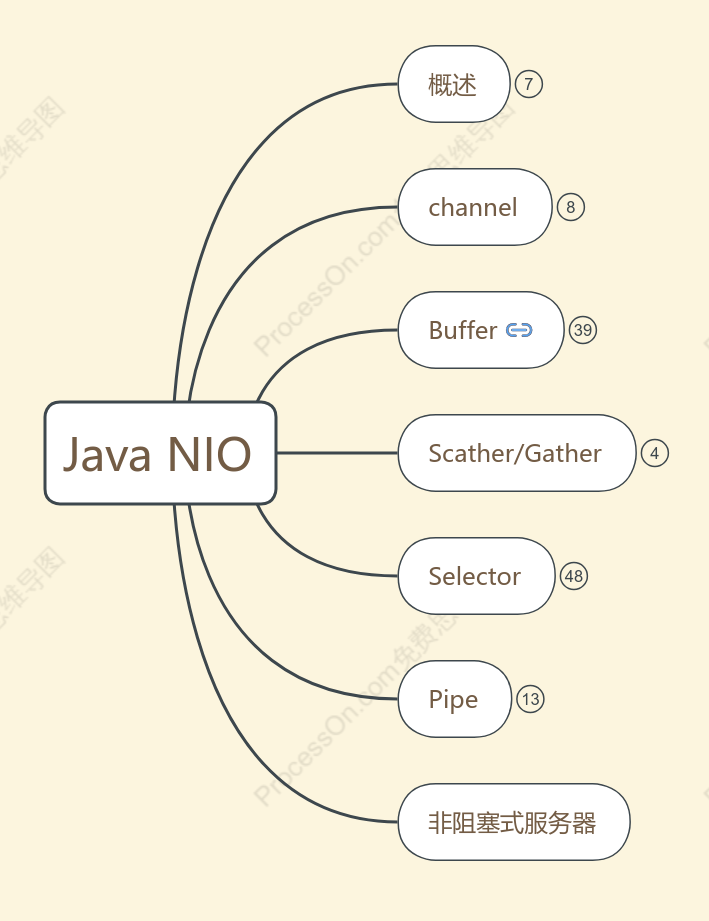
Java NIO 知识点梳理
2018-04-06 23:37:12 0 举报仅支持查看
Java NIO 学习后的文档记录
模板推荐
作者其他创作
大纲/内容
概述
chanels & buffers
不再通过字符流和字节流在设备和内存之间读写
从缓冲区写入通道,从通道读入缓冲区
非阻塞
selector
选择器同时监听多个通道事件(连接打开,数据到达)
单个线程同时监听多个通道
channel
fileChannel
文件读取数据
datagramChannel
udp读取网络数据
SocketChannel
tcp读取网络数据
ServerSocketChannel
<span style="color: rgb(102, 102, 102); font-family: Arial, Helvetica, sans-serif;">监听新进来的TCP连接,像Web服务器那样。</span><div><span style="color: rgb(102, 102, 102); font-family: Arial, Helvetica, sans-serif;">对每一个新进来的连接都会创建一个SocketChannel。</span><br></div>
Buffer
概念
<span style="color: rgb(102, 102, 102); font-family: Arial, Helvetica, sans-serif;">是一块内存被包装成NIO Buffer对象</span><br>
<span style="color: rgb(102, 102, 102); font-family: Arial, Helvetica, sans-serif;">用于和NIO通道进行交互</span><br>
属性
capicity
<span style="color: rgb(102, 102, 102); font-family: Arial, Helvetica, sans-serif;">作为一个内存块,Buffer有一个固定的大小值,</span><span style="color: rgb(102, 102, 102); font-family: Arial, Helvetica, sans-serif;">也叫“capacity”.你只能往里写capacity个byte、long,char等类型。</span><div><div><span style="color: rgb(102, 102, 102); font-family: Arial, Helvetica, sans-serif;">一旦Buffer满了,</span><span style="color: rgb(102, 102, 102); font-family: Arial, Helvetica, sans-serif;">需要将其清空(通过读数据或者清除数据)才能继续写数据往里写数据。</span><br></div></div>
position
<span style="color: rgb(102, 102, 102); font-family: Arial, Helvetica, sans-serif;">初始的position值为0.当一个byte、long等数据写到Buffer后, </span><div><span style="color: rgb(102, 102, 102); font-family: Arial, Helvetica, sans-serif;">position会向前移动到下一个可插入数据的Buffer单元。position最大可为capacity – 1.</span><br></div>
limit
<span style="color: rgb(102, 102, 102); font-family: Arial, Helvetica, sans-serif;">写模式下,limit等于capacity</span><br><div><font color="#666666" face="Arial, Helvetica, sans-serif">读模式下,limit等于</font><span style="color: rgb(102, 102, 102); font-family: Arial, Helvetica, sans-serif;">写模式下的</span><span style="color: rgb(102, 102, 102); font-family: Arial, Helvetica, sans-serif;">position</span></div>
拓扑图
<img style="-webkit-user-select:none; display:block; margin:auto;" src="http://ifeve.com/wp-content/uploads/2013/06/buffers-modes.png">
类型
<ul style="list-style-type: none; margin-bottom: 1em; padding: 0px; line-height: 0px; color: rgb(102, 102, 102); font-family: Arial, Helvetica, sans-serif;"><li style="padding-left: 9px; line-height: 28px; zoom: 1; background-image: url(http://ifeve.com/wp-content/themes/flat/img/bullet1.png); background-position: left 0.9em; background-repeat: no-repeat no-repeat;">ByteBuffer</li><li style="padding-left: 9px; line-height: 28px; zoom: 1; background-image: url(http://ifeve.com/wp-content/themes/flat/img/bullet1.png); background-position: left 0.9em; background-repeat: no-repeat no-repeat;">MappedByteBuffer(特别)</li><li style="padding-left: 9px; line-height: 28px; zoom: 1; background-image: url(http://ifeve.com/wp-content/themes/flat/img/bullet1.png); background-position: left 0.9em; background-repeat: no-repeat no-repeat;">CharBuffer</li><li style="padding-left: 9px; line-height: 28px; zoom: 1; background-image: url(http://ifeve.com/wp-content/themes/flat/img/bullet1.png); background-position: left 0.9em; background-repeat: no-repeat no-repeat;">DoubleBuffer</li><li style="padding-left: 9px; line-height: 28px; zoom: 1; background-image: url(http://ifeve.com/wp-content/themes/flat/img/bullet1.png); background-position: left 0.9em; background-repeat: no-repeat no-repeat;">FloatBuffer</li><li style="padding-left: 9px; line-height: 28px; zoom: 1; background-image: url(http://ifeve.com/wp-content/themes/flat/img/bullet1.png); background-position: left 0.9em; background-repeat: no-repeat no-repeat;">IntBuffer</li><li style="padding-left: 9px; line-height: 28px; zoom: 1; background-image: url(http://ifeve.com/wp-content/themes/flat/img/bullet1.png); background-position: left 0.9em; background-repeat: no-repeat no-repeat;">LongBuffer</li><li style="padding-left: 9px; line-height: 28px; zoom: 1; background-image: url(http://ifeve.com/wp-content/themes/flat/img/bullet1.png); background-position: left 0.9em; background-repeat: no-repeat no-repeat;">ShortBuffer</li></ul>
<span style="color: rgb(102, 102, 102); font-family: Arial, Helvetica, sans-serif;">Buffer类型代表了不同的数据类型,</span><span style="color: rgb(102, 102, 102); font-family: Arial, Helvetica, sans-serif;">来操作缓冲区中的字节</span><br>
基本用法
写入数据到Buffer
调用flip()方法
<span style="color: rgb(102, 102, 102); font-family: Arial, Helvetica, sans-serif;">flip()方法将Buffer从写模式切换到读模式。</span><div><span style="color: rgb(102, 102, 102); font-family: Arial, Helvetica, sans-serif;">在读模式下,可以读取之前写入到buffer的所有数据。</span><br></div>
从Buffer读取数据
调用clear()或者compact()
<span style="color: rgb(102, 102, 102); font-family: Arial, Helvetica, sans-serif;">compact()</span><br>
<span style="color: rgb(102, 102, 102); font-family: Arial, Helvetica, sans-serif;">方法将所有未读的数据拷贝到Buffer起始处。然后将position设到最后一个未读元素正后面。</span><div><span style="color: rgb(102, 102, 102); font-family: Arial, Helvetica, sans-serif;">limit属性依然像clear()方法一样,设置成capacity。现在Buffer准备好写数据了,但是不会覆盖未读的数据。</span><br></div>
clear()
<span style="color: rgb(102, 102, 102); font-family: Arial, Helvetica, sans-serif;">position将被设回0,limit被设置成 capacity的值。</span><br>
方法
分配
allocate(int capicity)
<h3 id="rewind" style="line-height: 26.207998275756836px; margin-bottom: 10px; color: rgb(102, 102, 102); font-family: Arial, Helvetica, sans-serif;">rewind()</h3>
<span style="color: rgb(102, 102, 102); font-family: Arial, Helvetica, sans-serif;">Buffer.rewind()将position设回0,所以你可以重读Buffer中的所有数据。limit保持不变,仍然表示能从Buffer中读取多少个元素</span><br>
<h3 id="markandreset" style="line-height: 26.207998275756836px; margin-bottom: 10px; color: rgb(102, 102, 102); font-family: Arial, Helvetica, sans-serif;">mark()与reset()</h3>
<span style="color: rgb(102, 102, 102); font-family: Arial, Helvetica, sans-serif;">通过调用Buffer.mark()方法,可以标记Buffer中的一个特定position。之后可以通过调用Buffer.reset()方法恢复到这个position</span><br>
读写
写入到buf
channel.read(buf)
buf.put(var)
从buf读
channel.write(buf)
buf.get()
Scather/Gather
<span style="color: rgb(102, 102, 102); font-family: Arial, Helvetica, sans-serif;">scatter</span><br>
<span style="color: rgb(102, 102, 102); font-family: Arial, Helvetica, sans-serif;">分散</span><span style="color: rgb(102, 102, 102); font-family: Arial, Helvetica, sans-serif;">(scatter)</span><span style="color: rgb(102, 102, 102); font-family: Arial, Helvetica, sans-serif;">从Channel中读取是指在读操作时将读取的数据写入多个buffer中</span><br>
gather
<span style="color: rgb(102, 102, 102); font-family: Arial, Helvetica, sans-serif;">聚集(gather)写入Channel是指在写操作时将多个buffer的数据写入同一个Channel</span><br>
Selector
<span style="color: rgb(102, 102, 102); font-family: Arial, Helvetica, sans-serif;">检测一到多个NIO通道</span><br>
方法
select方法
int select()
<span style="color: rgb(102, 102, 102); font-family: Arial, Helvetica, sans-serif;">阻塞到至少有一个通道在你注册的事件上就绪</span><br>
<span style="color: rgb(102, 102, 102); font-family: Arial, Helvetica, sans-serif;">int值表示有多少通道已经就绪。</span><br>
int select(long timeout)
<span style="color: rgb(102, 102, 102); font-family: Arial, Helvetica, sans-serif;">最长会阻塞timeout毫秒</span><br>
int selectNow()
<i style="color: rgb(102, 102, 102); font-family: Arial, Helvetica, sans-serif;">此方法执行非阻塞的选择操作。没有通道变成可选择的,则此方法直接返回零</i><br>
<h4 id="selectedkeys" style="line-height: 22.399999618530273px; margin-bottom: 10px; color: rgb(102, 102, 102); font-family: Arial, Helvetica, sans-serif;">selectedKeys()</h4>
<h2><span style="font-family: inherit; color: rgb(69, 69, 69); font-size: 12px; line-height: normal;">一旦调用了</span><span style="font-family: inherit; color: rgb(69, 69, 69); font-size: 12px;">select()</span><span style="font-family: inherit; color: rgb(69, 69, 69); font-size: 12px; line-height: normal;">方法,并且返回值表明有一个或更多个通道就绪了,可以通过调用</span><span style="font-family: inherit; color: rgb(69, 69, 69); font-size: 12px;">selector</span><span style="font-family: inherit; color: rgb(69, 69, 69); font-size: 12px; line-height: normal;">的</span><span style="font-family: inherit; color: rgb(69, 69, 69); font-size: 12px;">selectedKeys()</span><span style="font-family: inherit; color: rgb(69, 69, 69); font-size: 12px; line-height: normal;">方法,访问</span><span style="font-family: inherit; color: rgb(69, 69, 69); font-size: 12px;">“</span><span style="font-family: inherit; color: rgb(69, 69, 69); font-size: 12px; line-height: normal;">已选择键集(</span><span style="font-family: inherit; color: rgb(69, 69, 69); font-size: 12px;">selected key set</span><span style="font-family: inherit; color: rgb(69, 69, 69); font-size: 12px; line-height: normal;">)</span><span style="font-family: inherit; color: rgb(69, 69, 69); font-size: 12px;">”</span><span style="font-family: inherit; color: rgb(69, 69, 69); font-size: 12px; line-height: normal;">中的就绪通道。如下所示:</span><span style="font-family: inherit; color: rgb(69, 69, 69); font-size: 12px;">Set selectedKeys = selector.selectedKeys();</span></h2>
wakeUp()
唤醒select而阻塞的线程(如果当前没有,唤醒下一个)
close()
<span style="color: rgb(102, 102, 102); font-family: Arial, Helvetica, sans-serif;">SelectionKey实例无效。通道本身并不会关闭。</span><br>
创建
<span style="color: rgb(102, 102, 102); font-family: Arial, Helvetica, sans-serif;">Selector.open()</span><br>
注册通道
<span style="color: rgb(102, 102, 102); font-family: Arial, Helvetica, sans-serif;">SelectableChannel.register()</span><br>
<p style="font-size: 12px; line-height: normal; font-family: 'Helvetica Neue'; color: rgb(69, 69, 69);">channel.configureBlocking(<b>false</b>);</p><br><p style="font-size: 12px; line-height: normal; font-family: 'Helvetica Neue'; color: rgb(69, 69, 69);">SelectionKey key = channel.register(selector,</p><br><p style="font-size: 12px; line-height: normal; font-family: 'Helvetica Neue'; color: rgb(69, 69, 69);">Selectionkey.OP_READ);</p><br><div><p style="font-size: 12px; line-height: normal; font-family: 'Helvetica Neue'; color: rgb(69, 69, 69);"><br></p></div>
<p style="font-size: 12px; line-height: normal; font-family: 'Helvetica Neue'; color: rgb(69, 69, 69);">interest<span style="line-height: normal; font-family: '.PingFang SC';">集合</span></p><br>
<p style="font-size: 12px; line-height: normal; font-family: 'Helvetica Neue'; color: rgb(69, 69, 69); min-height: 14px;"><br></p>
<ol>
<li style="font-size: 12px; line-height: normal; font-family: 'Helvetica Neue'; color: rgb(69, 69, 69);">Connect</li>
<li style="font-size: 12px; line-height: normal; font-family: 'Helvetica Neue'; color: rgb(69, 69, 69);">Accept</li>
<li style="font-size: 12px; line-height: normal; font-family: 'Helvetica Neue'; color: rgb(69, 69, 69);">Read</li>
<li style="font-size: 12px; line-height: normal; font-family: 'Helvetica Neue'; color: rgb(69, 69, 69);">Write</li>
</ol>
<p style="font-size: 12px; line-height: normal; font-family: '.PingFang SC'; color: rgb(69, 69, 69);">这四种事件用<span style="line-height: normal; font-family: 'Helvetica Neue';">SelectionKey</span>的四个常量来表示:</p><br><ol><br><li style="font-size: 12px; line-height: normal; font-family: 'Helvetica Neue'; color: rgb(69, 69, 69);">SelectionKey.OP_CONNECT</li><br><li style="font-size: 12px; line-height: normal; font-family: 'Helvetica Neue'; color: rgb(69, 69, 69);">SelectionKey.OP_ACCEPT</li><br><li style="font-size: 12px; line-height: normal; font-family: 'Helvetica Neue'; color: rgb(69, 69, 69);">SelectionKey.OP_READ</li><br><li style="font-size: 12px; line-height: normal; font-family: 'Helvetica Neue'; color: rgb(69, 69, 69);">SelectionKey.OP_WRITE</li><br></ol>
<p style="font-size: 12px; line-height: normal; font-family: '.PingFang SC'; color: rgb(69, 69, 69);">如果你对不止一种事件感兴趣,那么可以用<span style="line-height: normal; font-family: 'Helvetica Neue';">“</span>位或<span style="line-height: normal; font-family: 'Helvetica Neue';">”</span>操作符将常量连接起来,</p><div><p style="font-size: 12px; line-height: normal; font-family: '.PingFang SC'; color: rgb(69, 69, 69);">如下:</p><br><p style="font-size: 12px; line-height: normal; font-family: 'Helvetica Neue'; color: rgb(69, 69, 69);"><b>int</b> interestSet = SelectionKey.OP_READ | SelectionKey.OP_WRITE;</p><br><div><p style="font-size: 12px; line-height: normal; font-family: 'Helvetica Neue'; color: rgb(69, 69, 69);"><br></p></div></div>
<h3 id="SelectionKey" style="line-height: 26.207998275756836px; margin-bottom: 10px; color: rgb(102, 102, 102); font-family: Arial, Helvetica, sans-serif;">SelectionKey</h3>
interestOps
<div class="line alt1" style="font-family: Consolas, 'Bitstream Vera Sans Mono', 'Courier New', Courier, monospace; color: rgb(102, 102, 102); margin: 0px !important; padding: 0px !important; border: 0px !important; outline: 0px !important; background-image: none !important; float: none !important; vertical-align: baseline !important; position: static !important; left: auto !important; top: auto !important; right: auto !important; bottom: auto !important; height: auto !important; width: auto !important; line-height: 1.1em !important; direction: ltr !important;"><table style="margin: 0px !important; padding: 0px !important; border-collapse: collapse !important; width: auto !important; border: 0px !important; outline: 0px !important; background-image: none !important; float: none !important; vertical-align: baseline !important; position: static !important; left: auto !important; top: auto !important; right: auto !important; bottom: auto !important; height: auto !important; line-height: 1.1em !important; font-size: 1em !important; direction: ltr !important;"><tbody style="margin: 0px !important; padding: 0px !important; border: 0px !important; outline: 0px !important; background-image: none !important; float: none !important; vertical-align: baseline !important; position: static !important; left: auto !important; top: auto !important; right: auto !important; bottom: auto !important; height: auto !important; width: auto !important; line-height: 1.1em !important; font-size: 1em !important; direction: ltr !important;"><tr style="margin: 0px !important; padding: 0px !important; border: 0px !important; outline: 0px !important; background-image: none !important; float: none !important; vertical-align: baseline !important; position: static !important; left: auto !important; top: auto !important; right: auto !important; bottom: auto !important; height: auto !important; width: auto !important; line-height: 1.1em !important; font-size: 1em !important; direction: ltr !important;"><td class="content" style="border-width: 0px 0px 0px 1px !important; border-left-style: solid !important; border-left-color: rgb(212, 208, 200) !important; padding: 0px 0px 0px 0.5em !important; margin: 0px !important; outline: 0px !important; background-image: none !important; float: none !important; vertical-align: top !important; position: static !important; left: auto !important; top: auto !important; right: auto !important; bottom: auto !important; height: auto !important; width: auto !important; line-height: 1.1em !important; font-size: 1em !important; direction: ltr !important; color: rgb(0, 0, 0) !important;"><code class="keyword" style="margin: 0px !important; padding: 0px !important; border: 0px !important; outline: 0px !important; background-image: none !important; float: none !important; vertical-align: baseline !important; position: static !important; left: auto !important; top: auto !important; right: auto !important; bottom: auto !important; height: auto !important; width: auto !important; line-height: 1.1em !important; font-family: Consolas, 'Bitstream Vera Sans Mono', 'Courier New', Courier, monospace !important; font-weight: bold !important; font-size: 1em !important; direction: ltr !important; display: inline !important; color: rgb(127, 0, 85) !important;">int</code> <code class="plain" style="margin: 0px !important; padding: 0px !important; border: 0px !important; outline: 0px !important; background-image: none !important; float: none !important; vertical-align: baseline !important; position: static !important; left: auto !important; top: auto !important; right: auto !important; bottom: auto !important; height: auto !important; width: auto !important; line-height: 1.1em !important; font-family: Consolas, 'Bitstream Vera Sans Mono', 'Courier New', Courier, monospace !important; font-size: 1em !important; direction: ltr !important; display: inline !important;">interestSet = selectionKey.interestOps();</code></td></tr></tbody></table></div><div class="line alt1" style="font-family: Consolas, 'Bitstream Vera Sans Mono', 'Courier New', Courier, monospace; color: rgb(102, 102, 102); margin: 0px !important; padding: 0px !important; border: 0px !important; outline: 0px !important; background-image: none !important; float: none !important; vertical-align: baseline !important; position: static !important; left: auto !important; top: auto !important; right: auto !important; bottom: auto !important; height: auto !important; width: auto !important; line-height: 1.1em !important; direction: ltr !important;"><table style="margin: 0px !important; padding: 0px !important; border-collapse: collapse !important; width: auto !important; border: 0px !important; outline: 0px !important; background-image: none !important; float: none !important; vertical-align: baseline !important; position: static !important; left: auto !important; top: auto !important; right: auto !important; bottom: auto !important; height: auto !important; line-height: 1.1em !important; font-size: 1em !important; direction: ltr !important;"><tbody style="margin: 0px !important; padding: 0px !important; border: 0px !important; outline: 0px !important; background-image: none !important; float: none !important; vertical-align: baseline !important; position: static !important; left: auto !important; top: auto !important; right: auto !important; bottom: auto !important; height: auto !important; width: auto !important; line-height: 1.1em !important; font-size: 1em !important; direction: ltr !important;"><tr style="margin: 0px !important; padding: 0px !important; border: 0px !important; outline: 0px !important; background-image: none !important; float: none !important; vertical-align: baseline !important; position: static !important; left: auto !important; top: auto !important; right: auto !important; bottom: auto !important; height: auto !important; width: auto !important; line-height: 1.1em !important; font-size: 1em !important; direction: ltr !important;"><td class="number" style="border: 0px !important; padding: 0px !important; margin: 0px !important; outline: 0px !important; background-image: none !important; float: none !important; vertical-align: top !important; position: static !important; left: auto !important; top: auto !important; right: auto !important; bottom: auto !important; height: auto !important; width: 3em !important; line-height: 1.1em !important; font-size: 1em !important; direction: ltr !important; color: rgb(120, 120, 120) !important;"><br></td><td class="content" style="border-width: 0px 0px 0px 1px !important; border-left-style: solid !important; border-left-color: rgb(212, 208, 200) !important; padding: 0px 0px 0px 0.5em !important; margin: 0px !important; outline: 0px !important; background-image: none !important; float: none !important; vertical-align: top !important; position: static !important; left: auto !important; top: auto !important; right: auto !important; bottom: auto !important; height: auto !important; width: auto !important; line-height: 1.1em !important; font-size: 1em !important; direction: ltr !important; color: rgb(0, 0, 0) !important;"><code class="keyword" style="margin: 0px !important; padding: 0px !important; border: 0px !important; outline: 0px !important; background-image: none !important; float: none !important; vertical-align: baseline !important; position: static !important; left: auto !important; top: auto !important; right: auto !important; bottom: auto !important; height: auto !important; width: auto !important; line-height: 1.1em !important; font-family: Consolas, 'Bitstream Vera Sans Mono', 'Courier New', Courier, monospace !important; font-weight: bold !important; font-size: 1em !important; direction: ltr !important; display: inline !important; color: rgb(127, 0, 85) !important;">boolean</code> <code class="plain" style="margin: 0px !important; padding: 0px !important; border: 0px !important; outline: 0px !important; background-image: none !important; float: none !important; vertical-align: baseline !important; position: static !important; left: auto !important; top: auto !important; right: auto !important; bottom: auto !important; height: auto !important; width: auto !important; line-height: 1.1em !important; font-family: Consolas, 'Bitstream Vera Sans Mono', 'Courier New', Courier, monospace !important; font-size: 1em !important; direction: ltr !important; display: inline !important;">isInterestedInAccept = (interestSet & SelectionKey.OP_ACCEPT) == SelectionKey.OP_ACCEPT;</code></td></tr></tbody></table></div><div class="line alt2" style="font-family: Consolas, 'Bitstream Vera Sans Mono', 'Courier New', Courier, monospace; color: rgb(102, 102, 102); margin: 0px !important; padding: 0px !important; border: 0px !important; outline: 0px !important; background-image: none !important; float: none !important; vertical-align: baseline !important; position: static !important; left: auto !important; top: auto !important; right: auto !important; bottom: auto !important; height: auto !important; width: auto !important; line-height: 1.1em !important; direction: ltr !important;"><table style="margin: 0px !important; padding: 0px !important; border-collapse: collapse !important; width: auto !important; border: 0px !important; outline: 0px !important; background-image: none !important; float: none !important; vertical-align: baseline !important; position: static !important; left: auto !important; top: auto !important; right: auto !important; bottom: auto !important; height: auto !important; line-height: 1.1em !important; font-size: 1em !important; direction: ltr !important;"><tbody style="margin: 0px !important; padding: 0px !important; border: 0px !important; outline: 0px !important; background-image: none !important; float: none !important; vertical-align: baseline !important; position: static !important; left: auto !important; top: auto !important; right: auto !important; bottom: auto !important; height: auto !important; width: auto !important; line-height: 1.1em !important; font-size: 1em !important; direction: ltr !important;"><tr style="margin: 0px !important; padding: 0px !important; border: 0px !important; outline: 0px !important; background-image: none !important; float: none !important; vertical-align: baseline !important; position: static !important; left: auto !important; top: auto !important; right: auto !important; bottom: auto !important; height: auto !important; width: auto !important; line-height: 1.1em !important; font-size: 1em !important; direction: ltr !important;"><td class="number" style="border: 0px !important; padding: 0px !important; margin: 0px !important; outline: 0px !important; background-image: none !important; float: none !important; vertical-align: top !important; position: static !important; left: auto !important; top: auto !important; right: auto !important; bottom: auto !important; height: auto !important; width: 3em !important; line-height: 1.1em !important; font-size: 1em !important; direction: ltr !important; color: rgb(120, 120, 120) !important;"><br></td><td class="content" style="border-width: 0px 0px 0px 1px !important; border-left-style: solid !important; border-left-color: rgb(212, 208, 200) !important; padding: 0px 0px 0px 0.5em !important; margin: 0px !important; outline: 0px !important; background-image: none !important; float: none !important; vertical-align: top !important; position: static !important; left: auto !important; top: auto !important; right: auto !important; bottom: auto !important; height: auto !important; width: auto !important; line-height: 1.1em !important; font-size: 1em !important; direction: ltr !important; color: rgb(0, 0, 0) !important;"><code class="keyword" style="margin: 0px !important; padding: 0px !important; border: 0px !important; outline: 0px !important; background-image: none !important; float: none !important; vertical-align: baseline !important; position: static !important; left: auto !important; top: auto !important; right: auto !important; bottom: auto !important; height: auto !important; width: auto !important; line-height: 1.1em !important; font-family: Consolas, 'Bitstream Vera Sans Mono', 'Courier New', Courier, monospace !important; font-weight: bold !important; font-size: 1em !important; direction: ltr !important; display: inline !important; color: rgb(127, 0, 85) !important;">boolean</code> <code class="plain" style="margin: 0px !important; padding: 0px !important; border: 0px !important; outline: 0px !important; background-image: none !important; float: none !important; vertical-align: baseline !important; position: static !important; left: auto !important; top: auto !important; right: auto !important; bottom: auto !important; height: auto !important; width: auto !important; line-height: 1.1em !important; font-family: Consolas, 'Bitstream Vera Sans Mono', 'Courier New', Courier, monospace !important; font-size: 1em !important; direction: ltr !important; display: inline !important;">isInterestedInConnect = (interestSet & SelectionKey.OP_CONNECT) == SelectionKey.OP_CONNECT<span style="font-size: 1em;">;</span><br></code></td></tr></tbody></table></div>
<span style="color: rgb(102, 102, 102); font-family: Arial, Helvetica, sans-serif;">用“位与”操作interest 集合和给定的SelectionKey常量,可以确定某个确定的事件是否在interest 集合中</span><br>
readyOps
获取准备就绪的操作集合
<code class="keyword" style="margin: 0px !important; padding: 0px !important; border: 0px !important; outline: 0px !important; background-image: none !important; float: none !important; vertical-align: baseline !important; position: static !important; left: auto !important; top: auto !important; right: auto !important; bottom: auto !important; height: auto !important; width: auto !important; line-height: 1.1em !important; font-family: Consolas, 'Bitstream Vera Sans Mono', 'Courier New', Courier, monospace !important; font-weight: bold !important; direction: ltr !important; display: inline !important; color: rgb(127, 0, 85) !important;">int</code><span style="color: rgb(0, 0, 0); font-family: Consolas, 'Bitstream Vera Sans Mono', 'Courier New', Courier, monospace;"> </span><code class="plain" style="color: rgb(0, 0, 0); margin: 0px !important; padding: 0px !important; border: 0px !important; outline: 0px !important; background-image: none !important; float: none !important; vertical-align: baseline !important; position: static !important; left: auto !important; top: auto !important; right: auto !important; bottom: auto !important; height: auto !important; width: auto !important; line-height: 1.1em !important; font-family: Consolas, 'Bitstream Vera Sans Mono', 'Courier New', Courier, monospace !important; direction: ltr !important; display: inline !important;">readySet = selectionKey.readyOps();</code><br>
<span style="color: rgb(0, 0, 0); font-family: Consolas, 'Bitstream Vera Sans Mono', 'Courier New', Courier, monospace;">selectionKey.isAcceptable();</span><br>
<span style="color: rgb(0, 0, 0); font-family: Consolas, 'Bitstream Vera Sans Mono', 'Courier New', Courier, monospace;">selectionKey.isConnectable();</span><br>
<span style="color: rgb(0, 0, 0); font-family: Consolas, 'Bitstream Vera Sans Mono', 'Courier New', Courier, monospace;">selectionKey.isReadable();</span><br>
<span style="color: rgb(0, 0, 0); font-family: Consolas, 'Bitstream Vera Sans Mono', 'Courier New', Courier, monospace;">selectionKey.isWritable();</span><br>
<h4 id="channel-and-selector" style="line-height: 22.399999618530273px; margin-bottom: 10px; color: rgb(102, 102, 102); font-family: Arial, Helvetica, sans-serif;">Channel + Selector</h4>
<span style="color: rgb(0, 0, 0); font-family: Consolas, 'Bitstream Vera Sans Mono', 'Courier New', Courier, monospace;">Channel channel = selectionKey.channel();</span><br>
<span style="color: rgb(0, 0, 0); font-family: Consolas, 'Bitstream Vera Sans Mono', 'Courier New', Courier, monospace;">Selector selector = selectionKey.selector();</span><br>
<h4 id="attach-object" style="line-height: 22.399999618530273px; margin-bottom: 10px; color: rgb(102, 102, 102); font-family: Arial, Helvetica, sans-serif;">附加的对象</h4>
添加
<span style="color: rgb(0, 0, 0); font-family: Consolas, 'Bitstream Vera Sans Mono', 'Courier New', Courier, monospace;">SelectionKey key = channel.register(selector, SelectionKey.OP_READ, theObject);</span><br>
<span style="color: rgb(0, 0, 0); font-family: Consolas, 'Bitstream Vera Sans Mono', 'Courier New', Courier, monospace;">selectionKey.attach(theObject);</span><br>
获取
<span style="color: rgb(0, 0, 0); font-family: Consolas, 'Bitstream Vera Sans Mono', 'Courier New', Courier, monospace;">selectionKey.attachment()</span><br>
remove
<span style="color: rgb(102, 102, 102); font-family: Arial, Helvetica, sans-serif;">Selector不会自己从已选择键集中移除SelectionKey实例。必须在处理完通道时自己移除。下次该通道变成就绪时,Selector会再次将其放入已选择键集中。</span><br>
<span style="color: rgb(0, 0, 0); font-family: Consolas, 'Bitstream Vera Sans Mono', 'Courier New', Courier, monospace;">selectedKeys.iterator().remove()</span><br>
Pipe
概念
<span style="color: rgb(102, 102, 102); font-family: Arial, Helvetica, sans-serif;"> 管道是2个线程之间的单向数据连接。</span><code style="color: rgb(102, 102, 102);">Pipe</code><span style="color: rgb(102, 102, 102); font-family: Arial, Helvetica, sans-serif;">有一个source通道和一个sink通道。数据会被写到sink通道,从source通道读取。</span><br>
<img class="aligncenter size-full wp-image-5386" src="http://ifeve.com/wp-content/uploads/2013/06/pipe.bmp" alt=""><br>
创建管道
<span style="color: rgb(0, 0, 0); font-family: Consolas, 'Bitstream Vera Sans Mono', 'Courier New', Courier, monospace;">Pipe pipe = Pipe.open();</span><br>
写数据
<span style="color: rgb(102, 102, 102); font-family: Arial, Helvetica, sans-serif;">访问sink通道</span><br>
<span style="color: rgb(0, 0, 0); font-family: Consolas, 'Bitstream Vera Sans Mono', 'Courier New', Courier, monospace;">pipe.sink()</span><br>
<span style="color: rgb(102, 102, 102); font-family: Arial, Helvetica, sans-serif;">调用SinkChannel的</span><code style="color: rgb(102, 102, 102);">write()</code><br>
<span style="color: rgb(0, 0, 0); font-family: Consolas, 'Bitstream Vera Sans Mono', 'Courier New', Courier, monospace;">sinkChannel.write(buf);</span><br>
读数据
访问source通道
<span style="color: rgb(102, 102, 102); font-family: Arial, Helvetica, sans-serif;">调用source通道的</span><code style="color: rgb(102, 102, 102);">read()</code><br>
非阻塞式服务器

收藏
立即使用

收藏
立即使用


评论
0 条评论
下一页

